

AI tools helped gather research and write the first draft of this article. I edited it and checked every figure and quote against the page it comes from, listed at the end. The cover illustration is AI-generated. Details at the end.
Two people look at the same post. One is its author. The other is anyone else: a reader, a competitor, a journalist, a researcher.
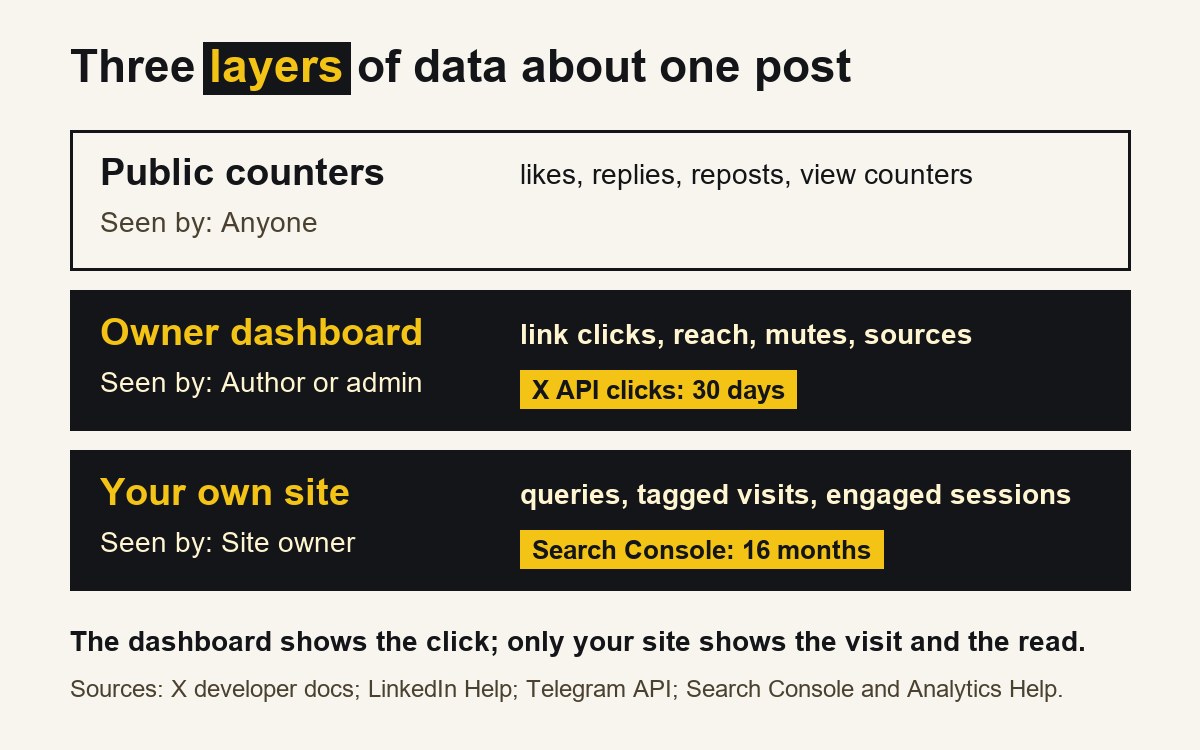
The second person sees the counters under the post: likes, replies, reposts, sometimes views. The author sees those too, and a second layer that no one else can open: how many people clicked the link, how many distinct people the post reached, how many muted the channel afterwards. And if the link leads to the author's own website, there is a third layer, owned by the site: which search queries brought people, how many of the visitors from the post actually read.
Public counters show how people responded in the open. Only first-party analytics show what happened in private: the click, the visit, the read. The two kinds of data answer different questions, and the most useful private data expires. This article sets out, platform by platform, what the owner sees, what everyone sees, and for how long, using each platform's own documentation.
This is part 6 of the Platforms & Metrics series. Part 5 covered why view counts from different platforms cannot be compared; this part is about who gets to see which numbers at all.
Three layers of data
The table sums up what each platform's own pages say. The details and sources follow in the sections below.
| Public: anyone can see | First-party: only the owner | How long the owner's data lasts | |
|---|---|---|---|
| X | Likes, reposts, replies, quotes, bookmarks, impressions [1] | Link clicks, profile clicks, engagements, organic metrics [1] | 30 days after posting, via the API [1] |
| The reactions, comments and reposts under a post; a Page's followers and posting activity [4] | Post analytics: "Only you can view your post analytics" [2] | 180 days to two years, by metric [2] | |
| Telegram | A view counter and a forward counter on each channel post [6], [9] | Growth, mutes, notifications, views by source, for admins [5], [7], [8] | Not stated on the pages used here |
| Your site | Nothing | Search Console for verified owners [10]; Google Analytics for the property [15]–[18] | Search Console: 16 months [13]; GA4 explorations: 2 or 14 months [17] |
X: the click is private, and it expires
X's developer documentation sorts post metrics into four types. Public metrics are "Visible to anyone (impressions, likes, reposts, replies)", and an app can read them with an ordinary app token, without the author's permission. Non-public metrics are described in two words: "Private metrics (clicks)". They need the author's authorisation and work only "for posts you own" [1].
The split is telling. The impression count, which part 5 showed to be a count of appearances on screens, is public. The number that says whether a post sent anyone anywhere is not. url_link_clicks and user_profile_clicks sit in the non-public and organic groups, and engagements is a non-public metric. Organic metrics, the ones from "non-promoted views", are private too [1].
Then the time limit: "Non-public, organic, and promoted metrics are only available for posts created within the last 30 days" [1]. After a month, the API no longer returns link clicks for a post, even to its owner. Anyone who wants that number for a post should record it within the first 30 days.
X's own help pages on its analytics dashboard could not be fetched for this article, so nothing here describes which subscription the dashboard needs. The developer documentation is enough for the point that matters: the click is the owner's data, and it is kept for a short time.
LinkedIn: only you can see it
LinkedIn's help page on post analytics is direct: "Only you can view your post analytics." It also notes that "Your own views, social engagements, link engagements, saves, and sends are counted towards the analytics of your content", so the author's own activity is part of the figures [2].
The same page sets how long each part is kept. "Video performance analytics and video viewer demographics are available for 180 days." Article and newsletter analytics "are available for two years". For other content, "discovery and social engagement counts are available for 1,000 days", while "Members' reached data is available for 400 days" and "Demographic breakdowns are available for 180 days" [2]. The combined analytics view covers ranges "from the past seven days up to the past 365 days" [3].
What can someone else learn? LinkedIn offers Page admins competitor analytics. Its help page lists followers, "new comments, new posts, and new reactions" for the competitors a Page tracks, and their trending posts from the past 30 days. A free Company Page gets data for one competitor, a Premium Company Page for up to nine [4]. It also mentions competitor highlights on new followers and engagement rates. The page does not list competitors' impressions, reach or clicks, so even LinkedIn's own tool for studying another account stops short of the numbers its owner sees.
Demographics have a further condition: they are not available "for any content you share with only your connections or in LinkedIn Groups" [2].
Telegram: the counter is public, the statistics are not
Telegram puts a number on every post. "Each post in a channel has a view counter", and views of forwarded copies are included [6]. In Telegram's API, the message object for a channel post carries views, the "View count for channel posts", and forwards, a "Forward counter" [9]. These two numbers travel with the post and are not reserved for admins.
The statistics are another matter. Telegram's tour says "Advanced statistics are available for channels with more than 500 subscribers" and that admins "can track how many users join, leave and mute your channel" and how they found it [5]. The API documentation adds that the statistics methods are for "Administrators of channels of a certain size" and that the "exact limit is a server-side config" [7]. One of the research notes behind this article gave a threshold of 50 subscribers; the official tour says 500, and the API says the limit can change. Check what your own channel shows.
Part 3 of this series described these statistics in detail; among their fields are a "Muted users graph", a "Views by source graph" and a "New followers by source graph" [8]. The subscriber list itself "is only visible to the channel owner and admins" [5].
So on Telegram an outsider can read the view and forward counts of any public channel's posts. Only an admin can see whether the channel is being muted, where its views come from and how its audience changes.
Your own site: the layer no platform shows
None of the private platform data described above says whether a reader reached the article and read it. That answer lives on the website, and only its owner can see it.
Search Console shows how a site performs in Google Search. Its performance report defines clicks as "The number of times a user clicked your site from Google Search results" and impressions as "How many times your site appeared in Search results" [11]. The data is private by design: "Site owners in Search Console have access to sensitive Google Search information about a site", which is why Google requires verification of ownership [10].
Three limits are worth knowing. First, history: when Google launched the current report it said "you'll have 16 months of data", and the report's current help, describing a newer filter, still speaks of "a 16-month history of data" [12], [13]. Second, completeness: "To protect user privacy, the Performance report doesn't show all data". Some rare queries and queries with personal or sensitive information are left out, and tables "can show a maximum of 1,000 rows" [14]. Third, freshness: "The newest data can be preliminary", which means it may still change over the next few hours [11].
Google Analytics (GA4) shows what visitors did once they arrived. Two of its features matter most for an author:
- Campaign tags. When a link carries utm_source, utm_medium and utm_campaign, "the parameter values are visible in the Traffic acquisition report" [16]. This is how a visit from a LinkedIn post can be told apart from a visit from X or Telegram, as described in earlier parts of this series.
- Engaged sessions. GA4 counts a session as engaged when it "Lasts longer than 10 seconds", "Has a key event" or "Has 2 or more screen or page views" [15]. It is a rough line, but a better sign of reading than a visit alone.
GA4 has its own limits. Its data retention setting of 2 or 14 months "only affects explorations and funnel reports", not standard reports [17]. And when a report includes demographics, data can be withheld under thresholds that are "system defined" and cannot be adjusted [18].
What public data is good for
Public counters are not useless. They are the only data available about accounts you do not own, and they answer real questions:
- What does this account publish, and how often? Posting rhythm and formats are visible to anyone.
- Which posts started a conversation? Replies and comments are public, and they can be read, not only counted.
- What spread? Reposts on X, and forwards on Telegram, are public [1], [9].
What public data cannot do is say what happened after the reader looked. A post with many likes may have sent no one to the article. A quiet post may have sent many. The click, the visit and the read are first-party data, and they belong to the owner of the account and of the site. That is also a reason to be careful with claims about other people's results: a statement such as "their post drove a lot of traffic" usually rests on public counters that do not measure traffic at all.
A worked example
All numbers in this example are invented for illustration and describe no real post.
An article goes out with a LinkedIn post and an X post. Two days later:
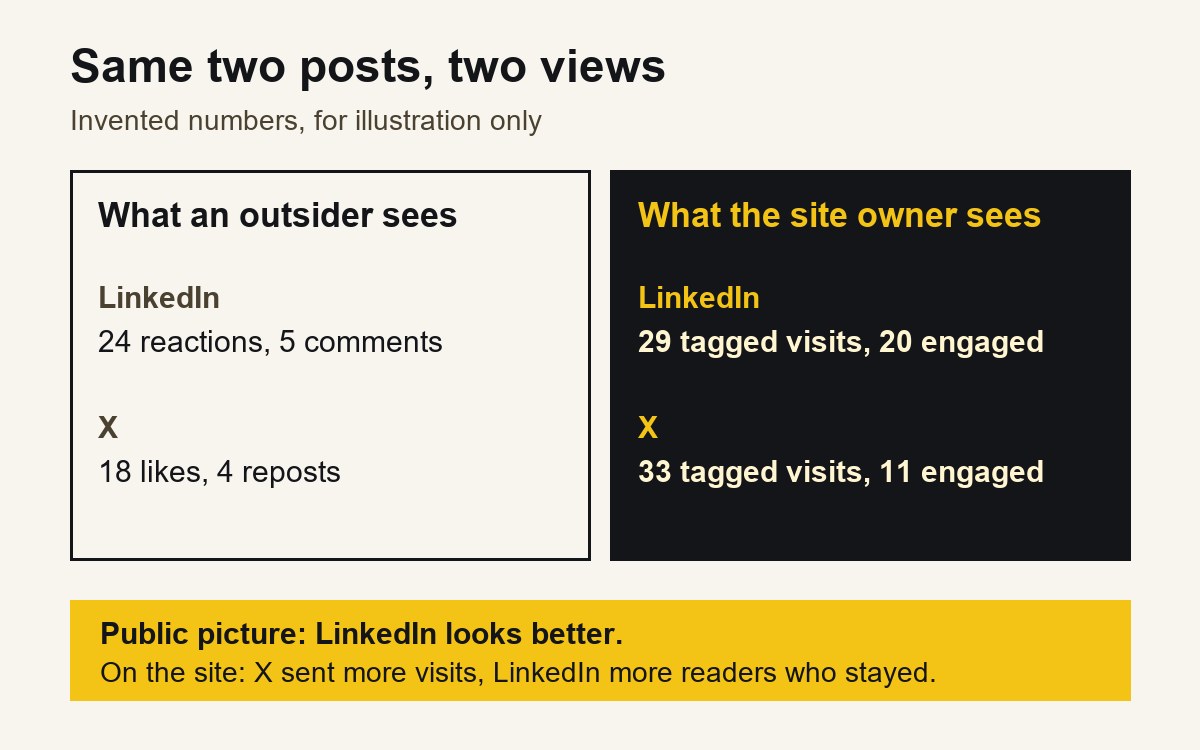
- What an outsider sees. The LinkedIn post has 24 reactions and 5 comments. The X post has 18 likes and 4 reposts.
- What the author sees on the platforms. LinkedIn's post analytics show how many distinct members the post reached and how many engaged with the link; X's private metrics show 37 link clicks on the X post.
- What the site owner sees. In Google Analytics, sessions with utm_source=linkedin and the article's campaign: 29, of which 20 engaged. With utm_source=x: 33, of which 11 engaged.
The public picture suggests LinkedIn did better: more reactions, more comments. The private picture is more mixed. X sent slightly more visits, LinkedIn sent more readers who stayed. Only the last layer answers the question an author usually cares about, and only the owner can see it.
Note what the example does not do. It does not add the platform counters together or rank them against each other; part 5 explained why that does not work. Within the site, all visits are counted by one rule, so the tagged sessions can be compared.
A routine for keeping your own data
Because the most useful private numbers expire, a simple record per article helps:
- Tag every link to your own site with source, medium and campaign before posting [16].
- Within 30 days, write down the link clicks of each X post; after that, the API does not return them [1].
- Within 180 days, save any LinkedIn demographics and video figures you need [2].
- Monthly, export Search Console queries for the article's page, keeping in mind that rare queries are omitted and history goes back about 16 months [13], [14].
- Keep the definition next to the number: "X link clicks, private metric", "GA4 engaged sessions, utm_source=x". A number without its source and rule is hard to use a year later.
A short check before you draw a conclusion
- Is this number public or first-party? If public, does it really measure what the claim says?
- If it is first-party, is it still available, or has its window closed?
- Did the visit reach the site with a campaign tag, so it can be attributed?
- Is the conclusion about another account based only on what anyone can see?
- For search data, could rare or private queries be missing from the table?
What this article cannot tell you
The descriptions here come from official help and developer pages as fetched on 16 November 2026; platforms change their analytics and retention rules, sometimes without notice. X's help pages on its analytics dashboard and view counts could not be fetched, so the X section relies on the developer documentation only, and nothing here says which X subscription includes which dashboard. Telegram's pages used here do not state how long channel statistics are kept. Whether Google Analytics counts every visit is outside this article; Search Console's own help notes that some tools track only visitors with JavaScript enabled [14]. The worked example is invented and reports no Dapp.Expert results.
How this article was made
| Task | What the AI did | What a person did | How it was checked |
|---|---|---|---|
| Research | Collected platform documentation and research notes on analytics | Chose the question and the sources to rely on | Every quote and figure checked against the pages listed below [1]–[18] |
| Draft | Wrote the first draft from the notes | Edited the text, the table and the worked example | A separate review compared claims and quotes with the sources |
| Images | Generated the cover photograph-style illustration | Chose the illustration; designed the explanatory diagrams | Labelled as AI-generated in the disclosure line and alt text |
| Not done by AI | — | The decision to publish and responsibility for the text | — |
Conflicts of interest: none. The author has no commercial relationship with X, LinkedIn, Telegram or Google.
Responsible for this article: Dmitriy Lastovka, author. Corrections: contact form.
Sources
All sources are official (the platform's own page), fetched on 16 November 2026.
- X Developer Platform, "Metrics" (public, non-public, organic and promoted metrics). https://docs.x.com/x-api/fundamentals/metrics Official.
- LinkedIn Help, "View post analytics for your content". https://www.linkedin.com/help/linkedin/answer/71493 Official.
- LinkedIn Help, "Combined post analytics". https://www.linkedin.com/help/linkedin/answer/a701208 Official.
- LinkedIn Help, "Competitor analytics for your LinkedIn Page". https://www.linkedin.com/help/linkedin/answer/126090 Official.
- Telegram, "Telegram Channels" (feature tour). https://telegram.org/tour/channels Official.
- Telegram, "Channels FAQ". https://telegram.org/faq_channels Official.
- Telegram API, "Statistics". https://core.telegram.org/api/stats Official.
- Telegram API, stats.broadcastStats (channel statistics). https://core.telegram.org/constructor/stats.broadcastStats Official.
- Telegram API, message constructor (views and forwards fields). https://core.telegram.org/constructor/message Official.
- Search Console Help, "Verify your site ownership". https://support.google.com/webmasters/answer/9008080 Official.
- Search Console Help, "Performance report (Search results): Overview and basic setup". https://support.google.com/webmasters/answer/7576553 Official.
- Search Console Help, "Performance report (Search results): Dimensions and data groupings". https://support.google.com/webmasters/answer/17011259 Official.
- Google Search Central Blog, "Introducing the new Search Console" (January 2018). https://developers.google.com/search/blog/2018/01/introducing-new-search-console Official.
- Search Console Help, "About Search Console data". https://support.google.com/webmasters/answer/96568 Official.
- Analytics Help, "[GA4] Engagement rate and bounce rate". https://support.google.com/analytics/answer/12195621 Official.
- Analytics Help, "URL builders: Collect campaign data with custom URLs". https://support.google.com/analytics/answer/10917952 Official.
- Analytics Help, "Data retention". https://support.google.com/analytics/answer/7667196 Official.
- Analytics Help, "[GA4] About data thresholds". https://support.google.com/analytics/answer/9383630 Official.