



Gmart by Gravis Finance — an NFT (non-fungible token) marketplace with its own genuine NFT assets. Gmart users can trade Evervoid NFT collections as well as partner NFTs. Two blockchains are currently supported: BSC and Polygon. Avalanche and Solana will also be available soon.
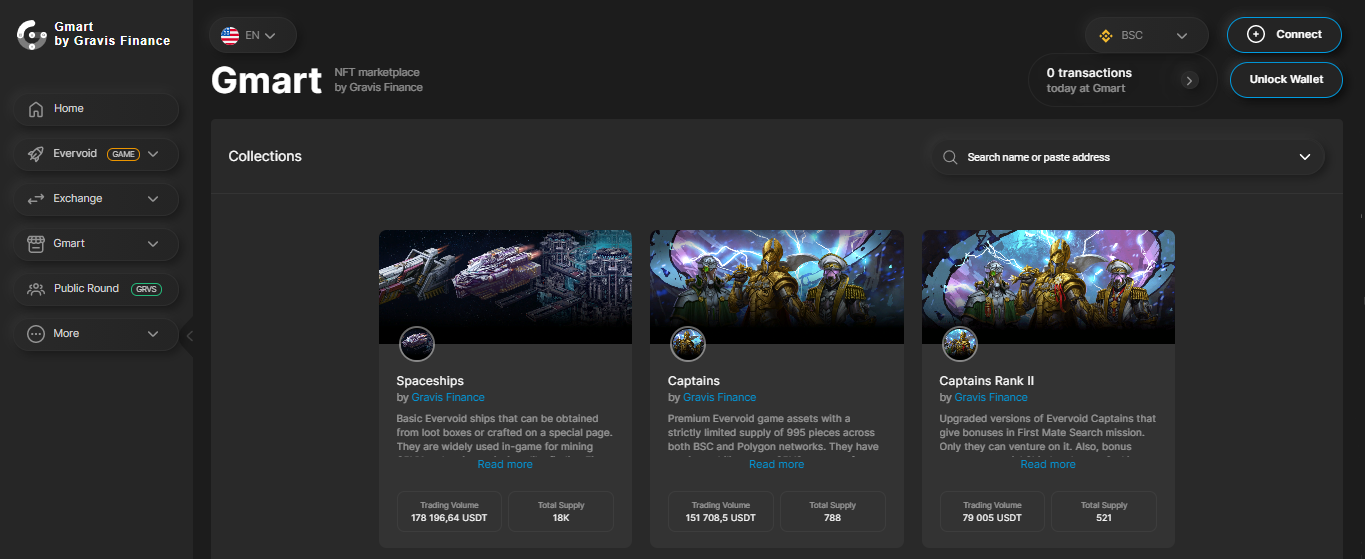
About Gmart by Gravis Finance
To purchase NFT, go to the Gmart page. Firstly, you need to unlock your wallet if it is not already connected. Traded NFTs are represented by several collections. Each collection page will give you information about available lots (items to buy), items (total number of cards in the collection), owners (other players), minimum price (cheapest item price) and total volume.
Usage features:
| 1 | Go to the Buy NFT tab. You will see a list of available lots that you can buy. |
| 2 | By default, lots will be sorted by price from low to high. You can arrange the lots in reverse order (largest to smallest) or alphabetically (A-Z or Z-A). |
| 3 | Use the search field if you are looking for a specific item. If this is your first time purchasing an item, please click the "Confirm" button and confirm the use of the tokens in your wallet. |
If you don't have enough funds for a particular lot, try choosing a different token by clicking the "Balance" drop-down menu or by adding funds to your wallet. After you approve the use of tokens, the "Confirm" button will change to "Buy". After clicking on the “Buy for…” button, a confirmation pop-up window will appear. Click Buy NFT and confirm the transaction in your wallet. Once approved, your NFT is successfully purchased. To see the NFT cards in your wallet, copy the address from the pop-up window or click the Add Address button to add it to Metamask.
Additional defi app features
Visit the Market Activity page to see Gmart NFT trading statistics. Go to the "Market Activity" tab. Choose your language and network. Click the Collections drop-down menu to view total statistics for all collections or select a specific collection. Click the Chart drop-down list to select the chart options you want to view. By default, the chart will display historical data for the previous 30 days. You can select "All Time" or "7 Days" to change the chart view.
Under the statistical chart, you can find information about all NFT transactions on Gmart. The most recent transactions will be displayed at the top. You can sort the table by price (high to low or low to high).