

AI tools helped gather research and write the first draft of this article. I edited it and checked every condition, price and quote against the page it comes from, listed at the end. The cover illustration is AI-generated. Details at the end.
Search for "social media analytics tools" and you get lists of twenty or thirty names, each with a feature grid. The grids answer a question few authors are asking: what can this tool do at its best?
The question that matters for one author is narrower: which of these can I open today, for the accounts I actually have, without changing my budget? Put that way, the list shrinks quickly. A free plan may exclude the one network you post on most; a platform's own statistics may wait until the channel is bigger.
Whether an analytics tool is usable is decided by its access conditions, not its feature list, and those conditions are written on pricing and help pages that change. This article sets out five gates that decide it, what X, LinkedIn and Telegram open natively, and where five third-party free plans stop, as read on each tool's own page on 16 November 2026.
This is part 9 of the Platforms & Metrics series. Part 7 built a small dashboard of five numbers, and part 8 read the conversation behind one of them. This part asks which tools can actually supply those numbers.
Five gates before the feature list
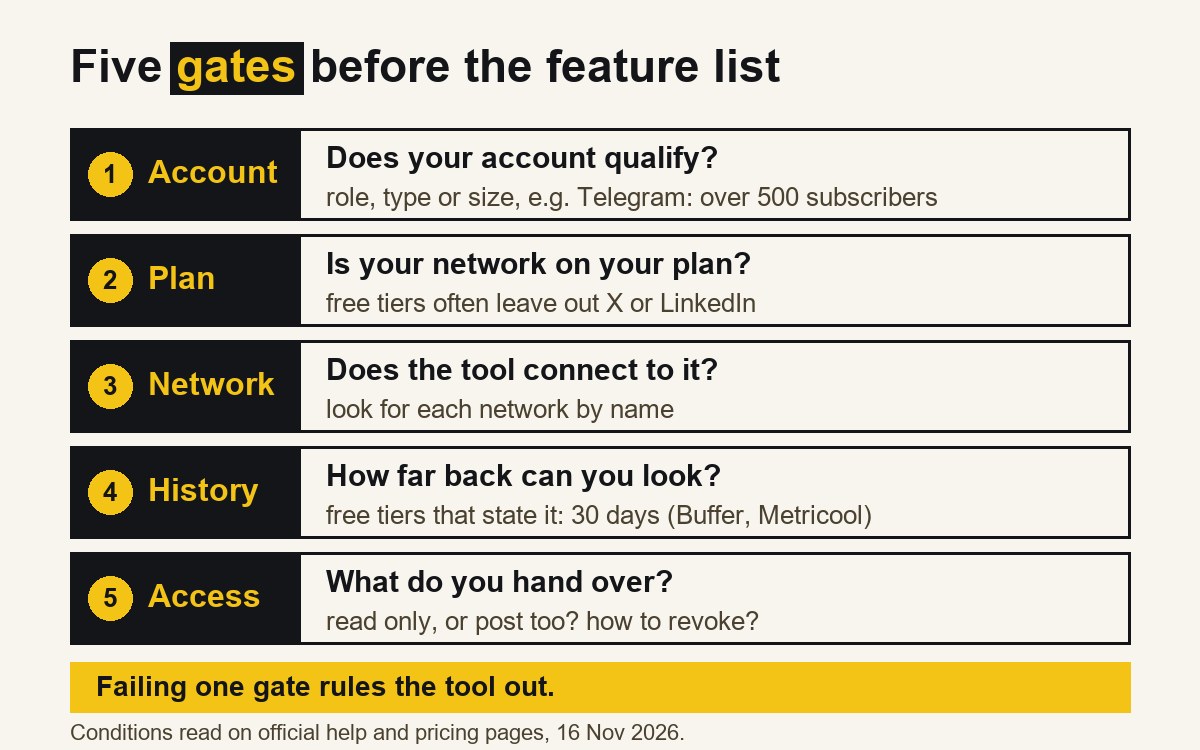
Every analytics tool, native or third-party, sits behind the same five questions. Failing one is enough to rule a tool out, however good the rest is.
- Account. Does your account qualify? Some statistics require a certain account type, role or size.
- Plan. Is the network you need included on the plan you are willing to use, including the free one?
- Network. Does the tool connect to that network at all?
- History. How far back does the plan let you look? A tool that keeps 30 days cannot answer a question about last quarter.
- Access. What does connecting the tool require you to hand over, and can you take it back?
The first three gates are yes-or-no and can be checked on a pricing page in minutes. The last two decide whether the tool stays useful after the first week.
What the platforms open natively
The platforms' own analytics are free, but not open to everyone.
| Platform | Native analytics | Condition on the official page | Gate |
|---|---|---|---|
| LinkedIn (member) | Combined post analytics | "All LinkedIn members have access"; ranges from 7 to 365 days; export to .XLSX [1] | None for members |
| LinkedIn (Page) | Page analytics | "available for all page admin roles" [2] | Account: admin role |
| Telegram | Channel statistics | "Advanced statistics are available for channels with more than 500 subscribers" [3] | Account: channel size |
| X | Post metrics via the API; dashboard | Public metrics for any post; private metrics need the owner's authorisation [5]; dashboard conditions not readable (see below) | Unverified |
LinkedIn is the most open of the three. Its help page says that "All LinkedIn members have access to combined post analytics", that the date range runs "from the past seven days up to the past 365 days", and that the data can be exported "to an .XLSX file" [1]. It also warns about one newer table: "We're gradually making this feature available, and you might not have access to it at this time" [1]. For a company Page, analytics "are available for all page admin roles" [2], so the gate is a role, not a payment.
Telegram opens its counters to everyone and its statistics to larger channels. The official tour sets the threshold at "more than 500 subscribers" [3]. Telegram's API documentation is less fixed: statistics are for "Administrators of channels of a certain size", and "the exact limit is a server-side config" [4]. A small channel should expect view counters on its posts and nothing more until it grows, and should check what its own admin screen shows.
X is the one platform whose conditions could not be read. Its Help Center pages on Premium and on analytics returned an access error (HTTP 403) to every attempt on 16 November 2026, so this article cannot say from X's own pages which subscription, if any, opens the analytics dashboard. Third-party guides disagree on this and are not cited here as fact. What X's developer documentation does say is that an app can "Access public metrics with any authentication, or private metrics for your own content with user authentication", and that private metrics require "OAuth 1.0a or OAuth 2.0 with user context for posts you own" [5]. Part 6 covered the 30-day limit on those private metrics.
The API route has a price list
For X, the developer route is now metered. X's pricing page says that "The X API uses pay-per-usage pricing with no subscriptions": credits are bought in advance and "deducted as you make API requests" [6]. Reading a post costs $0.005 per resource. Reading your own data, which X calls "Owned Reads", costs "$0.001 per resource (1,000 resources for $1)", for uses such as "dashboard apps, personal analytics" [6]. Pay-per-use plans "are capped at 3 million Post reads per monthly billing cycle", and the page warns that "Prices are subject to change" [6].
For one author reading their own posts the amounts are small. The gate is not the amount but the payment account: a script that reads your X metrics needs credits bought in advance.
Where third-party free plans stop
Third-party tools promise one screen for several networks. The five below come from the research notes and span the range: three with a free plan, one open-source tool you can run on your own server, and one with no free plan.
| Tool | Free plan | X on the free tier | LinkedIn on the free tier | Telegram listed | History on the free tier |
|---|---|---|---|---|---|
| Buffer | Yes, up to 3 channels [7] | Basic analytics "Not included" for free X profiles [7] | Basic analytics included for profiles and pages [7] | Not in the channel table [7] | 30 days [7] |
| Metricool | Yes, 1 brand [8] | Excluded [8] | Excluded [8] | Not on the pricing page [8] | 30 days [8] |
| Publer | Yes, 3 accounts except X [9] | "You cannot connect Twitter / X accounts in the free version" [9] | Connects; analytics only on the Business plan [9] | Yes, as a channel [9] | Not stated |
| Postiz (self-hosted) | Free licence, your own server [10] | Listed as a channel [11] | Listed as a channel [11] | Yes, as a channel [11] | Not stated |
| Sprout Social | No; free trial [12] | No free tier [12] | No free tier [12] | Not on the pricing page [12] | No free tier |
Buffer's free plan keeps 30 days of insights history; its paid plans keep two years [7]. Its channel table marks basic analytics as "Included" for LinkedIn profiles and pages, "Not included" for "X / Twitter free profiles", and "Included" for "X / Twitter premium profiles" [7]. Whether Buffer can show your X numbers depends on your subscription to X, not only on your plan with Buffer.
Metricool's free plan covers "all your brands' social networks (except LinkedIn and Twitter)" with "30 days of analytics" [8]. LinkedIn and an "X add-on" appear on the paid Starter plan; "Complete Twitter/X analytics" only on the higher Advanced plan [8].
Publer is explicit about why X costs more: "Due to the Twitter / X Enterprise API cost, we can only support Twitter / X accounts on a paid subscription basis" [9]. It lists "Telegram Groups and Channels" among its connections, but "Analytics insights & reports" appear in the Business plan's list, not the free one [9].
Postiz offers a different trade. Its GitHub repository describes the self-hosted version as "Free forever (AGPL-3.0); you pay only for your own infra" [10], and its site lists X, LinkedIn and Telegram among its channels [11]. The licence costs nothing; a server, updates and someone to run them do not. Whether its analytics cover each listed channel was not checked for this article.
Sprout Social offers a free trial, and its lowest listed plan is $79 per seat per month billed annually [12]: the table's reference point for the top of the market.
Two patterns stand out. X is the network most often moved off the free tier, and Publer says plainly that the cause is the cost of X's API. Telegram is the network most often missing: three of the five pricing pages do not mention it at all.
The access gate: what you hand over
The first four gates can be checked on a pricing page. The fifth is checked when you click "Connect".
For X, reading private metrics means authorising the tool "with user context for posts you own" [5]: the tool acts on behalf of your account. For Telegram, the statistics methods are for "Administrators of channels" [4], so a tool that reads them has to act through an account with admin rights over the channel. For a LinkedIn Page, the analytics are tied to admin roles [2].
None of this makes third-party tools unsafe, but connecting one is a decision about access, not features. Three questions before the click:
- Does the tool ask to post as well as read? A scheduler needs to post; a dashboard does not. If the consent screen asks for more than the job needs, that is worth noticing.
- Which account is being connected? An admin account for a channel or Page carries more than analytics with it.
- How is access withdrawn? Know where in the platform's settings the connection can be removed before you need to remove it.
A worked example
The author and accounts below are invented for this article and do not describe any real account.
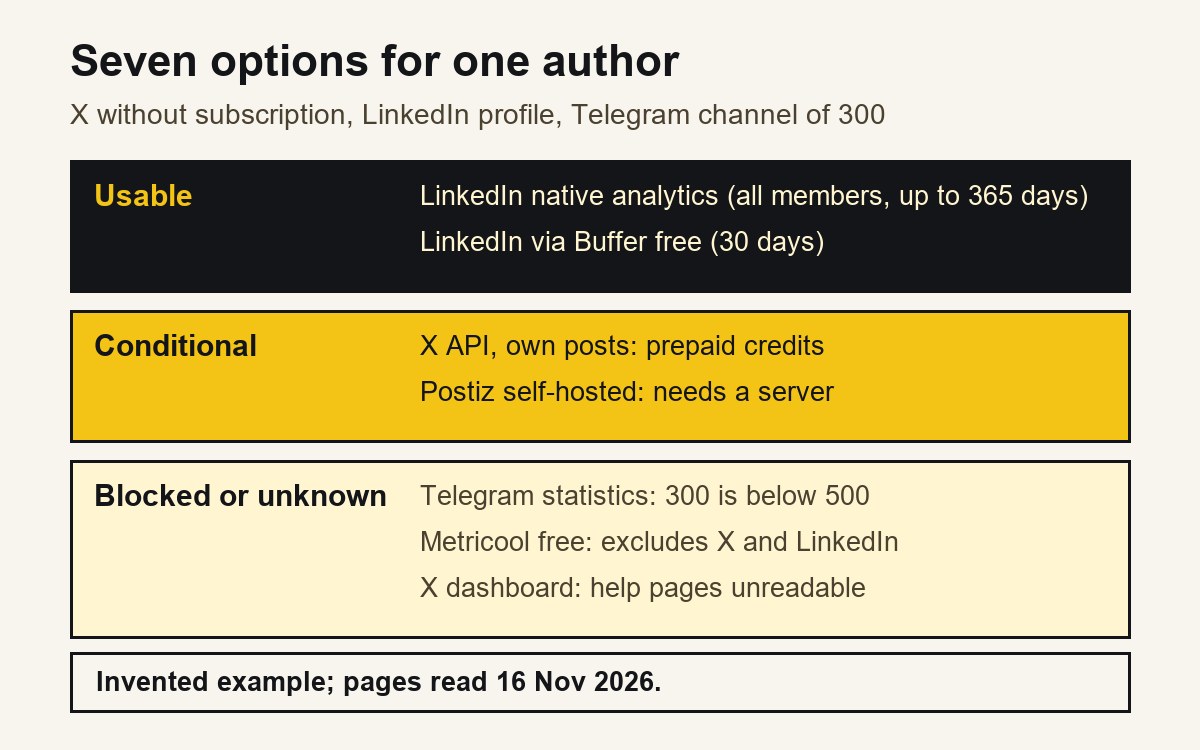
An author posts each article on three accounts: a personal X account without a subscription, a personal LinkedIn profile, and a Telegram channel with 300 subscribers. They want reach and replies for each post, kept for at least six months. Running the five gates, using only the pages cited above:
| Option | Account | Plan | Network | History | Result |
|---|---|---|---|---|---|
| LinkedIn native | Passes (all members) | Free | 7 to 365 days, export | Usable | |
| Telegram native statistics | Fails (300 is below 500) | Free | Telegram | — | Counters only |
| X dashboard | Unknown (help pages unreadable) | Unknown | X | — | Check in the account |
| X API, own posts | Passes (owner authorises) | Prepaid credits | X | Private metrics: 30 days | Usable with credits |
| Buffer free | Passes | Free | No Telegram; no X analytics for free profiles | 30 days | LinkedIn only |
| Metricool free | Passes | Free | Excludes X and LinkedIn | 30 days | Not usable here |
| Postiz self-hosted | Passes | Free licence | Lists all three | Not checked | Needs a server |
Out of seven options, two are plainly usable at no cost, and both cover only LinkedIn, through the native screen and Buffer's free plan. Telegram offers public counters until the channel passes the threshold. X depends on facts the author has to check in their own account or pay for through the API. The only option that lists all three networks without a licence fee is the one that needs a server.
Six months of history is the other filter. Buffer's and Metricool's free plans stop at 30 days, and X's private metrics at 30 days after posting; only LinkedIn's own screen reaches back a year, and only for LinkedIn. That is the practical argument for part 7's spreadsheet: whichever tools pass the gates, the numbers that need to last should be copied out on a fixed day into a file the author keeps.
Conditions go stale
The research notes behind this article were compiled on 28 October 2026. On 16 November, two of their conditions did not match the official pages: Metricool's free history (three months in the notes, 30 days on the page) and, as part 6 already noted, the Telegram threshold (50 in the notes, 500 on the tour). Perhaps the pages changed; perhaps the notes were wrong. Either way, a condition copied from a review, a list or a note three weeks old is not a condition you can rely on.
The habit that follows is small. Write the check date next to every access condition you rely on, and re-read the tool's own page before any decision that costs money or moves data.
A short check before you connect a tool
- Which of your networks does the tool connect to at all? Look for each by name.
- Are those networks on the plan you intend to use, or only on a higher one?
- Does your account qualify: role, size, subscription on the platform itself?
- How much history does that plan keep, and is it longer than the question you want to answer?
- What does the consent screen ask for, and do you know how to revoke it?
- What date did you read all of this, and on whose page?
What this article cannot tell you
The conditions here were read on official pricing, help and developer pages on 16 November 2026; prices, plans and thresholds change, sometimes without notice. X's Help Center pages on Premium and analytics returned HTTP 403 and could not be read, so nothing here states which X subscription opens which analytics screen. The tools were not signed up for or tested; the table reports what their pages say, not how the analytics behave in use, and whether Postiz's or Publer's analytics cover Telegram was not checked. Five third-party tools are a sample, not a market survey, and their inclusion is not a recommendation. Nothing here is a recommendation to buy any product. The worked example is invented and reports no Dapp.Expert results.
How this article was made
| Task | What the AI did | What a person did | How it was checked |
|---|---|---|---|
| Research | Collected platform documentation and tool pricing into research notes | Chose the question, the five gates and the tools to compare | Every condition, price and quote checked against the pages listed below [1]–[12] on 16 November 2026 |
| Draft | Wrote the first draft from the notes | Edited the text, the tables and the worked example | A separate review compared claims and quotes with the sources |
| Images | Generated the cover photograph-style illustration | Chose the illustration; designed the explanatory diagrams | Labelled as AI-generated in the disclosure line and alt text |
| Not done by AI | — | The decision to publish and responsibility for the text | — |
Conflicts of interest: none. The author has no commercial or affiliate relationship with X, LinkedIn, Telegram, Buffer, Metricool, Publer, Postiz or Sprout Social.
Responsible for this article: Dmitriy Lastovka, author. Corrections: contact form.
Sources
All sources are official (the platform's or vendor's own page), fetched on 16 November 2026.
- LinkedIn Help, "Combined post analytics". https://www.linkedin.com/help/linkedin/answer/a701208 Official.
- LinkedIn Help, "LinkedIn Page analytics". https://www.linkedin.com/help/linkedin/answer/a547077 Official.
- Telegram, "Telegram Channels" (feature tour). https://telegram.org/tour/channels Official.
- Telegram API, "Statistics". https://core.telegram.org/api/stats Official.
- X Developer Platform, "Metrics". https://docs.x.com/x-api/fundamentals/metrics Official.
- X Developer Platform, "X API pay-per-usage pricing and credits". https://docs.x.com/x-api/getting-started/pricing Official.
- Buffer, "Pricing" (plans, feature comparison and supported channels table). https://buffer.com/pricing Official.
- Metricool, "Pricing". https://metricool.com/pricing/ Official.
- Publer, "Plans" (plans and supported networks). https://publer.com/plans Official.
- Postiz, GitHub repository README (gitroomhq/postiz-app). https://github.com/gitroomhq/postiz-app Official.
- Postiz, "Pricing" (plans and channel list). https://postiz.com/pricing Official.
- Sprout Social, "Pricing". https://sproutsocial.com/pricing/ Official.