

AI tools helped gather research and write the first draft of this article. I edited it and checked every quote and figure against the source page listed at the end, read on 18 November 2026. The cover illustration is AI-generated. Details at the end.
A developing story changes after it is published. Facts arrive, statements are withdrawn, early reports prove wrong. The reader should always be able to see three things: when the story was first published, when it was last changed, and what changed. The practical way to do this is a dated note at the point of change, a separate label for an error, and visible dates that match the dates in the page's markup.
This article sets out that scheme, applies it to a fictional exchange story with a full timeline, and lists four mistakes. It is aimed at people who publish quick factual stories on AI, finance, blockchain and games and then keep updating them. It is not a legal guide and does not replace a publication's own corrections policy.
Two different things: an update and a correction
An update adds information that was not available before. The earlier text was right when written. An error means the earlier text was wrong. These need different handling, because the reader's question is different. After an update the reader asks "what is new?" After an error the reader asks "what did you get wrong, and does it change anything I decided?"
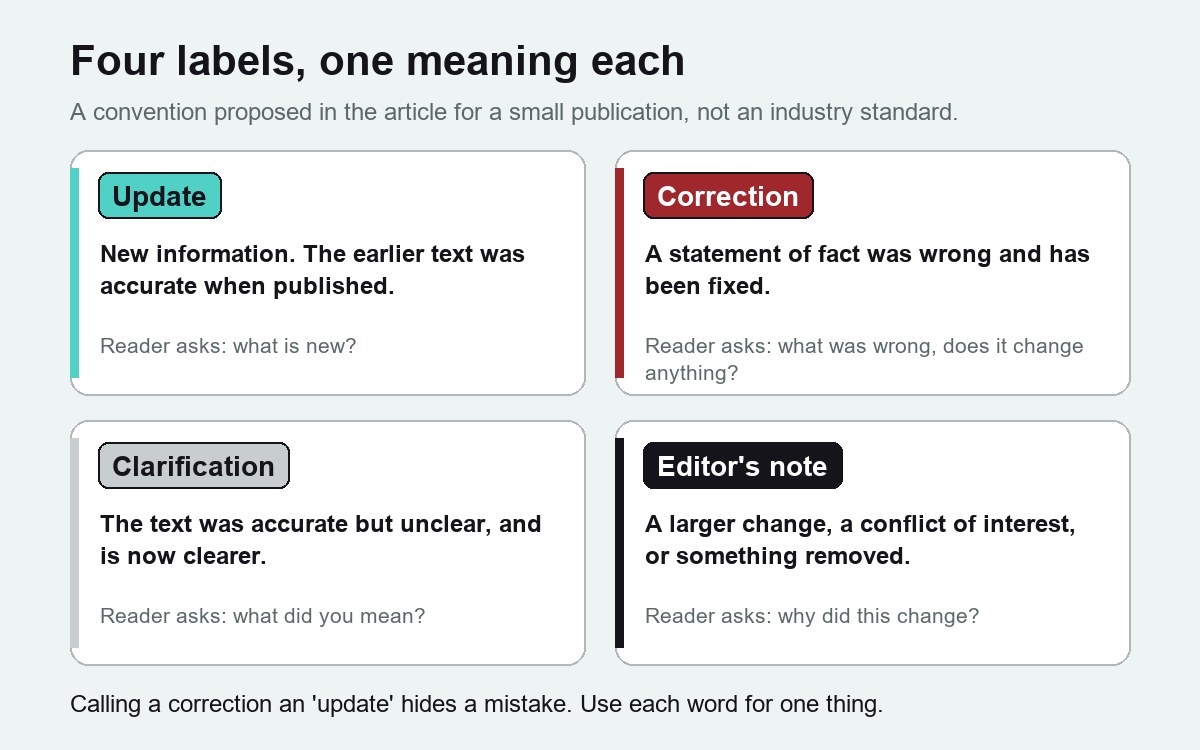
A labelling scheme with four labels is proposed here for a small publication:
- Update: new information. The earlier text was accurate when published.
- Correction: a statement of fact was wrong and has been fixed.
- Clarification: the text was accurate but unclear, and is now clearer.
- Editor's note: a larger change, a conflict of interest, or something removed.
The labels are a convention proposed here, not a standard that every outlet follows. What matters is that the publication uses each word for one thing. Calling a correction an "update" hides a mistake. Calling an update a "correction" teaches readers to distrust the labels.
No silent changes to facts
Journalism.co.uk's guide to online corrections, published in 2013, quotes Greg Brock of the New York Times: "We never change a factual error online without telling readers that we've done it" [1]. It adds, in his words, "the policy is you never change a fact in the article without appending the note" [1]. The piece is over a decade old and describes one newsroom's practice, but the principle is plain: the reader should not have to compare two versions to learn that something changed.
Poynter's published ethics guidelines express the same idea as a standard, committing to "timely response, clear corrections, and prominent acknowledgement that a mistake was made and addressed" [2]. They do not specify labels or placement.
A practical limit follows. Fixing a typo does not need a note. Changing a number, a name, a date, a quote or a conclusion does.
What a visible update looks like
ProPublica's public corrections page gives a model of a plain format. Each entry is headed "Correction, [date]:" and many begin "This story originally misstated..." or "misidentified..." [3]. The page lists entries newest first, each linked to its article, and does not state a formal policy on its own [3]. The format is worth copying: the label, the date, then what was wrong and what is right.
For updates in a story that is still moving, three placement choices work:
- A dated note at the top, above the first paragraph, when the update changes the main point. Example: "Update, 14:20 UTC: Example Exchange has resumed withdrawals."
- A timestamped log at the bottom, when the story keeps the original text and adds events. The reader can scroll to see the sequence.
- A dated note beside the changed passage, when only one fact changed.
Do not overwrite the opening with new facts without a note. If the headline changes materially, say so.
Dates: visible and in the markup
Google's guidance on publication dates tells publishers to "add a user-visible date to the page and feature it prominently" and to specify the datePublished and/or dateModified fields; it also asks that dates and times be consistent, with the date and any time and time zone matching between visible and structured values [4]. The Article structured data documentation defines datePublished as "the date and time the article was first published, in ISO 8601 format" and dateModified as "the date and time the article was most recently modified, in ISO 8601 format", and recommends including time zone information [5].
Two practical consequences:
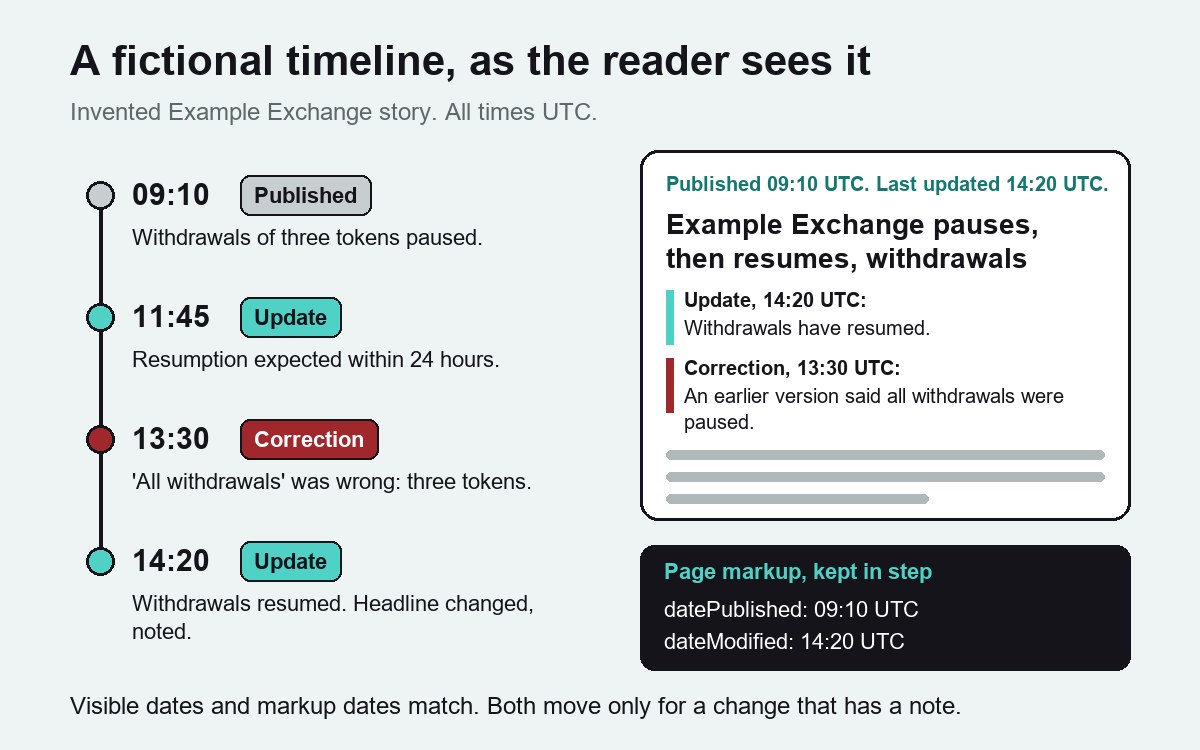
- Show both times when they differ. "Published 09:10 UTC. Last updated 14:20 UTC." The reader can then tell a fresh story from a refreshed one.
- Do not change dateModified for a typo. The field means a modification the reader would care about. The sources above do not say this explicitly, so this is a recommendation, not a quotation: keep the visible "last updated" time and the markup time in step, and move both only for a change that has a note.
For stories that are structured as a running log, Schema.org defines LiveBlogPosting, described as "intended to provide a rolling textual coverage of an ongoing event through continuous updates", with coverageStartTime, coverageEndTime and liveBlogUpdate properties [6]. For a news story with a visible correction, Schema.org also defines a correction property, which "indicates a correction to a CreativeWork, either via a CorrectionComment, textually or in another document" [7]. These are vocabulary definitions, not requirements of any search engine, so use them only if your platform supports them.
A fictional timeline
Example Exchange is invented; the times and statements are made up to show the format. All times are UTC.
| Time | Event | What the page shows |
|---|---|---|
| 09:10 | Exchange posts a status notice: withdrawals of three tokens paused, deposits and trading unaffected. | The story is published. Dateline "Published 09:10 UTC." |
| 11:45 | Exchange says it expects to resume withdrawals within 24 hours. | Update, 11:45 UTC: Exchange says it expects to resume withdrawals within 24 hours. Added under the opening. |
| 13:30 | Our first version said "all withdrawals" were paused. The notice said three tokens. | Correction, 13:30 UTC: An earlier version said all withdrawals were paused. The exchange's notice said withdrawals of three tokens were paused. The text has been changed. |
| 14:20 | Exchange resumes withdrawals and says the cause was a records mismatch. | Update, 14:20 UTC: Withdrawals have resumed. The headline has been changed from "pauses" to "pauses, then resumes". Last updated 14:20 UTC. |
Three things are visible to the reader. The first is that the story was wrong about "all withdrawals" for a few hours, and that the correction says what was wrong and what is right. The second is that the 11:45 and 14:20 notes are updates, not mistakes. The third is that the headline change is stated rather than silent.
If the social post that carried the first version is still in feeds, add the correction to that post or reply to it with the correction and a link, as the post is where many readers saw the wrong claim.
Four mistakes and fixes
1. A silent rewrite. The story changes and nothing says so. Fix: a dated note on every change to a fact, a name, a number, a quote or a conclusion [1].
2. "Updated" for everything. A correction labelled as an update hides the error. Fix: use "Correction" when something was wrong; "Update" only when new information arrived. Use "Clarification" when the meaning was unclear.
3. A date that does not move, or moves for nothing. A story with a new fact that still says "published this morning", or a typo fix that makes it look fresh. Fix: keep the visible last-updated time and the markup in step [4], and change them only with a noted change (a recommendation, not a quotation).
4. Notes that pile up and bury the story. After ten updates, the reader has to read ten notes to find the present state. Fix: rewrite the body to the current state, keep the notes as a short log, and say at the top what the latest position is. Keep the earlier notes, including corrections, visible.
A template to copy
At the top of a developing story:
Published [time, zone]. Last updated [time, zone]. [One line: the current state.]
For each change:
Update, [time, zone]: [new information, one or two sentences.]
Correction, [time, zone]: [what was wrong]. [What is right, and its source.] [Whether the conclusion changed.]
Before each change, ask: is this new information, a mistake or a clarification? Use the label that matches, and keep the note after the change is made.
What this article does not settle
It does not define when a change counts as significant; that depends on the publication and the topic. The 2013 Journalism.co.uk guide describes one newsroom's practice at the time, and the Poynter page does not specify labels or placement. The four labels are a convention proposed here, not a standard. Google's documents describe how Google reads dates, not what readers prefer, and they do not say which edits justify changing dateModified. The exchange story is invented. Rules about who is responsible for corrections and how a publication states its policy are a separate question.
How this article was made
| Task | What the AI did | What a person did | How it was checked |
|---|---|---|---|
| Research | Gathered candidate sources and drafted notes | Chose the question and which pages to rely on | Every quote and figure checked against the page named in the sources, read on 18 November 2026 |
| Draft | Wrote the first draft from the notes | Edited the text, the timeline and the template | An independent review compares claims with the sources before publication |
| Images | Generated the cover illustration | Chose and checked it | Labelled as AI-generated in the disclosure line and alt text |
| Not done by AI | — | The decision to publish and responsibility for the text | — |
Conflicts of interest: none. The author has no commercial relationship with the organisations named here.
Responsible for this article: Dmitriy Lastovka, author. Corrections: contact form.
Sources
Labels: news report (a published guide), policy (a published organisational standard), guidance (a platform's documentation), schema (a public vocabulary definition).
- Rachel McAthy, "Made a mistake? Advice for journalists on online corrections", Journalism.co.uk, 21 January 2013. https://www.journalism.co.uk/how-to-handle-online-news-corrections/ News report; guidance article quoting practitioners.
- Poynter, ethics guidelines page. https://www.poynter.org/guidelines-2/ Policy.
- ProPublica, corrections page. https://www.propublica.org/corrections Policy; a list of corrections, no formal policy stated on the page.
- Google Search Central, "Add a Byline Date to Google Search Results". https://developers.google.com/search/docs/appearance/publication-dates Guidance.
- Google Search Central, "Article (Article, NewsArticle, BlogPosting) structured data". https://developers.google.com/search/docs/appearance/structured-data/article Guidance.
- Schema.org, "LiveBlogPosting". https://schema.org/LiveBlogPosting Schema.
- Schema.org, "correction" property. https://schema.org/correction Schema.