
AI tools helped gather research and write the first draft of this article. I edited it and checked every price, quote and date against the source page listed at the end, read on 27 November 2026. The cover illustration is AI-generated. Details at the end.
"When is local image generation cheaper than a hosted service?" has a short answer: when your monthly volume times the hosted price per image is larger than everything the local machine costs you each month, counted honestly, and when you can live with the control, upkeep and licence terms that come with running it yourself. Price per image is only one side of that sentence. The other side is a list of costs that never appear on a pricing page.
This article reads the price lists of four hosted image services, turns them into monthly figures, lists the cost factors of a local GPU without inventing numbers for them, gives a break-even formula, and covers four things the formula leaves out. It does not rank image quality or pick a model.
What hosted services charge today
I read these pages on 27 November 2026. Prices change, so treat the table as a dated snapshot and re-read the page before you decide.
| Service and model | Price on the page | Notes from the page |
|---|---|---|
| Google Gemini API, Nano Banana 2.1 | $0.0336 per 1K image; $0.0168 in Batch | Image output priced at $30 per 1M tokens (Standard) or $15 (Batch); a 1K image (1024x1024) uses 1120 tokens [3] |
| Google Gemini API, Gemini 3.1 Flash Image | $0.067 per 1K image | Image output priced at $60 per 1M tokens; 1K is 1120 tokens [3] |
| Black Forest Labs, FLUX 3 Image Klein | $0.009 per image at 1K | Listed from $0.008 (768 x 768) to $0.036 (4K) [4] |
| Black Forest Labs, FLUX 3 Image | $0.048 per image at 1K | Listed from $0.041 (768 x 768) to $0.607 (4K) [4] |
| Recraft API, V4.1 Flash V2 | $0.007 per image | The lowest price per image the page opens with [5] |
| Recraft API, V4.1 and V4 Styles | $0.035 per image | Generating with style references also creates a style, which adds $0.005 per request [5] |
| OpenAI API, GPT-Image-2.5 Sunburst | Per token: image output $30 per 1M tokens, $15 with Batch | The page gives no flat price per image [1] |
Three cautions before comparing rows. First, "1K" is not defined the same way everywhere: Google states 1024x1024 pixels, while BFL's documentation page describes its 1K tier as "About 1 megapixel" [3][4]. Second, OpenAI's page prices image output per token, so the cost of one image depends on how many tokens that image uses, and the page itself says "The GPT Image 2 calculator does not estimate GPT-Image-2.5 token consumption" [1]. Third, a price per image says nothing about whether the result is usable: if it takes three tries to get one publishable picture, the price per usable image is triple the listed figure.
Hosted pricing also comes with terms. BFL's page says "No subscriptions, no seat fees. Only pay for what you generate" [4]. Recraft says "There is no subscription: you buy API units in advance, each request deducts its cost", and also that "API unit packages are non-cancellable and non-refundable" [5]. So "pay per image" can still mean paying in advance.
From a price per image to a monthly bill
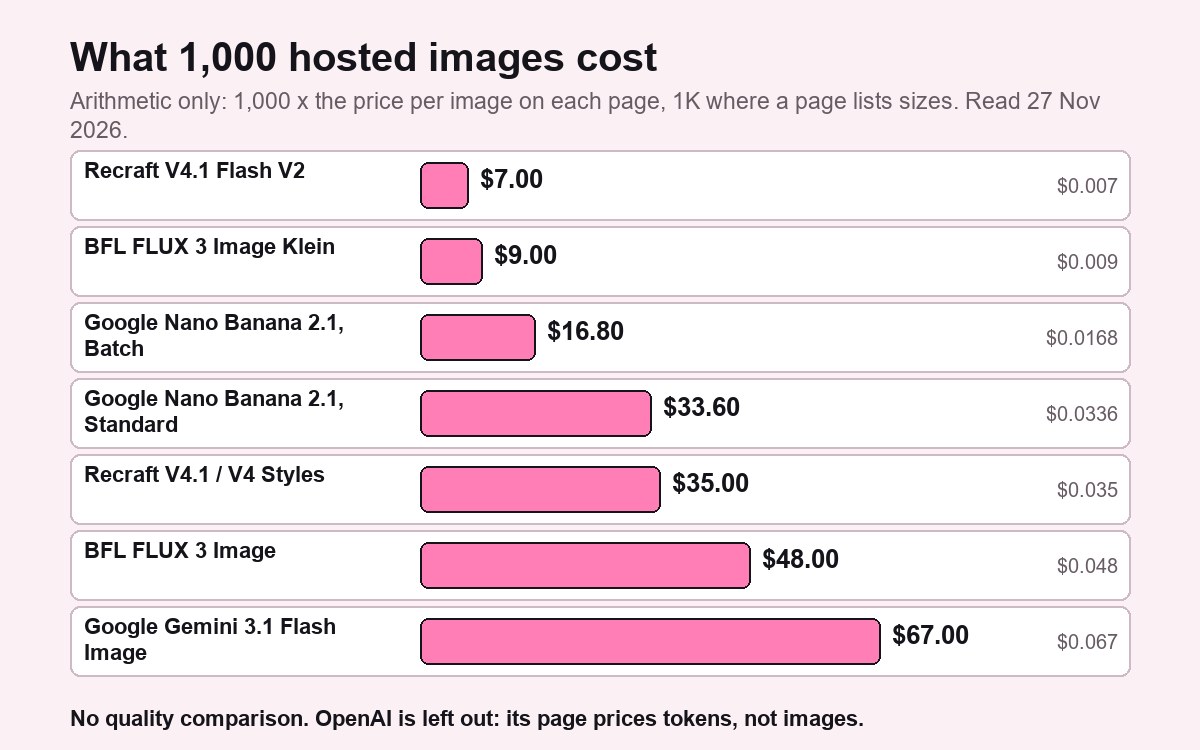
Take the prices above (the 1K tier where a page lists sizes; Recraft's page gives one price per image) and multiply by 1,000 images a month. Arithmetic only:
- Recraft V4.1 Flash V2: 1,000 x $0.007 = $7.00
- BFL FLUX 3 Image Klein (1K): 1,000 x $0.009 = $9.00
- Google Nano Banana 2.1, Batch: 1,000 x $0.0168 = $16.80
- Google Nano Banana 2.1, Standard: 1,000 x $0.0336 = $33.60
- Recraft V4.1 or V4 Styles: 1,000 x $0.035 = $35.00
- BFL FLUX 3 Image (1K): 1,000 x $0.048 = $48.00
- Google Gemini 3.1 Flash Image (1K): 1,000 x $0.067 = $67.00
A thousand images a month is a lot for a small publication, and the hosted bill at that volume is small. The first lesson of the price lists: at modest volume, money is rarely the reason to go local. The reasons are elsewhere.
What a local GPU costs: the factors
A local setup has no price per image, but it is not free. These are the cost factors. I give no numbers for them because they depend on your machine, your electricity and your time, and I did not measure them for this article.
- The card. If you already own it, its price is a sunk cost and the marginal cost is low. If you would buy it for this purpose, spread its price over the months you expect to use it.
- Electricity while the card is working, and cooling if the room needs it.
- Time shared with other jobs. One GPU doing image generation is not doing video, training or anything else. A shared card needs a rule for who goes first. A queue costs waiting time even when it costs no money.
- Setup and upkeep. Installing a generation interface, keeping drivers, Python packages and model files working together, and re-testing after updates. This is the factor most often left off a comparison, because it is paid in hours, not dollars.
- Retries and storage. Failed attempts cost time instead of a fee, and model files and outputs take disk space.
- Fit. Whether the model you want runs in the card's memory at the size you need. That is its own question; the next article in this block, What Can You Generate With 24 GB of VRAM?, takes it up.
One more factor sits on the other side of the ledger. A local machine can run whatever its licence allows without a per-image fee, which makes retries cheap in money. A hosted service bills every retry.
A break-even formula
Put the monthly factors in one number and compare:
Break-even volume per month = monthly local cost / hosted price per usable image
The monthly local cost is your honest sum of the factors above, with your own time priced at whatever you would otherwise pay for it. The hosted price per usable image is the listed price divided by the share of generations you actually publish.
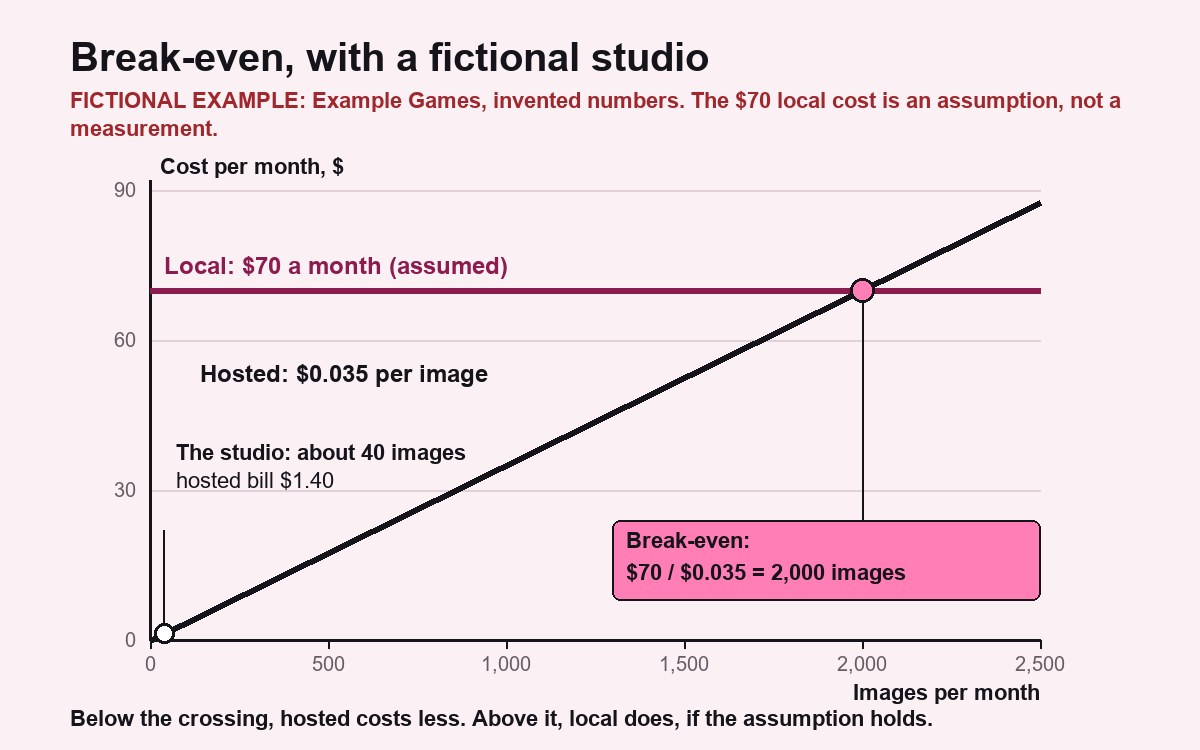
A fictional example, invented to show the arithmetic. Example Games is a small studio with a blog and a Discord server. It posts four illustrated articles a week and generates about 40 images a month, counting retries. Suppose it estimates its monthly local cost at $70, with setup time included. That figure is an assumption, not a measurement. Against a hosted price of $0.035 per image, break-even is $70 / $0.035 = 2,000 images a month. At 40 images a month the hosted bill is $1.40. Local generation would have to be justified by something other than price.
Change the inputs and the answer changes: an owned card lowers the monthly local cost and the break-even with it, while a dedicated machine and a person to maintain it raise both. The formula does not decide. It tells you which number to find out.
Four things the formula leaves out
1. Control over style
A hosted service gives you the controls it offers. Recraft's page, for one, describes a Styles model that "Generates images in a style built from 1–10 of your reference images" [5], so a hosted route to a repeatable look exists. A local setup lets you change the weights, the sampler and the pipeline itself. Neither route does the design work for you. Keeping a style consistent is its own craft, and a later article in this block, Keeping a Consistent Visual Style Across AI Images, covers it.
2. Where your prompts and files go
Hosted means sending your prompts, and sometimes your reference images, to a company. The terms differ by plan. In the Nano Banana 2.1 table of the Gemini API pricing page, the row "Used to improve our products" reads Yes for the Free Tier and No for the Paid Tier [3]. Check the equivalent line in whatever terms you actually accept. A local model keeps the prompts on your own disk, which matters if a prompt contains an unreleased product, a client's brand or an embargoed story. That is a data-handling difference, not a quality one. The pages I read do not say how long any provider keeps requests, so I claim nothing about that.
3. What happens when the service changes
Hosted models are retired. On 27 November 2026, OpenAI's page for gpt-image-1 states "GPT Image 1 was shut down on October 23, 2026 and is no longer available" and points to GPT-Image-2.5 Sunburst [2]. Google's page says gemini-2.5-flash-image "is deprecated and will be shut down on March 15, 2027" and recommends Gemini 3.1 Flash Lite Image [3]. If your published look depends on one model's output, a shutdown can change it.
A model file on your own disk is not retired by a vendor. It also gets no fixes, and its licence still applies. Open weights are not the same as free for every use, so read the licence of the exact model before you plan around it; Reading an Image Model's License Before Publishing, a later article in this block, takes that up. BFL's pricing page, for example, describes its FLUX 3 Image Klein as having "the customization and speed of open weights" and as "5.6B parameters, runs on a single consumer GPU" [4]. The same page sells that model by the image, so one model family can be both a hosted and a local option, with different terms for each.
4. Who owns the output and what it carries
Hosted terms differ here too. Recraft states "You own the images you create with the API and can use them commercially, except to train AI models" [5]. Whether images carry provenance metadata, and what such metadata can and cannot prove, is the subject of What Image Provenance Metadata Can Establish, so I leave it there.
A real case: pre-generated covers
The covers of this publication come from a bank, not from a generator run at publishing time. The cover library's own README states that it holds 732 images, made with gpt-image-2 at 1024x1536, copied on 2026-11-18, about 2.0 GB, with every file checked against a sha256 manifest. A cover is chosen from that bank by subject.
That setup moves the local-or-hosted question from every article to the occasional batch. Picking from the bank costs no generation time, no fee and no GPU. A pre-generated bank is a third option beside the two in the title: for steady themes, "generate in advance, choose later" can beat both. It does not cover every subject, and a new subject means a new batch. The owner's PC has an RTX 3090 with 24 GB of video memory, which is the local side of the comparison for this publication. How far that card actually goes is a measurement, and I do not guess at it here.
Four mistakes and fixes
1. Comparing the list price with local "free". Local generation is free only if your hardware, power and hours are. Fix: write down the monthly sum, even roughly, and use the break-even formula.
2. Counting generations, not usable images. A cheaper model that needs more tries may cost more per publishable picture. Fix: track the share of generations you actually use, and divide the price by that share.
3. Treating one price snapshot as permanent. Pages change, and models are retired. Fix: date every price you write down, and re-read the page before a purchase.
4. Deciding on price alone. Control, privacy, licence and continuity can outweigh a few dollars. Fix: score each separately and record why you chose.
A short checklist
- How many images a month do you publish, counting retries? Multiply by the hosted price at your size.
- Do you already own a capable card? If so, what is its marginal cost: electricity, your time, and the queue against other jobs?
- Does anything in your prompts or reference files need to stay on your own disk?
- Does your published look depend on a specific model that could be retired?
- What does the licence of the exact model, local or hosted, allow you to do with the output? Would a pre-generated bank cover most of your subjects?
What this article cannot tell you
It does not compare image quality; I ran no side-by-side test. It does not measure any local machine: the cost factors are listed without numbers, and the fictional example uses an assumed figure. It reads the pages of only four providers, so it is not a market survey, and it says nothing about services I did not read. Price pages change, so the numbers are a snapshot of 27 November 2026. OpenAI's cost per image is not given, because its page prices tokens and says its calculator does not estimate this model's token use. Nothing here is legal advice on licences or data terms.
How this article was made
| Task | What the AI did | What a person did | How it was checked |
|---|---|---|---|
| Research | Gathered candidate sources and drafted notes | Chose the question and which pages to rely on | Every price and quote checked against the page named in the sources, read on 27 November 2026 |
| Draft | Wrote the first draft from the notes | Edited the text, the arithmetic and the example | An independent review compares claims with the sources before publication |
| Images | Generated the cover illustration | Chose and checked it | Labelled as AI-generated in the disclosure line and alt text |
| Not done by AI | — | The decision to publish and responsibility for the text | — |
Conflicts of interest: none. The author has no commercial relationship with the companies named here.
Responsible for this article: Dmitriy Lastovka, author. Corrections: contact form.
Sources
Labels: pricing (a provider's own price page), model page (a provider's documentation page for one model), library (this publication's own files). Prices and quotes are as on the pages read on 27 November 2026.
- OpenAI, model page for GPT-Image-2.5 Sunburst. https://platform.openai.com/docs/models/gpt-image-2.5-sunburst Model page.
- OpenAI, model page for gpt-image-1 (retired). https://platform.openai.com/docs/models/gpt-image-1 Model page.
- Google, Gemini API pricing (sections Gemini Nano Banana 2.1, Gemini 3.1 Flash Image, Gemini 2.5 Flash Image). https://ai.google.dev/gemini-api/docs/pricing Pricing.
- Black Forest Labs, pricing page. https://bfl.ai/pricing Pricing. The documentation page https://docs.bfl.ai/quick_start/pricing, last modified 2026-11-10 per its metadata, states that 1 credit equals $0.01.
- Recraft, API pricing. https://www.recraft.ai/docs/api-reference/pricing Pricing.
- Dapp.Expert cover library, README (732 images, copied 2026-11-18). Local file D:/DappExpert-Author/covers-library/README.md Library.