
AI tools helped gather research, run the test and write the first draft of this article. I edited it and checked every quote against the page listed at the end, read on 27 November 2026, and kept the test script and log. The cover illustration is AI-generated. Details at the end.
An editor that opens your article and shows it correctly has proved very little. The risk is in the trip: content leaves in one format and comes back in another, and something stays behind on the way. Test the round trip with one fixed document that contains every feature you rely on, compare structure rather than appearance, and run the loop twice.
This article explains what a round trip is, what the documentation of a few common tools says they cannot carry, and what a small real test on two free Python tools lost. Then it gives a procedure you can reuse. It does not recommend an editor.
What a round trip is, and four ways content goes missing
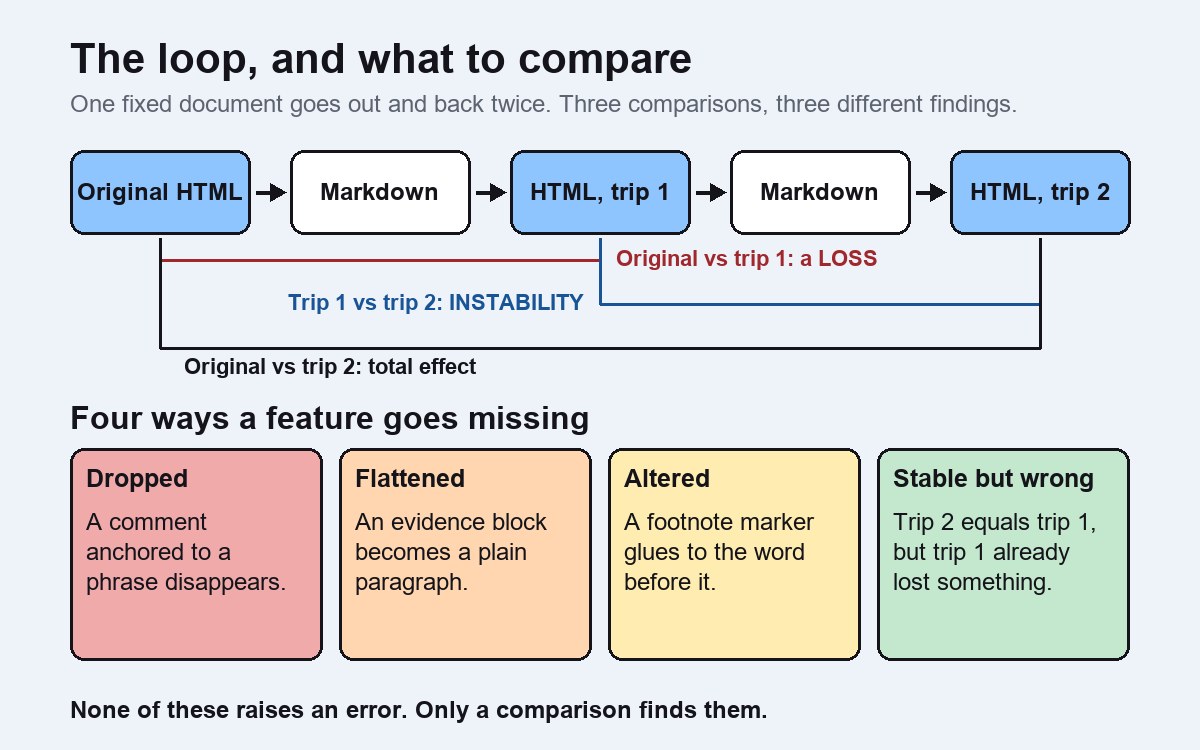
A round trip is a conversion out and back: your content is exported to a format (HTML, Markdown, a document file), then imported again, and you compare what you have with what you started from. Editors do this whenever they accept pasted content, load a stored article, or hand text to another tool.
In practice, four things can happen to a feature:
- Dropped. It is gone. A comment anchored to a phrase disappears.
- Flattened. It survives as plain text. A custom evidence block becomes an ordinary paragraph.
- Altered. It stays but means something different. A footnote marker glues itself to the previous word.
- Stable but wrong. The loop reaches a fixed point, so a second trip changes nothing, but the first trip already lost something. A test that only checks "does the second trip match the first?" will pass.
All four are quiet and raise no error, so a glance at the screen is not a test.
What the documentation says it cannot carry
Documentation is a lead, not a result, but it tells you where to look. Five pages, read on 27 November 2026:
- The Tiptap Markdown extension describes itself as "bidirectional", parsing Markdown into the editor's JSON and serialising back. The page also carries a notice that the extension is an early release, and a Limitations section. It lists comments as not yet supported, with a caution that comments in a document "may be lost" when Markdown content replaces it. For tables it says "only one child node per cell is allowed", because Markdown cannot represent several [1].
- Pandoc's manual says the cells of pipe tables "cannot contain block elements like paragraphs and lists" and cannot span several lines [2].
- The GitHub Flavored Markdown specification says: "Include a pipe in a cell’s content by escaping it" [3]. A converter that does not escape that pipe produces a table row with an extra column.
- The Turndown README (an HTML-to-Markdown converter for JavaScript) says: "By default, Turndown does not keep any elements". Elements without a rule fall to a default rule that, by default, "outputs the node's text content" [4]. In other words, an unknown block becomes text unless you tell the converter to keep it as HTML.
- The Python-Markdown documentation says its maintainers "consider it a bug to not enforce" the four-space rule for list content, and that any block nested in a list, sub-lists included, must "always be indented by at least four spaces (or one tab) for each level of nesting" [5]. Other parsers are looser, so the same Markdown can parse differently in two tools.
These pages describe designs and limits, not how often they bite in real content. Each limit shows up as a quiet loss, which is what a round-trip test exposes.
A real test, and what it lost
I ran one small test. The document and its content are fictional; the results are real.
Setup. The test document is an invented article called "Example Ledger". It is checked on 32 properties that cover: headings, bold, italic, underline, strikethrough, inline code, a link with a title and a query string, a hard line break, a non-breaking space, an emoji, an accented word and a CJK character, a nested list with a numbered parent and bulleted children, a blockquote, a fenced code block marked as Python, a table with one cell that holds two paragraphs and another that holds a pipe character, an image with alt text, a figure caption, a superscript footnote marker, a comment anchored to a phrase, a custom "evidence" block with a source and a date, and a horizontal rule.
Tools. Python 3.10.6 on Windows, with the Python-Markdown package version 3.10.3 and the markdownify package version 1.2.4, both installed free from PyPI for this test, and BeautifulSoup 4.15.0 for the comparison. I converted the HTML to Markdown with markdownify, back to HTML with Python-Markdown, and compared the two HTML versions on the 32 checks. Then I looped again: Markdown to HTML to Markdown, to see whether the result was stable.
I ran two configurations. In A, Python-Markdown ran in its core mode with no extensions. In B, I turned on the tables, fenced_code and sane_lists extensions and set markdownify to ATX headings and dashes for bullets.
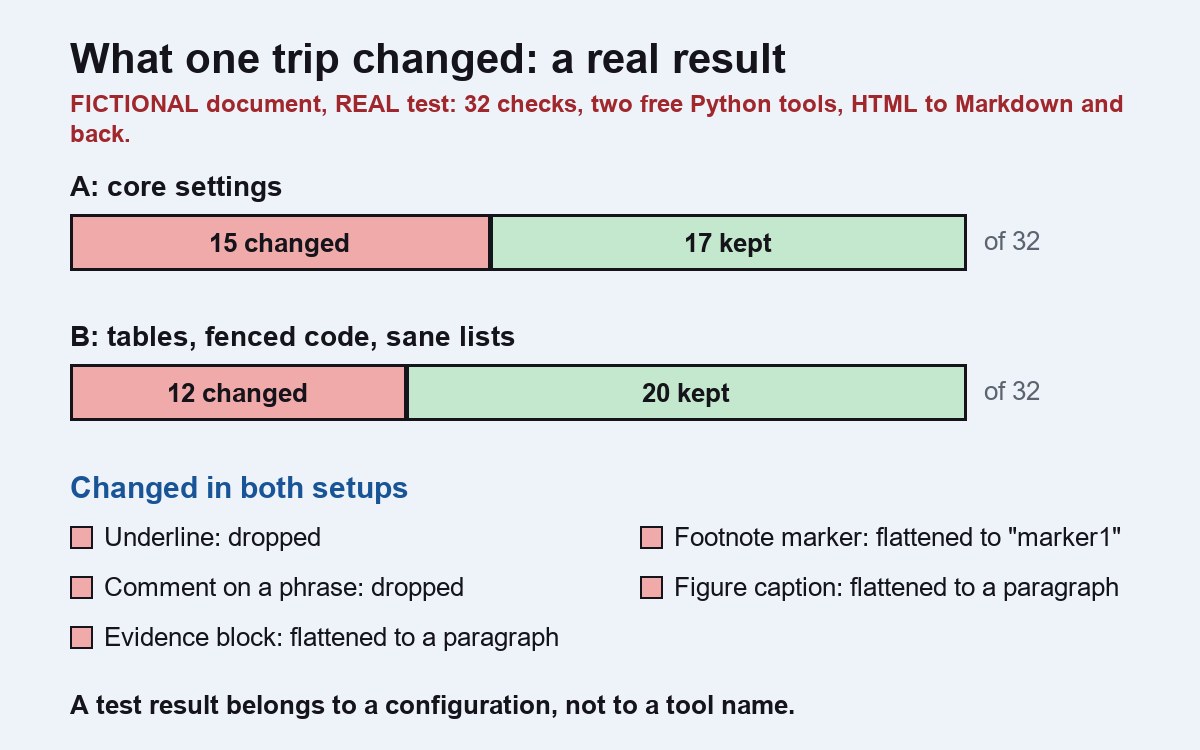
Result. One trip changed 15 of the 32 checks in A and 12 of the 32 in B:
| Feature | Config A (core) | Config B (+ tables, fenced code, sane lists) |
|---|---|---|
| Headings, bold, italic, link with title and query string, hard break, blockquote, image alt text, horizontal rule, emoji, accents, CJK | kept | kept |
| Underline | dropped (plain text) | dropped (plain text) |
| Strikethrough | altered: literal tildes show in the text | altered: literal tildes show in the text |
| Superscript footnote marker | flattened: "marker1" | flattened: "marker1" |
| Figure caption | flattened to a paragraph | flattened to a paragraph |
| Comment anchored to a phrase | dropped | dropped |
| Custom evidence block | flattened to a paragraph | flattened to a paragraph |
| Code block language label | dropped; the block became inline code | dropped; the block itself was kept |
| Table | not recognised: rows show as literal pipe text | kept |
| Cell with two paragraphs | not testable (no table) | merged into one |
| Cell containing a pipe | not testable (no table) | text after the pipe dropped |
| Nested list | merged into the numbered list | not parsed as a list: the bullets are literal text inside the first item |
Four details matter more than the totals.
The same loss can look different. In A, the table was not recognised at all; in B it was. The tool settings changed the result, so a test result belongs to a configuration, not to a tool name.
Counts can hide a loss. In A, the number of list items was 4 before and 4 after, so a naive "count the items" check passed. The bullets had been merged into the numbered list: the check that counted bulleted lists went from 1 to 0. This is why the 32 checks include both counts and specific properties.
A loss can hide in the middle format. In B, the cell text "pipe | inside" was exported as Markdown with the pipe unescaped, which the GFM specification says must be escaped [3]. On import, Python-Markdown kept "pipe" and silently dropped "inside". The Markdown from the first trip still contained both words, so a check that only looked for the text in that file would have passed. Only a check on the imported HTML, or the Markdown from the second loop, revealed it.
Stable is not correct. In both configurations, the structure after the second loop equalled the structure after the first. The Markdown text did change on the second loop in both (in A the nested bullets became numbered items and the code block became inline code; in B the word "inside" disappeared from the Markdown), yet the structural comparison between the two loops reported "stable", while 15 and 12 checks had already changed on the first trip. If I had only compared loop one with loop two, I would have called it a pass.
One more cause is visible in the log: markdownify wrote the nested bullets with three spaces of indentation, while the Python-Markdown documentation says nested blocks must be indented by at least four [5]. That is consistent with the nested list not surviving in B, although I did not isolate it with a separate experiment.
What the test does not cover
It tested two Python libraries, one direction first (HTML to Markdown to HTML), one document, one configuration each. It did not test Tiptap, TinyMCE, DOCX, pasted content or Markdown-first workflows. A different converter pair might keep underline as an HTML tag and the evidence block as raw HTML; the Turndown page describes exactly that option [4].
A procedure you can reuse
- Inventory what your content actually uses. List every element used in five real articles: heading levels, lists, tables, images with captions, links with titles, footnotes or citation markers, code, embeds, comments, any custom block. Add the risky details: pipes, non-breaking spaces, emoji, non-Latin text, long URLs with query strings, empty alt text.
- Build one fixture. One short document containing one example of each item, plus the risky details. Invent the content so you can keep the fixture in the open.
- Define checks that fail loudly. For each feature, record a count and a property: the number of tables, rows and columns; the language label on a code block; the exact link and title; the alt text; the custom block's attributes; a count of words in the visible text. Add a check for text that must never change (a number, a name, a date).
- Run every route you promise. Import from each format you accept, export to each you offer, and open the exported file in the tool a colleague would use. Do each route on its own; the path in the editor is not the path in the converter.
- Loop twice, compare both ways. Compare the original with trip one, trip one with trip two, and the original with trip two. A change between original and trip one is a loss. A change between trip one and two is instability.
- Record the versions and the date. Tool name, version, configuration, fixture, result. Without those, the result is an anecdote.
- Classify each loss. Is it cosmetic (underline), meaning-bearing (a footnote marker, an evidence date), or structural (a table, a list)? Decide what to do about each: change the configuration, keep the element as HTML, add a custom rule, or make the export one-way and declare that the original editor format is the source of truth.
- Keep the fixture as a regression test. Re-run it on every upgrade of the editor or a converter, since the Tiptap page above warns that its Markdown extension "can be subject to change" [1].
Choosing a storage format is a separate question (Part 02, Choosing a Storage Format for an Article). Here the question is narrower: whatever you chose, prove that it carries the content.
An observation from the author's own workflow
The author's publishing runbook records that the public author form of Dapp.Expert takes its article body through a Tiptap editor and the admin panel through TinyMCE. The same prepared HTML is set into both, and before the admin step the runbook requires replacing local image paths with served addresses. I have not run a formal round-trip test between them, so I cannot say what either keeps or loses. It shows why the procedure starts from the route content really takes.
What this article cannot tell you
It cannot tell you whether a given editor loses content, because I did not test one, or how often these losses happen on your content. The documentation pages describe intent and limits, not measured outcomes, and one of them calls itself an early release. The test document is invented and the 32 checks are my own list: a feature they do not cover is not shown to survive.
How this article was made
| Task | What the AI did | What a person did | How it was checked |
|---|---|---|---|
| Research | Gathered candidate pages and drafted notes | Chose the question and which pages to rely on | Every quote checked against the page named in the sources, read on 27 November 2026 |
| Test | Wrote the fixture and the comparison script, ran them locally | Reviewed the checks and read the log | Script and log saved with the draft; numbers in the table copied from the log |
| Draft | Wrote the first draft from the notes and the log | Edited the text and the example | An independent review compares claims with the sources and the log before publication |
| Images | Generated the cover illustration | Chose and checked it | Labelled as AI-generated in the disclosure line and alt text |
| Not done by AI | — | The decision to publish and responsibility for the text | — |
Conflicts of interest: none. The author has no commercial relationship with the organisations or tools named here.
Responsible for this article: Dmitriy Lastovka, author. Corrections: contact form.
Sources
Labels: documentation (a project's own page), specification (a published format specification), own test (a local test run for this article). Quotes are as on the pages read on 27 November 2026.
- Tiptap, Markdown extension documentation (including its Limitations section). https://tiptap.dev/docs/editor/markdown Documentation.
- Pandoc, User's Guide (pipe tables). https://pandoc.org/MANUAL.html Documentation.
- GitHub Flavored Markdown Spec (tables extension). https://github.github.com/gfm/ Specification.
- Turndown, README (keep, default rule). https://github.com/mixmark-io/turndown Documentation.
- Python-Markdown, documentation (indentation and tab length). https://python-markdown.github.io/ Documentation.
- Own test: round-trip script and log, run 27 November 2026 with Python-Markdown 3.10.3 and markdownify 1.2.4 (saved with this draft, research/roundtrip_test.py and research/roundtrip_log.txt). Own test.