
AI tools helped gather research, write the test script and draft this article. I edited it, ran the test and checked every quote against the page listed at the end, read on 27 November 2026. The cover is AI-generated. Details at the end.
An editor is accessible to the extent that someone who cannot use a mouse can write, format and leave it. Check that with a short keyboard-only script you can repeat on every candidate, and treat anything about screen readers as a separate test that needs a real screen reader. A vendor's page says what the vendor claims; a script shows what happened on one page, on one day.
This article reports a keyboard-only test I ran on the public demo pages of five editors, lists where the test itself went wrong, and then reads what standards and the editors' documentation say. No screen reader is installed on the machine I used, so nothing here is a screen-reader result.
Three checks that are easy to confuse
"Accessibility testing" can mean three things; a report should say which.
- Keyboard operation. Can you reach the editor, type, select, format and leave it without a mouse? I tested this.
- Programmatic names and roles. Do controls expose a name, role and state that software can read? I recorded DOM attributes and dumped each toolbar's accessibility tree. This is a weaker check: it shows the information exists, not that the experience is good.
- Screen-reader use. What does a real screen reader announce, and can a person write with it? I did not test this.
Three Web Content Accessibility Guidelines (WCAG) 2.2 criteria frame this. Criterion 2.1.1 says "All functionality of the content is operable through a keyboard interface without requiring specific timings for individual keystrokes" [1]. Criterion 2.1.2, No Keyboard Trap, says that once focus can move to a component, "then focus can be moved away from that component using only a keyboard interface" [1]. Criterion 4.1.2 says "the name and role can be programmatically determined" for user interface components [1].
The test
I used Playwright for Python 1.56.0 to drive the installed Chrome 158.0.8127.37 in headless mode. I did not change the user agent (the pages saw "HeadlessChrome/158") and did not use any stealth option.
The pages, all public and needing no login: the Simple Editor template preview that Tiptap's docs embed; the "basic" example on prosemirror.net; the Lexical Playground; the "Classic editor" example in CKEditor 5's docs; the "Basic example" in TinyMCE's docs.
The same script ran on each, with only the keyboard used for editing:
- Press Tab from the top of the page until focus lands in the editing area; count the presses.
- Type a line, select it with Shift+Arrow and Shift+Home, press Ctrl+B.
- Create a bulleted list by typing "- ".
- Press Tab and Shift+Tab in the list, leave it, then press Tab three times from a plain paragraph and note where focus goes.
- Press Shift+Tab to look for the toolbar, then try Alt+F10 and Alt+F9.
- Record role, label and related attributes of the editing area and toolbar.
I ran it twice. In run A the demo content was left as shipped. In run B I pressed Ctrl+A and Delete first, so demo images, checkboxes and embeds would not interfere.
What happened
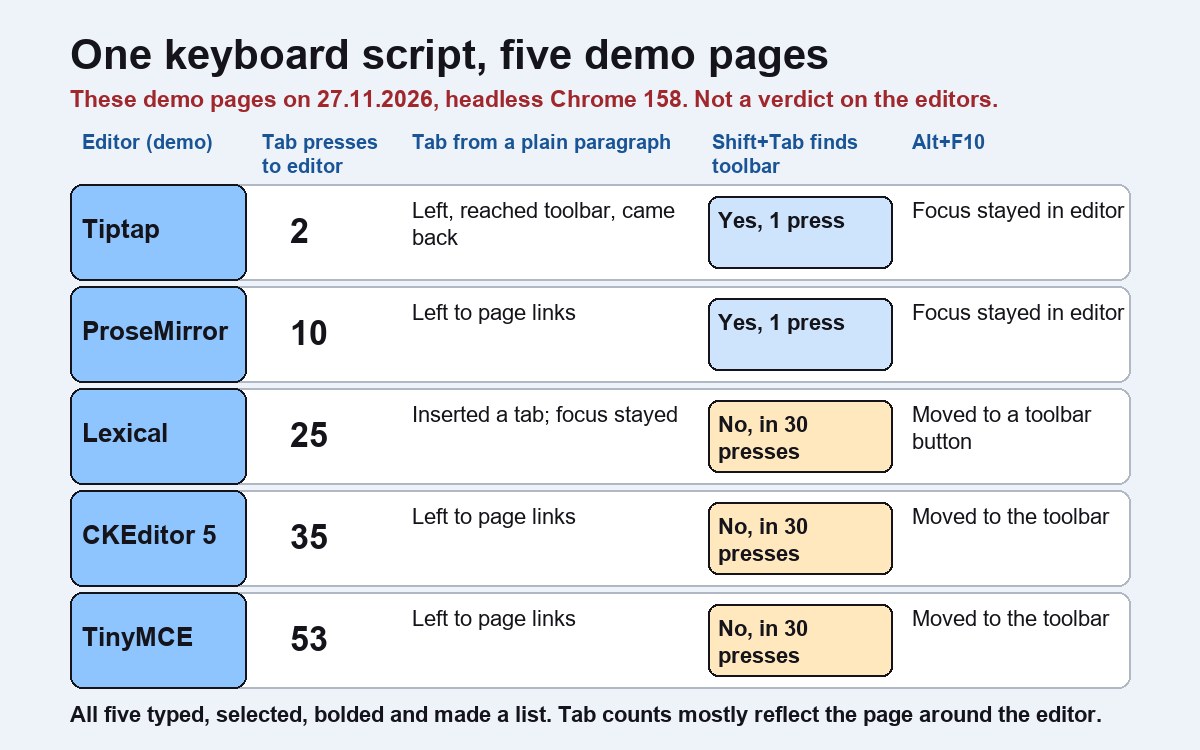
Everything below describes these demo pages on 27 November 2026 in headless Chrome 158, not the editors in general. In both runs, in all five editors, typing worked, Shift+Arrow and Shift+Home selected text, Ctrl+B produced bold, and typing "- " made a list. The differences were at the edges.
| Editor (demo) | Tab presses from page top to editor | Tab from a plain paragraph (empty document) | Toolbar by Shift+Tab | Alt+F10 |
|---|---|---|---|---|
| Tiptap (Simple Editor template) | 2 | Focus left, reached the toolbar, came back to the editor | Yes, 1 press | Focus stayed in the editor |
| ProseMirror (basic example) | 10 | Focus left to page links | Yes, 1 press | Focus stayed in the editor |
| Lexical (Playground) | 25 | Inserted a tab character; focus stayed | No; focus stayed in the editor for 30 presses | Moved focus to a toolbar button |
| CKEditor 5 (classic example) | 35 | Focus left to page links | No, in 30 presses | Moved focus to the toolbar |
| TinyMCE (basic example) | 53 | Focus left to page links | No, in 30 presses | Moved focus to the toolbar |
The Tab counts mostly reflect the navigation on the surrounding page.
Tab inside the editor. Four editors let Tab leave the editing area. In Lexical's Playground, Tab inserted a tab character and focus stayed; Escape, then Tab, let me leave. Lexical's keyboard page describes this: by default "Tab inside the editor follows the browser's normal focus order", an optional extension takes Tab over for indentation, and Escape blurs the editor; it adds that you should "treat WCAG 2.1.2 conformance as something to verify in your integration rather than a guarantee" [2]. In a list, Tab indented the item in Tiptap, CKEditor 5 and TinyMCE; ProseMirror's basic example let focus leave instead.
Demo content changes the answer. In run A, Tiptap's Tab went first to two task-list checkboxes in the document before leaving. In TinyMCE and CKEditor 5, three Tab presses never left the editing area. For TinyMCE a separate probe showed why: the demo text contains an embedded YouTube video that took the focus. That is a property of the demo text, not a verdict on TinyMCE, but a keyboard trap can come from content a writer inserts, so test with your own block types. For CKEditor 5 run A is not a clean measurement: the script failed to create the plain paragraph after the list there, so those Tab presses did not start from a plain paragraph.
Reaching the toolbar. In Tiptap and ProseMirror one Shift+Tab from the editing area reached the toolbar, and Right Arrow moved along it; in Tiptap 21 of 22 toolbar controls had tabindex -1, so the toolbar is one Tab stop. The WAI-ARIA Authoring Practices describe that structure: "the keyboard tab sequence includes one stop for the toolbar and arrow keys move focus among the controls" [3]. In CKEditor 5 and TinyMCE every toolbar control had tabindex -1 and Shift+Tab never reached the toolbar in 30 presses, but Alt+F10 did; CKEditor's documentation lists it under "Move focus to the toolbar" [4]. TinyMCE's keyboard-shortcuts page lists Alt+F10 as "Focus to toolbar" and Alt+F9 as "Focus to menu bar" [9]; on the demo, Alt+F9 reached the "File" menu. Lexical's Alt+F10 also reached its toolbar. On these three demo pages, Shift+Tab without the shortcut did not find the toolbar.
A documented shortcut that did not work. Tiptap's guide lists "Alt + F10 to focus the editor's toolbar" for its demo [5]. In the Simple Editor template, focus stayed in the editing area after Alt+F10 (a short independent re-run the same day gave the same result), while Shift+Tab reached the toolbar. These are different pages, so the guide is not shown to be wrong; a documented shortcut can simply be absent from another build.
What the DOM record shows, and what it does not
This is the weaker check from the start of the article.
- Tiptap template: role="textbox" with the label "Main content area, start typing to enter text."; toolbar with role="toolbar"; 22 controls, 17 with aria-pressed.
- ProseMirror: no role or label on the editing area; toolbar has role="toolbar", no label; controls named by title.
- Lexical: role="textbox", no label; toolbar labelled "Editor toolbar"; 18 controls, none with aria-pressed.
- CKEditor 5: role="textbox" labelled "Rich Text Editor. Editing area: main. Press Alt+0 for help."; toolbar labelled "Editor toolbar"; 5 of 15 controls with aria-pressed.
- TinyMCE: the editing area is the body of an iframe titled "Rich Text Area. Press ALT-0 for help."; the body has no role or label; the toolbar has no label.
In all five, no toolbar control lacked a name from text, aria-label, aria-labelledby or title (my rule counted title as a name). None of the five editing areas set aria-multiline, which the ARIA specification describes as indicating "whether a text box accepts multiple lines of input or only a single line" [6]. I did not test how a screen reader treats that.
The toolbar accessibility-tree dumps are in the research folder. A tree listing "button Bold" says the name exists, not whether the state change after Ctrl+B is spoken.
Where my test went wrong
Some results above depend on how I fixed my own script.
- A wrong focus check. In the first run, my "is focus in the editor" check for TinyMCE was true from the first Tab, because the editing area is a body inside an iframe and a body always contains the focused element. The script then typed into the wrong place and the page navigated away. I fixed the check and reran everything; that first log was overwritten, so only the fix in the script and a note in the research folder remain.
- A timing bug. In an early empty-document run, CKEditor 5's Ctrl+B did not bold the selected line (a note in the script says only the last letter was bolded; that screenshot was not kept), probably because the editor had not yet synchronised the selection. I added a 400 ms wait and reran; both attempts are kept in the superseded folder.
- Cleaning did not work everywhere. In Lexical, Ctrl+A and Delete left 736 characters, so its run B is effectively run A. To restart the toolbar steps I also used the browser's focus function, which is not keyboard use.
- Narrow coverage. One browser and system; Tab presses capped at 150; lists only by typing "- "; no tables, images, links, dialogs or touch.
- Demos are not products. I did not test Dapp.Expert's own editors (Tiptap in the public author form, TinyMCE in the admin panel).
What the documentation claims
This is documentation, not test, and I did not verify it.
- CKEditor 5's page states compliance with WCAG 2.2 levels A and AA and Section 508 "unless stated otherwise in the Accessibility Conformance Report", links a report for version 49.0.0 dated 22 September 2026, and recommends Chrome with NVDA or Safari with VoiceOver [4].
- TinyMCE's page says "TinyMCE supports full keyboard navigation" and "TinyMCE works with common screen readers, including VoiceOver (macOS and iOS), JAWS, and NVDA" [7].
- Tiptap's guide says it is headless: "We don’t provide an interface, so it’s up to you to make sure that the editor is accessible" [5]. It warns about a VoiceOver reading problem I could not check [5].
What W3C's guidance says about checking
W3C's older "Easy Checks" page (it says a newer draft exists) describes a first keyboard check: put the mouse aside and press Tab. It names "Tab away: Check that you can tab away from all elements that you can tab into" [8]. The editor-specific step is to put the caret in the text and look for the exit.
For screen readers I have only the editors' own pointers to named pairings; I found no W3C procedure for screen-reader testing of editors in the pages I read, and will not invent one. The limited recommendation: have someone who uses a screen reader every day test the build you intend to ship.
A fictional example: an acceptance sheet
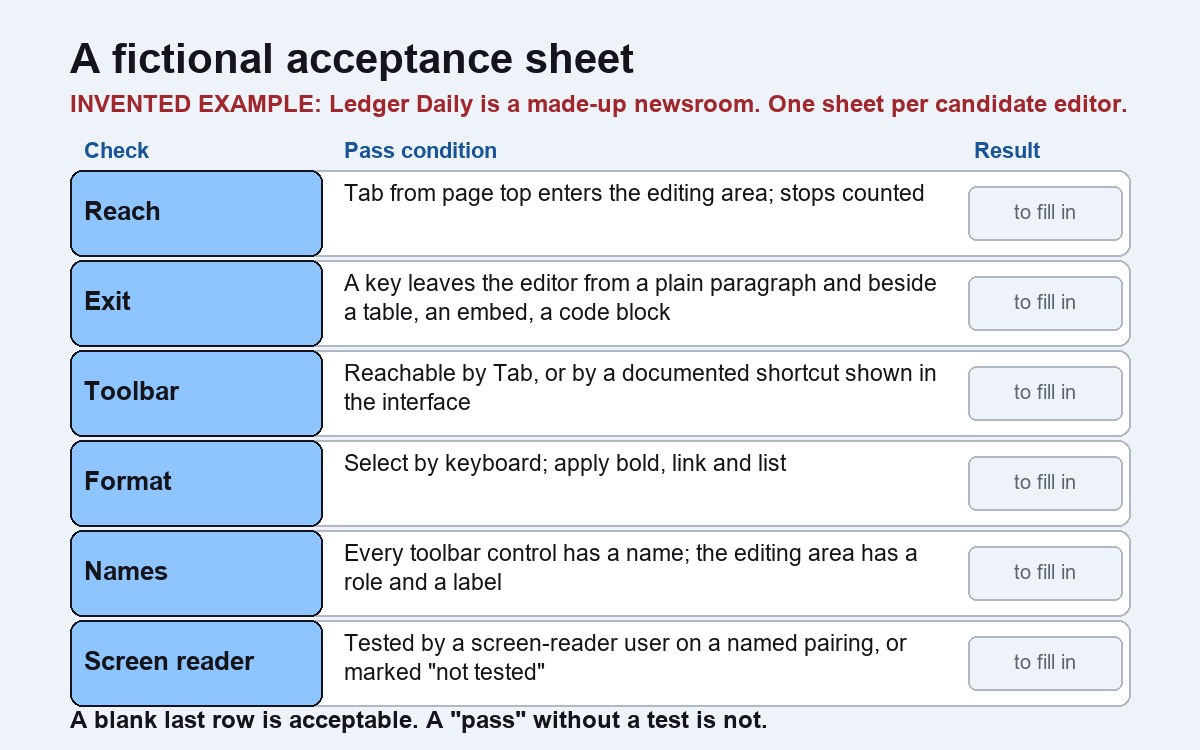
The following is invented. Ledger Daily is a made-up newsroom covering blockchain and AI finance; the sheet is my proposal.
Before contributors see a candidate editor, Ledger Daily's desk fills in one sheet per candidate, with build and browser noted:
| Check | Pass condition | Result |
|---|---|---|
| Reach | Tab from the page top enters the editing area; the stop count is recorded | |
| Exit | From a plain paragraph, and again beside a table, an embed and a code block, a key leaves the editor and the page says which | |
| Toolbar | Reachable by Tab, or by a documented shortcut shown in the interface | |
| Format | Select by keyboard and apply bold, link and list | |
| Names | Every toolbar control has a name; the editing area has a role and a label | |
| Screen reader | Tested by a screen-reader user on a named pairing, or marked "not tested" |
A blank last row is acceptable; a "pass" without a test is not.
What this article cannot tell you
It does not tell you that any of the five editors meets WCAG; I tested a few keyboard behaviours, not conformance. It says nothing about screen readers, voice control, zoom or touch. The results come from demo pages on one day in one browser and may change with a release. The DOM record shows attributes, not the experience. The acceptance sheet is a proposal. It ranks no editor.
How this article was made
| Task | What the AI did | What a person did | How it was checked |
|---|---|---|---|
| Test | Wrote the Playwright script and fixed two script bugs | Chose editors and steps, ran the test, read logs and screenshots | Full logs, including failed attempts, are saved |
| Sources | Gathered candidate pages, drafted notes | Chose which pages to rely on | Every quote checked against the page named in the sources, read 27 November 2026 |
| Draft | Wrote the first draft from the notes and logs | Edited the text and example | An independent review compares claims with sources |
| Images | Generated the cover illustration | Chose and checked it | Labelled AI-generated in the disclosure line and alt text |
| Not done by AI | — | The decision to publish and responsibility for the text | — |
Conflicts of interest: none. The author has no commercial relationship with the organisations named.
Responsible for this article: Dmitriy Lastovka, author. Corrections: contact form.
Sources
Labels: standard, guidance (W3C practice pages), documentation (a project's own page, not a test). Quotes are as on the pages read on 27 November 2026.
- W3C, Web Content Accessibility Guidelines (WCAG) 2.2, success criteria 2.1.1, 2.1.2 and 4.1.2. https://www.w3.org/TR/WCAG22/ Standard.
- Lexical, "Keyboard Accessibility". https://lexical.dev/docs/concepts/keyboard-accessibility Documentation.
- W3C WAI, ARIA Authoring Practices Guide, Toolbar Pattern. https://www.w3.org/WAI/ARIA/apg/patterns/toolbar/ Guidance.
- CKEditor 5 documentation, "Accessibility support". https://ckeditor.com/docs/ckeditor5/latest/features/accessibility.html Documentation.
- Tiptap documentation, "Accessibility". https://tiptap.dev/docs/guides/accessibility Documentation.
- W3C, Accessible Rich Internet Applications (WAI-ARIA) 1.2, glossary entry for aria-multiline. https://www.w3.org/TR/wai-aria-1.2/ Standard.
- TinyMCE documentation, "Accessibility options". https://www.tiny.cloud/docs/tinymce/latest/accessibility/ Documentation.
- W3C WAI, "Easy Checks – A First Review of Web Accessibility" (the page notes a newer draft at https://www.w3.org/WAI/test-evaluate/easy-checks/). https://www.w3.org/WAI/test-evaluate/preliminary/ Guidance.
- TinyMCE documentation, "Keyboard shortcuts". https://www.tiny.cloud/docs/tinymce/latest/keyboard-shortcuts/ Documentation.
Pages tested (public demos, 27 November 2026): https://template.tiptap.dev/preview/templates/simple, https://prosemirror.net/examples/basic/, https://playground.lexical.dev/, https://ckeditor.com/docs/ckeditor5/latest/examples/builds/classic-editor.html, https://www.tiny.cloud/docs/tinymce/latest/basic-example/.