
AI tools helped gather research and write the first draft of this article. I edited it and checked every quote against the source page listed at the end, read on 27 November 2026. The cover illustration is AI-generated. Details at the end.
An editor on screen is only a window. The article itself lives somewhere else, in a field in a database or a file in a repository, and the format of that stored copy decides what you can still do with the text in two years. Store the article in a form that keeps its structure as data, and produce HTML and Markdown from it when a destination needs them. HTML and Markdown are good outputs. They are weaker as the only copy, and the reasons are specific enough to test.
This article compares three families of stored format: an HTML string, a Markdown file and a tree of typed blocks, usually saved as JSON. It reads what the documentation of the formats and of four editors says about each, walks a fictional article through all three, and ends with a checklist. It does not choose an editor (that is the previous part of this series, "Choosing an Editor Engine for Editorial Work") and it does not test import and export in practice (that is the next one, "Testing an Editor's Import and Export Round Trip").
The question behind the question
"What do we save?" hides three different jobs:
- Rendering. Showing the article to a reader on a page, in a feed or in an email.
- Editing. Opening the article again in an editor, changing it and saving it without damage.
- Reuse. Searching it, checking its links, extracting its sources, converting it to another format or moving it to another system.
An HTML string is best at the first job. A block tree is best at the second and third. Markdown sits in the middle: good for humans reading source and tidy in version control, but limited once an article needs more than headings, paragraphs and links.
Three families of format
HTML as the stored copy
HTML is what the reader's browser needs, so saving it means no conversion step at display time. Tiptap's editor API offers it directly: the page says getHTML() "Returns the current editor document as HTML" [1]. Its persistence page is realistic about the trade-off: "While saving HTML is possible and may be the easiest way to get renderable content, we recommend using JSON to persist the editor state as it is more flexible, easier to parse and allows for external edits if needed without running an additional HTML parser over it" [2]. This is one vendor's recommendation for its own editor, not a universal rule. It names the cost, though: to read or change an HTML copy programmatically, you parse it first.
Two further costs belong to HTML as a stored format. First, HTML is also what attackers send. A copy that is stored and later displayed to readers has to be sanitised somewhere. DOMPurify's README describes the job: it "sanitizes HTML and prevents XSS attacks" [3]. That is a library you must run, update and trust, and stored HTML that was written before a rule changed stays as it was written. Second, HTML in a database mixes content with presentation choices of the day: wrapper elements, class names, inline styles. Whether a given editor writes clean markup is something to look at in its real output, not to assume.
Markdown as the stored copy
Markdown is plain text, so it diffs well, opens in any tool and survives for decades. Its limits are written into its own specification. The CommonMark spec (version 0.31.2, dated 2024-01-28) says some implementations "extended the original Markdown syntax with conventions for footnotes, tables, and other document elements" [4], which means that tables and footnotes are not part of the core syntax and are written differently by different tools. The same document explains why a specification was needed at all: the original description "does not specify the syntax unambiguously" [4]. So "Markdown" in a project always means a particular dialect and a particular parser.
Markdown also reaches HTML. The CommonMark spec says "Text between < and > that looks like an HTML tag is parsed as a raw HTML tag and will be rendered in HTML without escaping" [4]. Raw HTML is the usual escape hatch for things Markdown cannot express, such as a caption, a figure or an embed. Once it is used, the stored copy is a mixture of two formats, and the sanitising question from the HTML section applies to it as well.
Editors treat Markdown as a conversion target, not as their internal state. Tiptap's Markdown page describes an extension that parses Markdown "into Tiptap's JSON format" and serialises editor content back [5]. The page marks it as a beta, an early release that can change. Its own limitations section is useful reading for anyone planning to store Markdown: "Comments are not supported yet", and in tables "only one child node per cell is allowed as the Markdown syntax can't represent multiple child nodes" [5]. Those are limits of one extension today, but they show the problem: Markdown has no place for structure it was never designed to carry.
A block tree (JSON) as the stored copy
The third family keeps the article as a document tree. ProseMirror, the library under several editors, states the idea in its guide: "This document isn't a blob of HTML, but a custom data structure that only contains elements that you explicitly allow it to contain, in relations that you specified" [6]. The same guide says documents have a built-in JSON format: "You can call toJSON on them to get an object that can safely be passed to JSON.stringify" [6]. The tree is checked against a schema, so a stored node can only be a kind your editor knows about.
Other projects take the same route with their own shapes:
- Lexical says why it serialises at all: to "transfer it between editors or store it for retrieval at some later time". It offers JSON, HTML and Markdown as separate conversions of the same node tree, and on the clipboard "Paste uses the JSON when it is present, then HTML, then plain text" [7].
- Editor.js saves a list of blocks in a blocks property, each with an id, a type and a data object, plus a timestamp and a version [8]. What goes inside each block's data depends on the tool that produced it.
- Portable Text, a specification from the Sanity ecosystem, "is built on the idea of rich text as an array of blocks, themselves arrays of children spans" and can "be serialized into pretty much any markup language, be it HTML, Markdown, SSML, XML, etc." [9]. Its repository labels the document a working draft, version 0.0.1 [9], so treat it as one project's convention and not as a settled standard.
All of these keep the article's parts as named, typed pieces. That is what makes later questions answerable by code: which links does this article contain, which blocks cite a source, which figure has no caption.
Trees have their own costs. They are tied to a schema, and when the schema changes, stored documents may need migrating. A tree needs a renderer for every destination, which means HTML must still be produced from it. And the format is tool-shaped: Tiptap's JSON is not Lexical's JSON, and moving between them is a conversion project. That risk is real and should be weighed, not waved away.
A fictional test article
The following example is invented. Ledger Notes is a made-up publication, and the draft below is a made-up one.
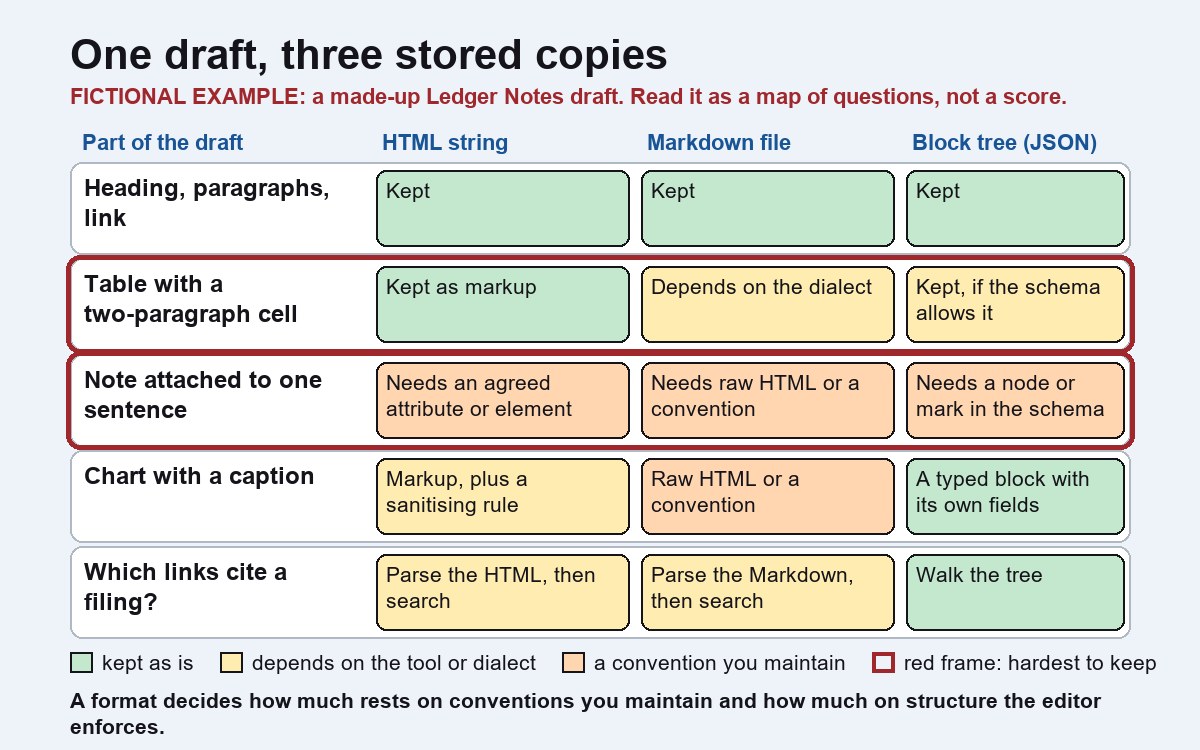
Ledger Notes drafts a piece on a fictional token-vesting schedule. The draft contains: a heading; two paragraphs; a link to a filing, with its date; a comparison table in which one cell holds two short paragraphs; a note attached to one sentence saying "check against the filing, p. 4"; and an embedded chart with a caption.
Here is what each stored copy can and cannot hold, reasoning from the documentation read above and from the general nature of each format:
| Part of the draft | HTML string | Markdown file | Block tree (JSON) |
|---|---|---|---|
| Heading, paragraphs, link | Kept | Kept | Kept |
| Table with a two-paragraph cell | Kept as markup | Depends on the dialect; Tiptap's extension allows one child per cell [5] | Kept, if the schema allows it |
| Note attached to a sentence | No standard place; needs an agreed attribute or element | No place without raw HTML or a convention; Tiptap's extension does not yet support comments [5] | A node or mark with data, if the schema defines one |
| Chart with caption | Kept as markup, plus a sanitising rule for the embed | Raw HTML, or a convention | A typed block with its own fields |
| "Which links cite a filing?" | Parse the HTML, then search | Parse the Markdown, then search | Walk the tree |
Read the table as a map of questions, not a score. A Markdown file with good conventions can carry a note; an HTML copy can carry a data attribute; a tree whose schema was never extended cannot carry a note either. The format decides how much lands on conventions you maintain yourself and how much on structure the editor enforces.
Recommended default, and when to break it
A default that works for most author-and-publisher setups:
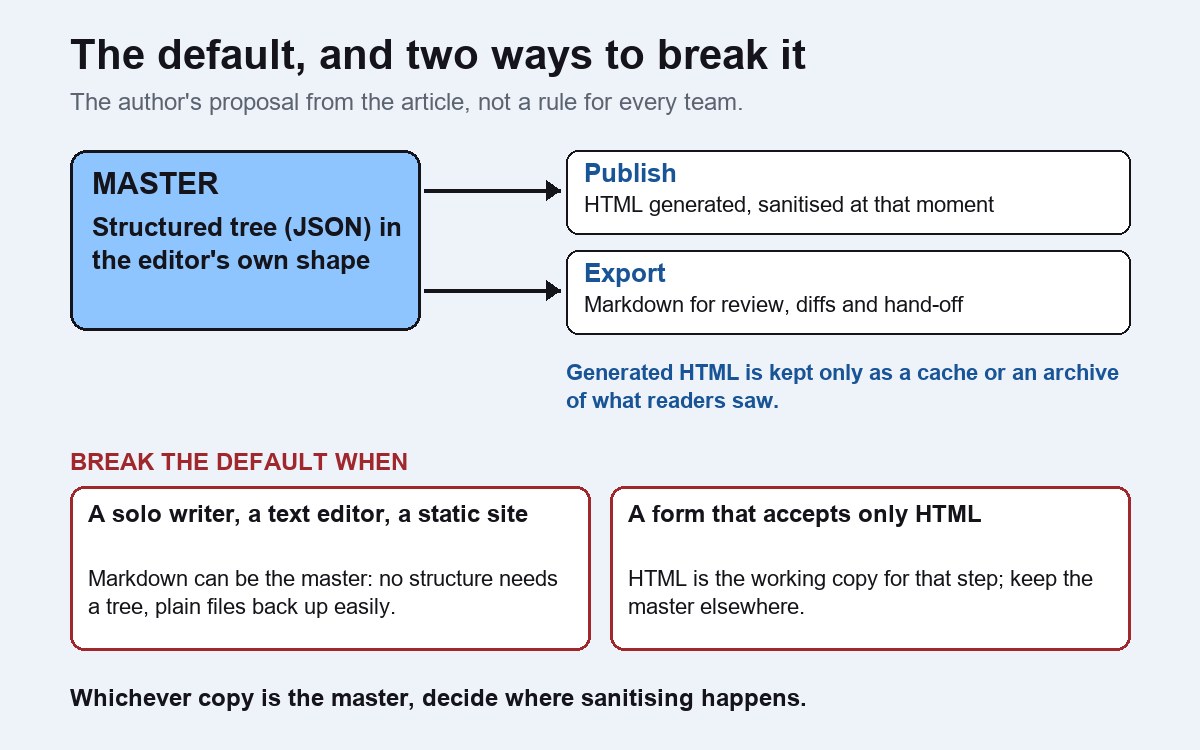
- Store a structured tree as the canonical copy, in the shape your editor writes natively. This is what Tiptap's own documentation recommends for Tiptap [2] and what the ProseMirror guide describes as the model [6].
- Treat HTML as a derived output. Generate it when publishing, run it through your sanitiser at that moment, and keep the generated copy only as a cache or an archive of what readers saw.
- Treat Markdown as an export or an interchange format, not the master. It is excellent for review, diffs and handing text to another tool, and its gaps are listed in its own spec and in the editors' docs.
Break the default when the situation differs:
- A solo writer with a text editor and a static site may reasonably keep Markdown as the master. There is no structure that needs a tree, and plain files are easy to back up.
- A pure paste-in workflow, where the platform's form accepts HTML and nothing else, makes HTML the working copy for that step. Keep the tree or Markdown master elsewhere and treat the HTML as an artefact of publishing.
What the author's own publishing path shows
I can describe one real setup, and only from observation. The public author form on Dapp.Expert uses a Tiptap editor and the admin panel uses TinyMCE. In my own publishing routine, the finished article is handed to the form as an HTML string. That is a fact about the hand-off step only; it does not tell me how the platform stores the article, so I draw no conclusion about that. It does show why a separate master matters: the destination sets the hand-off format, and the destination can change. My master is the Markdown source of each article, with the HTML generated from it by a script. For one author writing long, mostly linear articles that is a conscious choice with the gaps listed above, not a recommendation for a team with comments and embeds.
Mistakes to avoid
1. Storing only generated HTML and losing the source. If the editor's input format changes, the generated copy cannot be edited reliably. Keep a master.
2. Assuming Markdown is one thing. The spec itself describes implementations that diverge [4]. Name the dialect and the parser you rely on.
3. Skipping sanitising because "only staff write here". Raw HTML passes through Markdown unescaped [4], and pasted content brings its own markup. Sanitise on output.
4. Letting the schema grow without a migration habit. Every new block type is a promise about old documents. Version the schema and test old documents against it.
A checklist before you commit
- List the parts your articles actually contain: tables, embeds, notes, citations, captions.
- For each part, write down where it lives in each candidate format. If the answer is "a convention we will invent", say who maintains it.
- Save three real articles in the candidate format and open the stored copy, not the screen.
- Decide where sanitising happens, and which copy is the master.
What this article cannot tell you
It does not tell you which format is fastest or smallest; no benchmark was run. It does not report how any editor behaves when you import and then export a real article; that test is the subject of the next part. Statements about vendors' recommendations and limitations are as written on their pages on 27 November 2026 and may change. The example, the table of the fictional draft and the checklist are the author's proposals, not findings. Nothing here says that the format used by the Dapp.Expert platform is good or bad: only the form's editor names and the hand-off step were observed. No source here measures how storage format affects reader outcomes.
How this article was made
| Task | What the AI did | What a person did | How it was checked |
|---|---|---|---|
| Research | Gathered candidate sources and drafted notes | Chose the question and which pages to rely on | Every quote checked against the page named in the sources, read on 27 November 2026 |
| Draft | Wrote the first draft from the notes | Edited the text, the example and the checklist | An independent review compares claims with the sources before publication |
| Images | Generated the cover illustration and the inline figure | Chose and checked them | Labelled as AI-generated in the disclosure line and alt text |
| Not done by AI | — | The decision to publish and responsibility for the text | — |
Conflicts of interest: none. The author has no commercial relationship with the projects named here.
Responsible for this article: Dmitriy Lastovka, author. Corrections: contact form.
Sources
Labels: documentation (a project's own docs or readme), specification (a published format specification). Quotes are as on the pages read on 27 November 2026.
- Tiptap, editor API reference (getHTML, getJSON, getText). https://tiptap.dev/docs/editor/api/editor Documentation.
- Tiptap, Persistence. https://tiptap.dev/docs/editor/core-concepts/persistence Documentation.
- DOMPurify, README. https://github.com/cure53/DOMPurify Documentation; the README states version v3.5.0.
- CommonMark Spec, version 0.31.2 (2024-01-28), sections 1.1, 1.2 and 6.6. https://spec.commonmark.org/0.31.2/ Specification.
- Tiptap, Markdown (beta; including its Limitations section). https://tiptap.dev/docs/editor/markdown Documentation.
- ProseMirror, guide. https://prosemirror.net/docs/guide/ Documentation.
- Lexical, Serialization and Deserialization. https://lexical.dev/docs/serialization Documentation.
- Editor.js, Saving data. https://editorjs.io/saving-data/ Documentation.
- Portable Text, specification (working draft v0.0.1). https://github.com/portabletext/portabletext Specification; draft.