

AI tools helped gather research and write the first draft of this article. I edited it and checked every quote and figure against the source page listed at the end, read on 27 November 2026. The cover illustration is AI-generated. Details at the end.
A paragraph is easy to edit because everyone agrees what it is. A price table, a token data widget, an embedded post or a game stat block is harder: each one is a small object with its own structure, its own rules about who may change what, and its own way of failing. Treat every complex block as a small contract with four parts: what the author edits, what is stored, what the reader sees, and what happens when the block is broken or untrusted. If you can write those four lines for a block, the editor setting you need is usually obvious. If you cannot, no editor setting will rescue it.
This article is about that contract. It reads the documentation of Tiptap, ProseMirror's table module and TinyMCE, plus web-platform pages on iframes, embeds and table markup. It does not rank editors and does not report a test: I did not install any editor. Earlier parts of this series cover choosing an engine, choosing a storage format and testing an import and export round trip; this one is about what sits inside the document once you have chosen.
Four kinds of block
Complex blocks look different but fall into four kinds, and the kind decides the design.
- Structured text. A table or a callout with several editable parts. The author types inside it, so it has to behave like text: cursor, selection, copy and paste.
- Data with a form. A game stat block (name, health, attack) or a token data card (symbol, price, date). The author fills fields. Free typing inside it would be a mistake.
- A reference to something else. An embedded post, a chart, a video. The document stores an address and a few settings. The content lives elsewhere and can change or disappear.
- A mixture. A card with an editable caption and a non-editable embedded body.
Tiptap's documentation describes the same split for its custom node views. It lists editable text, non-editable text and mixed content, and for the mixed case notes: "You can even mix non-editable and editable text" [2]. For non-editable parts it says "Tiptap adds a contenteditable="false" to those by default" [2], and for mixed nodes it warns that if other elements with non-editable text are present, "the cursor can jump there" unless you mark those parts non-editable yourself [2]. In other words, the editor will not guess which part of a block is text and which is data. You declare it.
What the author edits is not what is stored
The most useful sentence about custom blocks in the sources I read is in the Tiptap node view page: node views "are unrelated to the HTML output by design, so you have full control about the in-editor experience and the output" [2]. The page adds: "The editor does not export the rendered JavaScript node". Its reason is that a video block can have a settings interface in the editor, but "The output of the editor should probably only have the video player" [2].
This is the heart of the design. The thing the author sees (buttons, a small form, a live preview) is an editing tool. The thing that is stored is a description of the block. The two can differ on purpose, and your job is to decide the stored form once and keep it boring.
Tiptap's page gives two practical rules for that stored form. For HTML output it says to make the markup "something distinguishable, so it’s easier to restore the content from the HTML", and suggests a data-type attribute when you only have generic markup such as a <div> [2]. For JSON storage it says there is nothing to configure: "In JSON, everything is stored as an object" [2]. A block that exists only as a rendered widget, with no stored description, is hard to re-open for editing or to move to another system.
A fictional example: Example Ledger
The following example is invented. Example Ledger is a made-up publication about games and tokens; its blocks and fields are fictional and show the method.
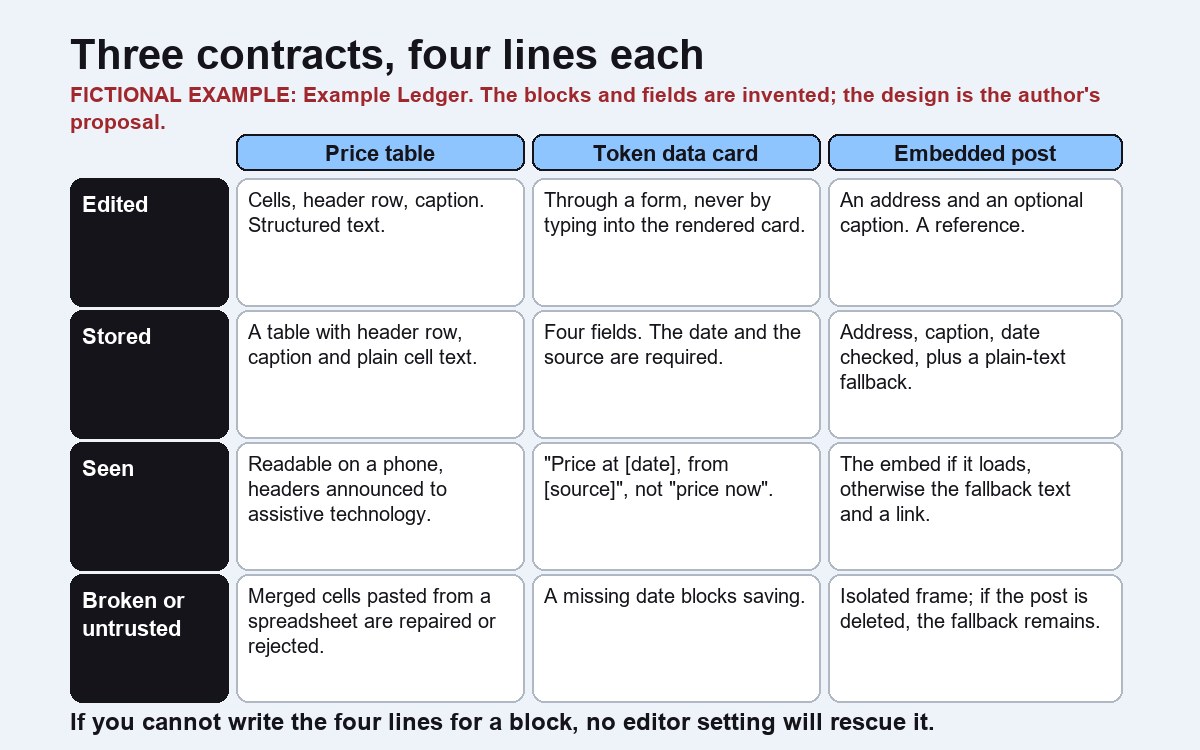
Example Ledger publishes three kinds of complex block. Here is the contract for each, as four short lines.
Price table (a comparison of three subscription tiers of a game).
- Edited: cells, header row, a caption. Structured text.
- Stored: a table with a header row, a caption and plain cell text; no colours or widths that carry meaning.
- Seen: the same table, readable on a phone, with headers announced to assistive technology.
- Broken or untrusted: a pasted table from a spreadsheet with merged cells is checked and repaired or rejected, not silently stored.
Token data card (symbol, price, date, source link).
- Edited: through a form, never by typing into the rendered card. Data with a form.
- Stored: four fields, not a screenshot and not a live feed. The date and the source are required.
- Seen: a card that says "price at [date], from [source]", not "price now".
- Broken or untrusted: a missing date blocks saving. A price that is a year old stays displayed with its date, which is honest, instead of changing silently.
Embedded post (a post on a social network quoted in an article).
- Edited: an address and an optional caption. A reference.
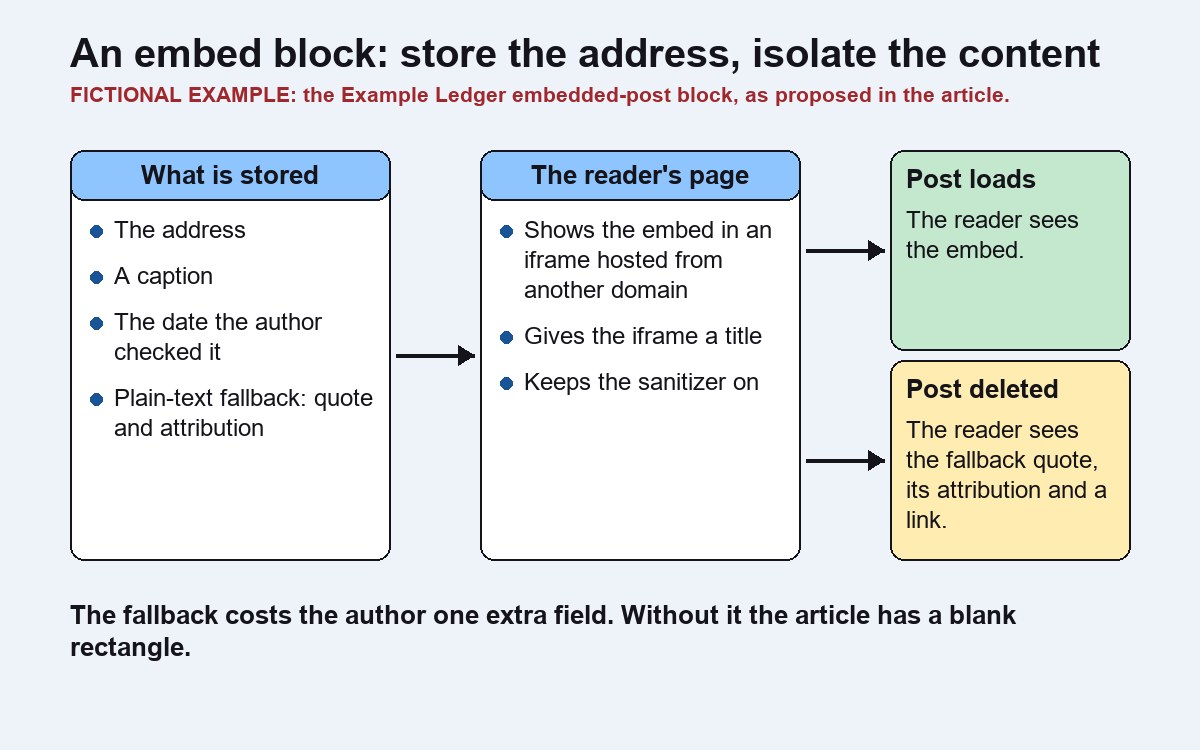
- Stored: the address, the caption and the date the author checked it, plus a plain-text fallback with the quote and attribution.
- Seen: the embed if it loads; otherwise the fallback text and a link.
- Broken or untrusted: the embed is shown in an isolated frame; if the post is deleted, the fallback remains.
The fallback is a choice, not a feature of any editor. It costs the author one extra field, and it is the difference between an article that is whole in a year and one with a blank rectangle in the middle.
A game stat block works the same way as the token card: a form with named fields (name, health, attack, a short rule text), stored as fields, rendered as a small table for readers. The author never types into the rendered block, so a typo cannot change its structure.
Tables: the quiet source of problems
Tables are the most common complex block and the one with the most hidden rules.
First, the structure has to stay valid. The ProseMirror table module describes its job this way: it "defines a schema extension to support tables with rowspan/colspan support, a custom selection class for cell selections in such a table, a plugin to manage such selections and enforce invariants on such tables" [3]. Its editing plugin handles cell-based copy and paste and "makes sure tables stay well-formed (each row has the same width, and cells don't overlap)" [3]. A table in a document is therefore not just an HTML table: it is a structure with invariants that the editor maintains for you, and a custom block that bypasses the editor's table, for instance by pasting raw HTML, loses that protection.
Tiptap's table page shows what the author gets in practice: a table is created as "a new three-by-three table by default, including a header row", with commands to add and delete rows and columns, to merge and split cells, to toggle header rows, columns and cells, and a fixTables() command that "Inspects all tables in the document and fixes them, if necessary" [1]. Column resizing exists but is an option, resizable, whose default is false [1]. These are facts about one editor's documentation on the day I read it. The generic lesson: ask what your editor does when a table is malformed, who calls the repair, and whether column widths are stored.
Second, pasting. TinyMCE documents a setting, table_merge_content_on_paste, that decides what happens "when a table is pasted into another table" [4]. Pasting a table into a table is exactly what happens when an author copies from a spreadsheet, and the documented answer is configurable, which means the default is a behaviour you should know before your authors discover it.
Third, accessibility is part of the block's contract, not decoration. The W3C tutorial states: "Header cells must be marked up with <th>, and data cells with <td> to make tables accessible." It adds that for more complex tables "explicit associations may be needed using scope, id, and headers attributes" [9]. It also says: "A caption identifies the overall topic of a table and is useful in most situations" [9]. And it gives a warning that matters for editors: "Tables markup is often lost when converting from one format to another" [9]. TinyMCE's table dialog can show a caption field, one of four appearance fields, together with cell spacing, cell padding and border width [4]. Whether your authors see that field, and whether the stored table keeps its header row and caption, are questions you can answer with a test, not with a feature list.
For a price table the practical rule is short: store the header row and the caption, keep merged cells to a minimum, and do not carry meaning in colour alone.
Embeds: store the address, isolate the content
An embed is a reference plus a risk. Two primary sources I read cover the two halves of that risk.
The oEmbed specification, a common format for embedding content from another site, says in its security section that when a consumer displays provider HTML there is "a vector for XSS attacks from the provider", and recommends that consumers "display the HTML in an iframe, hosted from another domain", which "ensures that the HTML cannot access cookies from the consumer domain" [8].
MDN's page on the iframe element adds the other half. The sandbox attribute restricts what an embedded document may do, but for a document from the same origin as the page, "it is strongly discouraged to use both allow-scripts and allow-same-origin", because that "lets the embedded document remove the sandbox attribute — making it no more secure than not using the sandbox attribute at all" [7]. The same page notes that without a title on the iframe, a person using assistive technology has "to navigate into the <iframe> to determine what its embedded content is" [7]. So an embed block should have a title field, and the editor should not let it be empty.
Editors handle this in different ways, and you should read what yours does. TinyMCE's media plugin has a cross-site scripting filter that "is enabled by default for the media plugin" [5]. For the media_filter_html option the page says: "Scripts, conditional comments, etc, can’t be used within these elements by default for security reasons." You can turn the filter off if you have server-side sanitizers or trust your users [5]. The same page documents media_live_embeds, enabled by default, which shows a live preview of embedded video inside the editing area, so that authors can play a clip while editing [5]. That is a convenience for the author and also a decision about what content runs inside your editing page.
A sound default for the embedded-post block in the fictional example: store the address and the fallback text, render the embed in an isolated frame with a title, and keep the sanitizer on.
Locking what should not be typed into
Some blocks should be placed, moved or deleted but not edited character by character. TinyMCE's non-editable content feature does this: noneditable_class names the class that TinyMCE uses "to determine which areas of content are non-editable", which "would be the same as contenteditable=false", with the default mceNonEditable, and allow_noneditable (default true) turns the feature on or off [6]. Tiptap's equivalent, as quoted above, is a non-editable node view [2]. Tiptap's page gives mentions as an example: users "can add or delete them, but not delete single characters" [2]. A token data card behaves the same way: the author can place it, change its fields in a form, or delete it, and cannot half-delete the symbol.
A checklist you can run
Before you accept any complex block into an editor, answer these in writing:
- Kind. Is it structured text, data with a form, a reference, or a mixture?
- Stored form. What exactly is stored? Can the block be re-opened for editing from it? Is the markup distinguishable?
- Reader view. What does the reader see if the script, the embed or the stylesheet fails?
- Untrusted input. What happens when the author pastes from a spreadsheet, a web page or another editor? Which filter runs, and who turned it on?
- Fallback. For a reference block, what text remains when the target disappears?
- Accessibility. Headers and caption for a table, a title for an embed, text alternatives for a data card. Are they required fields, not optional ones?
- Test. Which test proves each of these? "The documentation says so" is a lead, not a result.
What this article cannot tell you
I did not install or run any editor for this article. The statements about Tiptap, ProseMirror tables and TinyMCE come from their documentation as read on 27 November 2026; the behaviour of a particular version may differ, and the pages do not say how an editor behaves with your content. I did not check how Dapp.Expert's own forms handle tables or embeds. As I observed while publishing, the public author form uses a Tiptap editor and the admin panel uses TinyMCE; I did not test their block behaviour for this article. I did not read the documentation of every editor. The Example Ledger blocks are invented and the checklist is a proposal, not a standard. The sources describe options and recommendations; none measures how often these failures happen.
How this article was made
| Task | What the AI did | What a person did | How it was checked |
|---|---|---|---|
| Research | Gathered candidate sources and drafted notes | Chose the question and which pages to rely on | Every quote checked against the page named in the sources, read on 27 November 2026 |
| Draft | Wrote the first draft from the notes | Edited the text, the example and the checklist | An independent review compares claims with the sources before publication |
| Images | Generated the cover illustration | Chose and checked it | Labelled as AI-generated in the disclosure line and alt text |
| Not done by AI | — | The decision to publish and responsibility for the text | — |
Conflicts of interest: none. The author has no commercial relationship with the organisations named here.
Responsible for this article: Dmitriy Lastovka, author. Corrections: contact form.
Sources
Labels: documentation (a project's own docs), specification (a published specification), guidance (W3C or MDN pages). Quotes are as on the pages read on 27 November 2026.
- Tiptap, Table extension documentation. https://tiptap.dev/docs/editor/extensions/nodes/table Documentation.
- Tiptap, "Node views" (Custom extensions). https://tiptap.dev/docs/editor/extensions/custom-extensions/node-views Documentation.
- ProseMirror, prosemirror-tables README. https://github.com/ProseMirror/prosemirror-tables Documentation.
- TinyMCE, Table plugin documentation. https://www.tiny.cloud/docs/tinymce/latest/table/ Documentation.
- TinyMCE, Media plugin documentation. https://www.tiny.cloud/docs/tinymce/latest/media/ Documentation.
- TinyMCE, Non-editable content options. https://www.tiny.cloud/docs/tinymce/latest/non-editable-content-options/ Documentation.
- MDN Web Docs, the <iframe> element. https://developer.mozilla.org/en-US/docs/Web/HTML/Reference/Elements/iframe Guidance.
- oEmbed, specification (section 3, Security considerations). https://oembed.com/ Specification.
- W3C Web Accessibility Initiative, Tables tutorial. https://www.w3.org/WAI/tutorials/tables/ Guidance.