
AI tools helped gather research and write the first draft of this article. I edited it and checked every quote and figure against the source page listed at the end, read on 27 November 2026. The cover illustration is AI-generated. Details at the end. This is not legal advice.
"Open source" on a project page tells you where the story starts, not where it ends. Most editors for a publication have a free part, and several have a part that is not free. Before choosing an editor, find the exact line where the free part stops, and read what the licence asks of your own code on the free side of that line. The surprises are rarely in the headline licence. They are in the second page: a licence key, a private package registry, a watermark, a clause about copies.
This article reads the licence and pricing pages of Tiptap, CKEditor 5 and TinyMCE closely, because those are the three where the boundary is most visible, then glances at ProseMirror, Lexical, Slate, Quill and Editor.js, whose licence files are short. It uses a fictional newsroom to turn the findings into a checklist. It is a reading guide to what vendors publish, not an interpretation of any licence for your case, and not a recommendation of any editor.
What "free" can mean
When a page says an editor is free, at least five different things can be true:
- Free to use, change and ship in any product, with a copyright notice kept. This is the permissive case.
- Free if your own code is under a compatible licence. This is the copyleft case.
- Free for the editor, paid for features built on top of it.
- Free to use, but only on the vendor's hosting, up to a usage limit.
- Free to try, then the editor stops or the licence ends.
The same product can be in several of these at once. So "what is the licence?" is the wrong first question. Ask instead: which part do I need, under which licence is that part, and how do I obtain it?
The short files: ProseMirror, Lexical, Slate, Quill, Editor.js
I read the licence file in each project's main repository. ProseMirror's begins "Permission is hereby granted, free of charge, to any person obtaining a copy of this software" and names Marijn Haverbeke and others as copyright holders [1]. Lexical's file is an MIT licence held by Meta Platforms, Inc. and affiliates [2]. Slate's is an MIT licence that requires "the above copyright notice and this permission notice" to be included in all copies or substantial portions of the software [3]. Quill's file is a three-clause BSD licence, including a clause that the names of the copyright holder and contributors may not be used to endorse or promote derived products without permission [4]. Editor.js carries the Apache License, Version 2.0 [5].
For an author's tool, the practical meaning is small: keep the notices, and nothing in these files makes you open your own code or pay. Two limits: I read only the root licence file, not the licences of every package or plugin you would install, and a permissive editor licence says nothing about hosted services around it.
Tiptap: an open core and a separate Pro licence
Tiptap's repository carries an MIT licence with the copyright line "Copyright (c) 2025, Tiptap GmbH" [6]. Its pricing FAQ says "core editor is Open Source", and describes the paid platform as managed infrastructure and support added on top of that core [7].
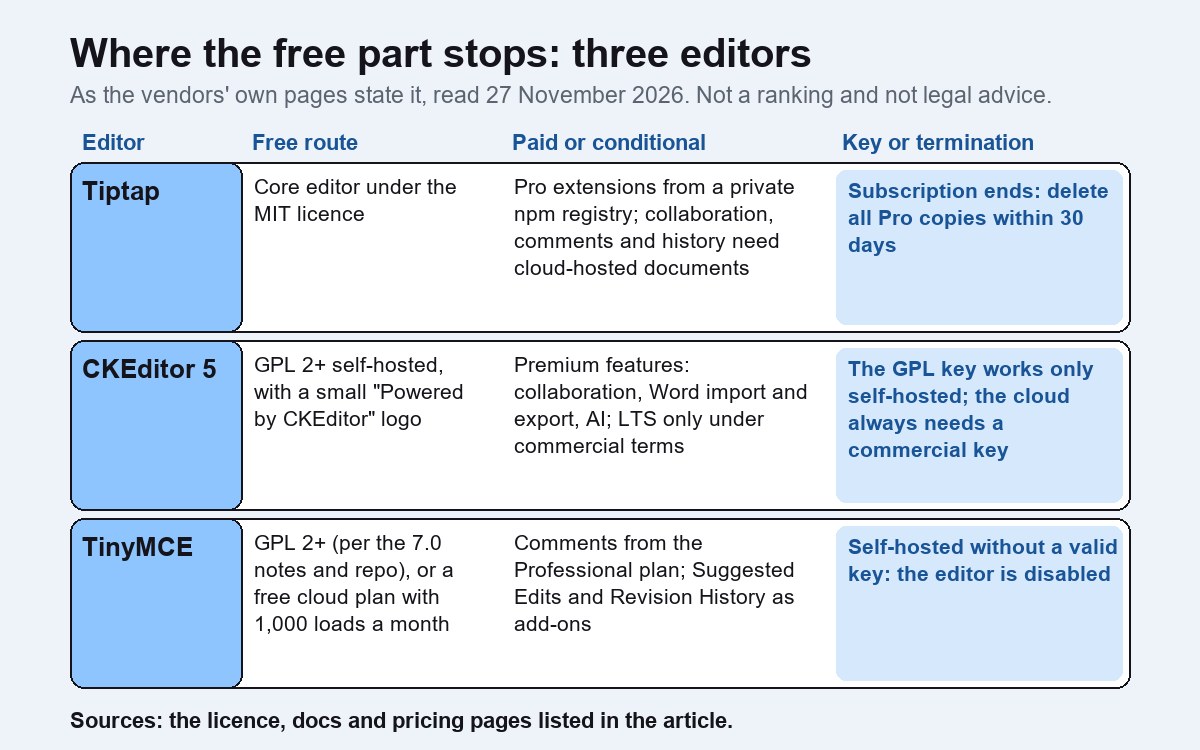
The boundary appears in the documentation. The extensions overview marks a group of features as paid, among them AI, Review, Smart Citations, Compare, Conversion, Composable Docs, Diagrams, Pages and Whiteboard, while a long list of other extensions is marked open source [8]. The guide to Pro extensions says "A Tiptap account is required to access Pro extensions", that select extensions "also require an active subscription", and that they are installed "from Tiptap's private NPM registry" with a personal access token [9]. That last point matters for a small team: the paid part is not a package anyone can pull from the public registry, so access becomes part of your build and your CI.
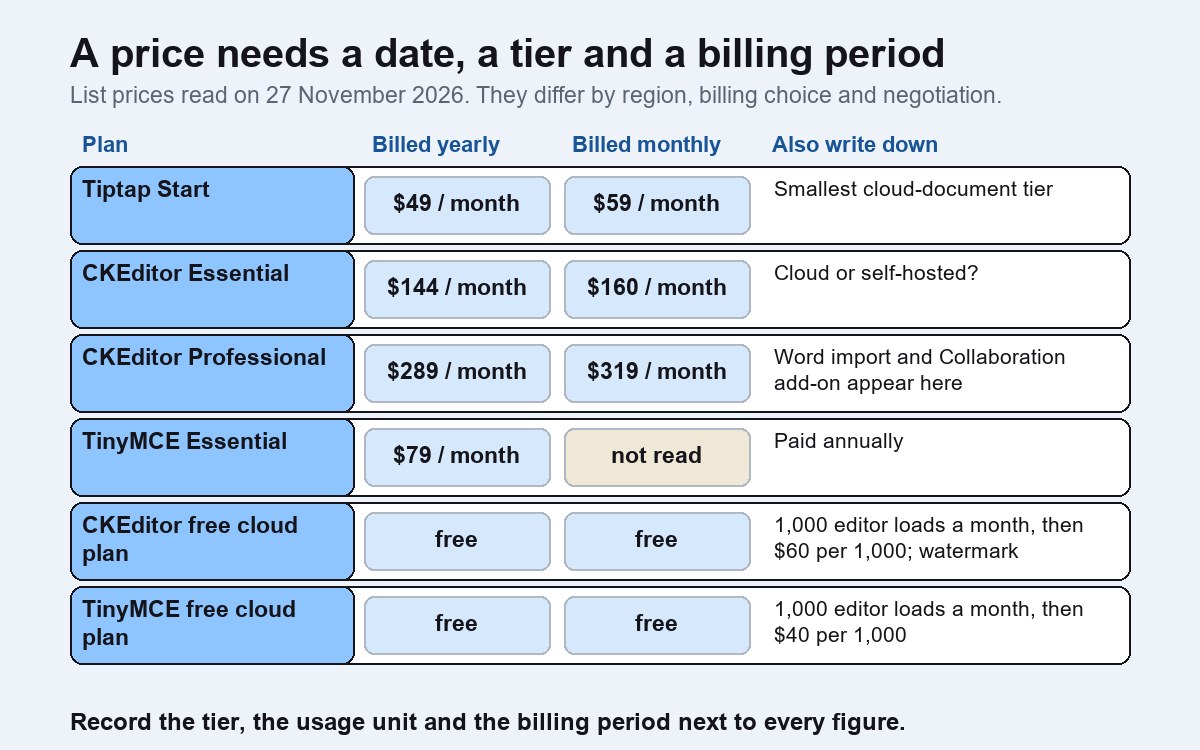
On 27 November 2026 the pricing page listed Start from $49 a month, Team from $149 and Business from $999 when billed yearly, or $59, $179 and $1,199 when billed monthly, each for the plan's smallest cloud-document tier, with Enterprise as custom [7]. The price rises with the number of cloud documents, so record the tier and the billing period with the figure. Several things on the page are conditions rather than prices. It states that "Features like collaboration, comments, and document history require Cloud-hosted documents", and that on an expired plan "paid features may stop working (for example, collaboration)" while data is not deleted [7]. A Track Changes add-on is listed separately at $249 a month billed yearly, or $299 billed monthly [7].
The most consequential text is in the separate Pro licence, last updated October 20, 2026 on its page [10]. Its main provisions, as written:
- The right of use is "limited to the term of the respective Subscription". When it ends, the customer must "cease using the Pro Software and delete all copies of the Pro Software in its possession, including those contained in its software products, without undue delay, and in any event within thirty (30) days", with an exception for backup copies that could only be deleted with disproportionate effort, which may no longer be used [10]. For a publication, this means that features built on a Pro extension are tied to an active subscription, not just paid for once.
- "Any editing, translation, adaptation or other modification of the Pro Software is prohibited", with an exception for code blocks such as UI components and templates, which may be adapted but "remain Pro Software" [10].
- The customer may not use Pro Software to build products that compete with or substitute it by making its functionality "available to third parties for integration into" their own products without those third parties getting their own licence [10]. The text names editor frameworks, SDKs and extension libraries; read it if you plan to publish a shared component.
- Your own code can be published under an open-source licence only if it contains no Pro Software and references it solely as a dependency, and you must say that the Pro Software needs a separate licence [10].
- The licence is offered to "entrepreneurs" within the meaning of German civil law; consumers "are not offered the use of the Pro Software" [10].
None of this is unusual for commercial software. It sits in a document most teams open only at a legal or finance review.
CKEditor 5: dual licence, with conditions in the details
CKEditor's licensing page begins, "CKEditor is dual-licensed", and the open source distribution is "licensed under the terms of GPL 2+" [11]. The repository licence file says the same: GPL version 2 or later, or commercial terms from CKSource [12]. GPL 2 or later is a copyleft licence, so the question for a publisher is whether and how the editor is distributed to others with your code. That is a legal question I do not answer here.
Several practical conditions sit outside the headline.
The free plan is a commercial licence. The page notes "the CKEditor Free Plan is licensed under a commercial license" [11]. The pricing page, read on 27 November 2026, describes it as cloud-hosted, with 1,000 editor loads a month and then $60 per 1,000, and lists a "Powered by CKEditor" watermark among its features [13]. So free is not the same as the open source route.
The GPL route has its own visible cost. The licensing documentation says CKEditor without premium features can be used under the GPL, and it "will then display a small “Powered by CKEditor” logo in the editor area" [14].
The GPL key is only for self-hosting. According to the documentation, "The 'GPL' key works only with the self-hosted distribution (npm or ZIP download)", and the cloud-hosted distribution "does not accept the 'GPL' key and always requires a commercial license key" [14].
Premium features are separate. The licensing page lists collaboration, import from Word, export to Word and PDF, an AI assistant and file storage among paid premium features [11]. On the pricing page, read on 27 November 2026, Import from Word and the Collaboration add-on appear from the Professional plan, listed at $319 a month on monthly billing or $289 a month on annual billing, while the Essential plan is $160 a month ($144 a month on annual billing) [13].
Long-term support is commercial only. The page says the LTS Edition "is available entirely under commercial terms" and that its distribution "cannot be used under GPL" [11].
A development key also exists, but the documentation says it "must not be used for production environments" [14].
TinyMCE: a licence key that can switch the editor off
TinyMCE's repository licence is GPL version 2 or later, held by Tiny Technologies [15]. The 7.0 release notes say: "TinyMCE 7.0 is licensed under GPL Version 2 or later", and that the release introduces a "license_key" setting letting self-hosted users choose GPL use or authenticate a paid licence [16]. I did not read the licence of versions before 7, so I make no claim here about what changed from earlier ones.
The current licence-key documentation, for TinyMCE 8, states the consequence plainly: in a self-hosted setup "a license key must be provided and it must be valid. Otherwise, the editor will be disabled" [17]. The GPL choice is a configuration value, 'gpl', and a commercial key is a different string. The documentation's table says an expired time-based commercial key leaves the "Editor is disabled" (after an optional grace period), and trial keys require a network connection to the vendor's cloud for validation [17]. A key is therefore an operational dependency: a calendar date on which an editing tool can stop.
On pricing, the page read on 27 November 2026 lists a free cloud plan at $0 with 1,000 editor loads a month then $40 per 1,000, for one domain plus subdomains, and the Essential plan at $79 a month paid annually [18]. Comments are marked as available from the Professional plan, and Suggested Edits and Revision History are shown as add-ons at "$79/month or $787/year" in the Professional column [18].
A fictional example
Example Ledger is an invented small publication that covers AI and blockchain. Its editor, Priya, wants an editor with comments, Word import for guest authors, and tracked changes. She builds the following table from the pages above, filled in for each candidate.
| Question | Where to read it | What Priya writes down |
|---|---|---|
| Which part do I need? | Feature list with plan labels | Comments, Word import and tracked changes sit in paid tiers or add-ons in some products, not in the open core |
| How do I obtain it? | Install guide | One candidate needs a private registry token in CI; another needs a licence key in the config |
| What stops if I stop paying? | Licence and pricing FAQ | One licence requires deleting copies within 30 days; one editor is disabled when a key expires |
| What does the free route cost me? | Licence docs | A visible logo, or a copyleft question for the lawyer |
| Who counts my usage? | Pricing | Editor loads per month, cloud documents, or developer licences |
| What am I allowed to publish? | Licence | Whether her own extension can be open sourced if it depends on a paid package |
Nothing in this table is a verdict on an editor. It is a list of questions, each answered from a dated page.
Seven things to read, in this order
- The repository licence file. It states what the code is under.
- The pricing page's feature table. Find your three must-have features and see in which tier they appear.
- The installation guide. Is the paid part from a public or private source?
- The licence key or activation page. What does the editor do with no key, a wrong key, an expired key?
- The usage unit. Loads, documents, seats, domains: which is counted and what happens at the limit?
- The termination text. What must you remove, and by when?
- The date. Write the date you read each page. Vendors revise these pages, and the Tiptap Pro licence page itself shows a last-updated date of October 20, 2026 [10].
Four mistakes
Trusting the badge. "Open source" on a landing page can describe a core, with the features you need outside it. Check where each feature sits.
Reading the licence, not the activation. A correct licence with a missing key can still stop an editor. Read what the editor does without one.
Forgetting the cloud and self-hosted split. CKEditor's GPL key works only when self-hosted, and TinyMCE separates cloud, self-hosted and hybrid setups [14][17].
Treating a price as the whole cost. Record the usage count, add-ons and billing setting with the price.
What this article cannot tell you
It cannot tell you whether GPL obligations apply to your site, whether your use is "commercial", or which licence you should choose; that needs a qualified lawyer. It does not cover editors or plugins that I did not read, among them BlockNote and Milkdown, and for the permissive editors it covers only the main repository file, not the licences of their dependencies. It does not read vendors' full terms of service or data-processing terms. It did not test what happens when a key expires or a subscription lapses; those statements are as the vendors wrote them. Prices are list prices on the day I read the pages and may differ by region, billing choice and negotiation. It also does not rank the editors. The Dapp.Expert public author form uses Tiptap and its admin panel uses TinyMCE; this article does not audit how those deployments are licensed.
How this article was made
| Task | What the AI did | What a person did | How it was checked |
|---|---|---|---|
| Research | Gathered candidate editors and drafted notes | Chose the question and which pages to rely on | Every quote and price checked against the page named in the sources, read on 27 November 2026; the reading table is saved with the article files |
| Draft | Wrote the first draft from the notes | Edited the text, the fictional example and the checklist | An independent review compares claims with the sources before publication |
| Images | Generated the cover illustration | Chose and checked it | Labelled as AI-generated in the disclosure line and alt text |
| Not done by AI | — | The decision to publish and responsibility for the text | — |
Conflicts of interest: the site that publishes this article uses Tiptap and TinyMCE, as noted above. No vendor named here paid for or reviewed this article.
Responsible for this article: Dmitriy Lastovka, author. Corrections: contact form.
Sources
Labels: licence (a licence file in a project repository), docs (vendor documentation), pricing (a vendor pricing page), terms (a vendor's licence terms). All read on 27 November 2026.
- ProseMirror, repository licence file. https://raw.githubusercontent.com/ProseMirror/prosemirror/master/LICENSE Licence.
- Lexical (Meta), repository licence file. https://raw.githubusercontent.com/facebook/lexical/main/LICENSE Licence.
- Slate, repository licence file. https://raw.githubusercontent.com/ianstormtaylor/slate/main/License.md Licence.
- Quill, repository licence file. https://raw.githubusercontent.com/slab/quill/main/LICENSE Licence.
- Editor.js, repository licence file. https://raw.githubusercontent.com/codex-team/editor.js/master/LICENSE Licence.
- Tiptap, repository licence file. https://raw.githubusercontent.com/ueberdosis/tiptap/main/LICENSE.md Licence.
- Tiptap, pricing page and FAQ. https://tiptap.dev/pricing Pricing.
- Tiptap, extensions overview. https://tiptap.dev/docs/editor/extensions/overview Docs.
- Tiptap, guide "How to integrate Tiptap Pro extensions?". https://tiptap.dev/docs/guides/pro-extensions Docs.
- Tiptap, Pro licence ("Last updated October 20, 2026"). https://tiptap.dev/pro-license Terms.
- CKEditor, licensing page. https://ckeditor.com/legal/ckeditor-licensing-options/ Terms.
- CKEditor 5, repository licence file. https://raw.githubusercontent.com/ckeditor/ckeditor5/master/packages/ckeditor5/LICENSE.md Licence.
- CKEditor, pricing page. https://ckeditor.com/pricing/ Pricing.
- CKEditor 5 documentation, license key and activation. https://ckeditor.com/docs/ckeditor5/latest/getting-started/licensing/license-key-and-activation.html Docs.
- TinyMCE, repository licence file. https://raw.githubusercontent.com/tinymce/tinymce/main/LICENSE.md Licence.
- TinyMCE documentation, 7.0 release notes. https://www.tiny.cloud/docs/tinymce/latest/7.0-release-notes/ Docs.
- TinyMCE documentation, license key. https://www.tiny.cloud/docs/tinymce/latest/license-key/ Docs.
- TinyMCE, pricing page. https://www.tiny.cloud/pricing/ Pricing.