
AI tools helped gather research and write the first draft of this article. I edited it and checked every quote and figure against the source page listed at the end, read on 27 November 2026. The cover illustration is AI-generated. Details at the end.
Most teams pick a text editor the way they pick a font: by looking at a demo. For editorial work that is the wrong first move, because a demo shows what the editor does while someone types and says little about what happens to the article afterwards. Start from the life of one article instead: write down what must survive from draft to archive, and choose the engine whose model of a document can carry it. The demo comes last.
This article is the first in a short series about an author's editor. It gives a selection framework: five questions that turn editorial needs into engine requirements, a short look at how six open-source engines differ on the first of them, a fictional scorecard, a test document, four common mistakes and a template. It does not rank products and it does not recommend one. I did not install or run any of the editors for this article; what is said about them comes from their own documentation, read on the date above. The other parts of the series go deeper on storage format, import and export, tables and embeds, comments and evidence, licences, and input beyond the mouse; this one only points to them.
Why an editor is not a text box
A text box holds characters. An editorial editor holds a document: headings that mean something, links that point at sources, quotes that are attributed, images with descriptions, perhaps a note from an editor attached to a sentence. The engine decides which of those things exist as real objects and which are only styled text.
That decision is made early and is expensive to reverse. If a source citation is stored as a blue underlined phrase, no tool can later list the sources of an article. So the first job is not to compare editors but to name the objects your articles are made of.
The first question: what does the engine think a document is?
The engines you are likely to meet make different bets here, and the differences are visible in their own documentation.
ProseMirror's guide says that its document "isn't a blob of HTML, but a custom data structure that only contains elements that you explicitly allow it to contain, in relations that you specified" [1]. In other words, you write a schema, and the editor refuses content the schema does not allow. The same page is frank about the cost: it describes the library as "more of a Lego set than a Matchbox car" [1]. Tiptap describes itself as "a headless rich-text editor framework" built on ProseMirror, which means that you assemble the interface yourself from extensions [2].
Lexical keeps a different kind of model. Its documentation says "The editor state, not the DOM, is the source of truth", and that the state is a tree of nodes [3]. It also says what it does not provide: "Lexical supplies the editing infrastructure. Your application supplies the layout, toolbars, menus, styling, and storage" [3]. Lexical's own comparison page spells out one structural difference from ProseMirror: in ProseMirror "the inline content of a textblock is a flat sequence of nodes (text and inline nodes) with marks for formatting and links", whereas in Lexical a link is an element that wraps the text [4]. Neither is wrong; the choice affects how easily you can later find every link in an archive.
BlockNote and Editor.js bet on blocks. BlockNote describes itself as "a block-based rich-text editor for React" and says "Unlike other rich-text editor libraries, BlockNote organizes documents into blocks" [5]. Editor.js presents itself as "A Free, Block-Style Editor with Universal JSON Output" [6]. Its home page shows an example of that output, in which a list item's text contains an inline link written as an HTML string [6]. That is a fact about one sample, not a verdict: it shows that block-level structure and inline structure can be stored in different ways even inside one block editor.
Slate calls itself "a completely customizable framework for building rich text editors", and its introduction also says "Slate is currently in beta" and "Its core API is usable now, but you might need to pull request fixes for advanced use cases" [7]. That is a maturity statement made by the project itself, and it belongs in the scorecard.
The lesson is not that one model is better. It is that "the editor supports links" can mean several different things for your archive. Read how each engine represents your objects before you read its feature table.
The five questions
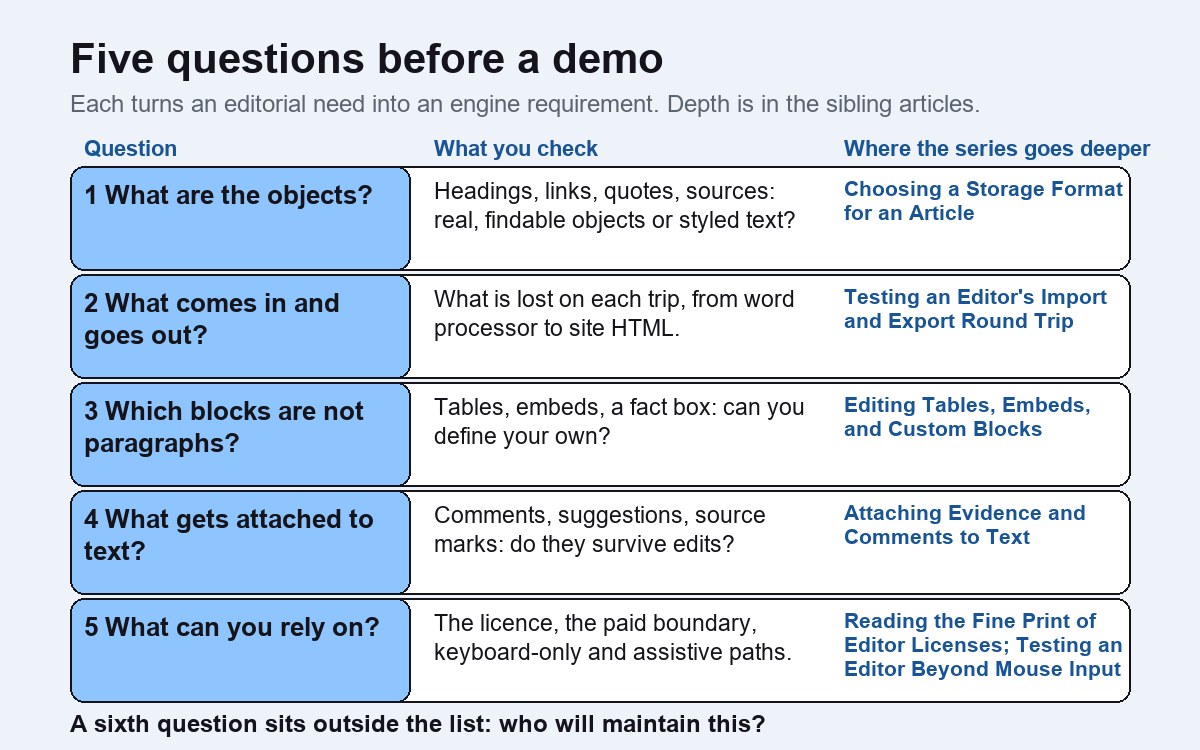
Turn your articles into five questions. Each one maps to a part of this series, so the depth is in the sibling articles; the framework only tells you what to ask.
- What are the objects? Headings, links, quotes, sources, figures, tables, embeds, corrections. For each, decide whether it must be a real, findable object or can be styled text. This is the question above. Related: "Choosing a Storage Format for an Article".
- What must come in and go out? Articles arrive from word processors and leave as HTML for a site, perhaps as a document for a lawyer. Ask what is lost on each trip. Related: "Testing an Editor's Import and Export Round Trip".
- Which blocks do you need that are not paragraphs? Tables, embedded posts, charts, a "fact box". Ask whether the engine lets you define your own, and what a new block costs to maintain. Related: "Editing Tables, Embeds, and Custom Blocks".
- What gets attached to text? Comments, suggestions, source references, fact-check marks. Ask whether the attachment survives edits to the text it sits on. Related: "Attaching Evidence and Comments to Text".
- What can you legally and practically rely on? The licence, which features sit behind a paid plan, and who can use the keyboard-only and assistive-technology paths. Related: "Reading the Fine Print of Editor Licenses" and "Testing an Editor Beyond Mouse Input".
A sixth question sits outside the list because it concerns your team, not the engine: who will maintain this? A framework such as ProseMirror or Lexical gives you control and asks for engineering time; a ready-made component gives you a working editor and asks you to live with its choices. ProseMirror's guide says outright that it is "prioritizing modularity and customizability over simplicity" [1]; BlockNote says it is focused on "a great out-of-the-box experience with minimal setup" [5]. Both statements are the projects describing themselves, and both can be right for different teams.
Licence and paid features: one example, one rule
A full licence review is the subject of the sixth article in the series. Here I only show why the question belongs in the first filter, with facts read on 27 November 2026.
Tiptap's documentation says its open source "is published on GitHub under the MIT license" and that for "advanced features like comments or AI commands" you add paid extensions [2]. The licence file in its repository is the MIT licence, with the copyright line "Tiptap GmbH" [8]. Lexical's repository carries an MIT licence file with Meta Platforms as the copyright holder [9]. Editor.js's repository carries the Apache 2.0 text [10]. BlockNote's pricing page says that "The core library is licensed under the MPL 2.0 license", and that its "XL packages" are available under GPL-3.0 or a commercial licence; the same page lists "Export to PDF, Docx, ODT, Email" among the features covered by the commercial licence for those packages [11].
Notice what that last example does. A feature that many editorial teams would call basic, getting a document out as a file an editor can send, sits in a different licence tier from the core editor. That is not a criticism; it is exactly the kind of boundary a scorecard should record. The rule is: check the licence and the paid-feature boundary on the date you decide, record the date, and look again before you build on it. A page read today can change next month.
A fictional scorecard
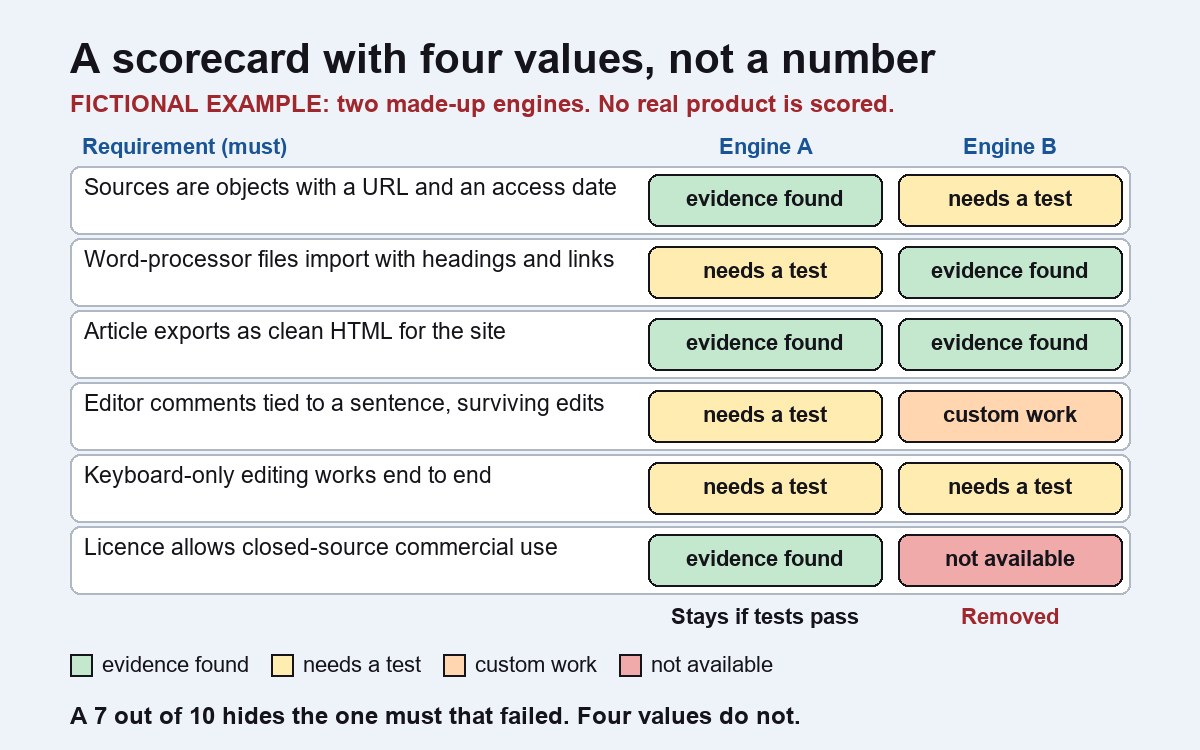
The following example is invented. Example Ledger is a made-up publication that covers AI and blockchain; its requirements and its scores are fictional and show the format only. No real product is scored.
Example Ledger publishes about thirty articles a month. Its writers work in a word processor today, and its editor wants every source in an article to be a findable object. Its two developers have time to build, but not to maintain a large custom system.
The requirements, each tagged as must or nice:
| Requirement | Tag | Question |
|---|---|---|
| Sources are objects with a URL and an access date | must | 1 |
| Word-processor files import with headings and links intact | must | 2 |
| Article exports as clean HTML for the site | must | 2 |
| A "fact box" block with its own fields | nice | 3 |
| Editor comments tied to a sentence, surviving edits | must | 4 |
| Keyboard-only editing works end to end | must | 5 |
| Licence allows closed-source commercial use | must | 5 |
For each candidate engine the team fills one row per requirement with one of four values: evidence found in documentation, needs a test, needs custom work, not available. Not a number. A score of 7 out of 10 hides the one must that failed; a table with four values does not. Any must that is not available removes the candidate. Any must that is needs a test becomes an item in the test document below, and the candidate stays only if it passes.
The test document
Before choosing, build one article that contains every object on your list and every awkward thing a real article does. Example Ledger's contains:
- three heading levels, one of them with a link inside;
- a quote with an attribution and a link inside the quote;
- a source list with access dates;
- a table with a merged cell;
- an embedded post from a social network;
- a sentence with a comment attached, then the sentence edited;
- a paragraph pasted from a word processor, with a footnote;
- a correction note added after "publication".
Then run the same sequence on every candidate: write it, save it, reload it, export it, import the export, open it with keyboard only. Record what was lost at each step. The sibling articles on round trips and keyboard use cover those steps. The point here is that the test is the same for every candidate and was written before anyone looked at a demo.
Four mistakes and fixes
1. Choosing by the toolbar. A toolbar shows what an editor lets you do to text, not what it keeps. Fix: begin with the list of objects, not the list of buttons.
2. Treating the engine as the product. Lexical and Slate describe themselves as frameworks [3][7], and Tiptap as a headless one [2]; the toolbar, the menus, the comment panel and the import screen are yours to build or to buy. Fix: price the work around the engine, not just the engine.
3. Reading a licence once. A free core and a paid extension can both be true at once, and pages change. Fix: record the licence, the paid boundary and the read date for every candidate, as above.
4. Letting the developer's taste decide alone. A model that is pleasant to program may be awkward for an editor's daily work. Fix: let one editor and one writer run the test document and write down what they could not do.
Where the Dapp.Expert editors fit
For context only: the public author form on Dapp.Expert uses a Tiptap editor, and the admin panel uses TinyMCE. I mention this as a fact about this site, not as an endorsement or a comparison. I have not evaluated TinyMCE for this article and say nothing about it here.
A template to copy
For each candidate, in one table:
Engine / version / read date. Source page for each claim.
Objects: how each object on your list is represented (own node, mark, string, not supported).
Must-have rows: one of evidence found / needs a test / needs custom work / not available, with a link.
Licence and paid boundary: the licence file or pricing page, read date.
Maintenance: who builds the interface; what the project says about its own maturity.
Test document result: what was lost at each step, and who tested it.
Decide only when no must is left at needs a test.
What this article cannot tell you
It does not name the right editor for your publication. It did not test any editor, so it says nothing about speed, bugs, mobile behaviour or accessibility in practice; the documentation quoted describes intentions and designs, not measured outcomes. It does not cover every engine: others exist, and the six here were chosen because their documentation was readable by an automated fetch and between them they cover the schema, node-tree and block models described above, not because they are the best. The scorecard, the requirements and the test document are a proposal, and the example is invented. Licence terms and paid plans change; everything above is as read on 27 November 2026.
How this article was made
| Task | What the AI did | What a person did | How it was checked |
|---|---|---|---|
| Research | Gathered candidate sources and drafted notes | Chose the question and which pages to rely on | Every quote checked against the page named in the sources, read on 27 November 2026 |
| Draft | Wrote the first draft from the notes | Edited the text, the framework and the example | An independent review compares claims with the sources before publication |
| Images | Generated the cover illustration | Chose and checked it | Labelled as AI-generated in the disclosure line and alt text |
| Not done by AI | — | The decision to publish and responsibility for the text | — |
Conflicts of interest: none. The author has no commercial relationship with the projects named here.
Responsible for this article: Dmitriy Lastovka, author. Corrections: contact form.
Sources
Labels: documentation (a project's own guide or site), licence file (the text in the project repository), pricing page (a vendor's own plans page). Quotes are as on the pages read on 27 November 2026.
- ProseMirror Guide, introduction and "Schemas". https://prosemirror.net/docs/guide/ Documentation.
- Tiptap Editor docs, "Get started" overview. https://tiptap.dev/docs/editor/getting-started/overview Documentation.
- Lexical docs, "Introduction". https://lexical.dev/docs/intro Documentation.
- Lexical docs, "Compared with ProseMirror". https://lexical.dev/docs/concepts/compared-with-prosemirror Documentation.
- BlockNote docs, "Introduction". https://www.blocknotejs.org/docs Documentation.
- Editor.js home page. https://editorjs.io/ Documentation.
- Slate docs, "Introduction". https://docs.slatejs.org/ Documentation.
- Tiptap repository, LICENSE.md. https://github.com/ueberdosis/tiptap/blob/main/LICENSE.md Licence file.
- Lexical repository, LICENSE. https://github.com/facebook/lexical/blob/main/LICENSE Licence file.
- Editor.js repository, LICENSE. https://github.com/codex-team/editor.js/blob/master/LICENSE Licence file.
- BlockNote pricing page. https://www.blocknotejs.org/pricing Pricing page.