
AI tools helped gather research and write the first draft of this article. I edited it and checked every quote and claim against the documentation pages listed at the end. The cover illustration is AI-generated. Details at the end.
You paste the address of a long page into an AI tool and ask for the numbers. The answer comes back confident, tidy and plausible. Was it taken from the page you are looking at?
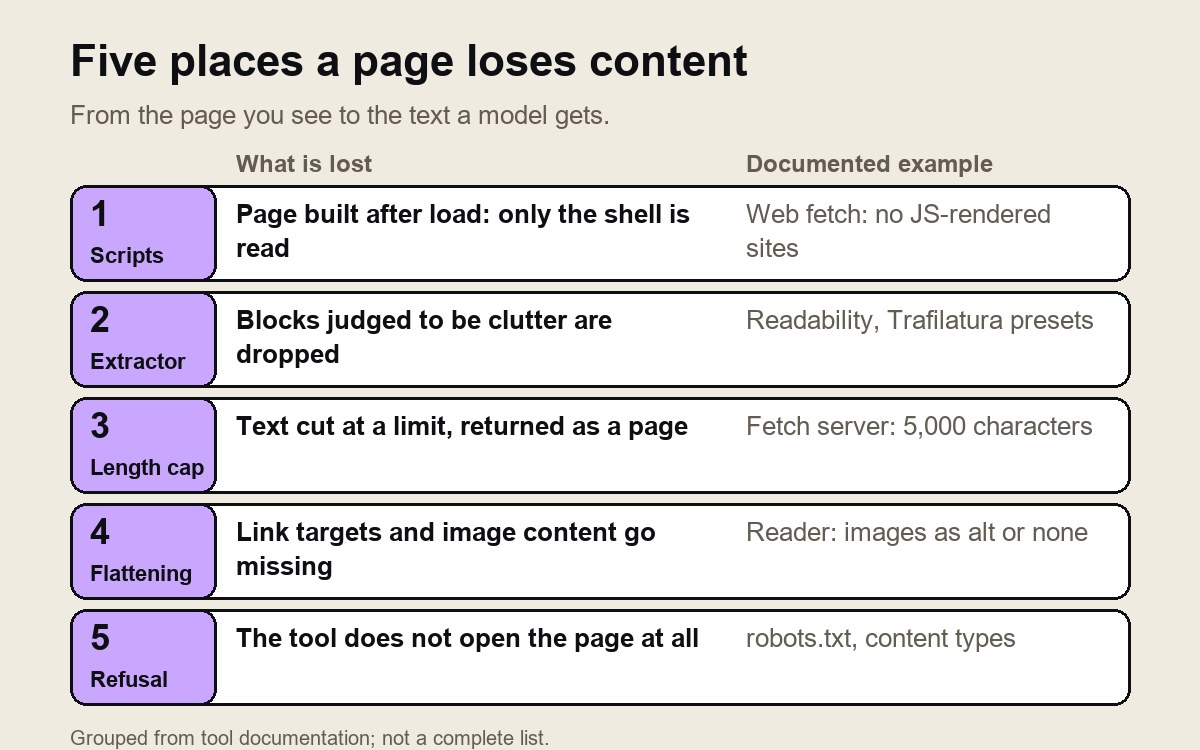
Often it was taken from a version of that page. Between the web server and the model there is usually a reading step: a program that downloads the page, decides what is content and what is clutter, turns it into plain text or Markdown, and cuts it to fit. Each stage can drop something, and none of them tells the model what is missing.
A reader tool does not give a model the page. It gives the model its own conversion of the page, and what was lost along the way is invisible in the answer. This article walks through five places where content is lost, using the documentation of tools that do this work, and ends with a short receipt you can ask for before you trust a number. It is the second part of Evidence Work, a series on how to build an answer that someone else can check. The first part was about finding a page. This one starts after the page has been found and asks what comes out of the reading.
Everything below is what the documentation states; I did not run these tools. Defaults change, and every number was read on 18 November 2026.
Loss 1: content that is not in the HTML at all
Many pages are shells. The HTML that the server sends contains a script and an empty container, and the browser fills the container after the script runs. A tool that only downloads the HTML sees the shell.
Anthropic's documentation for its web fetch tool says it plainly: the tool "currently does not support websites dynamically rendered with JavaScript", and for pages that need a real browser (JavaScript rendering, clicking, filling forms) it points to a separate browser tool [3]. Jina Reader exposes the choice as a setting. Its engine header can be browser (headless Chrome), curl ("lightweight, no JS") or auto, the default. The troubleshooting notes add that auto "prefers the lightweight curl path when it can; some sites only serve real content to a JS-capable browser" [4].
Search engines meet the same gap. Google's documentation explains that a page may wait in a queue until "a headless Chromium renders the page and executes the JavaScript", and that Google "uses the rendered HTML to index the page" [7]. That page is about Google's own indexing, not about AI readers, and I use it only as an analogy: if the content exists only after scripts run, a tool that does not run them has nothing to read.
The shell does not look broken. It often has a title, a menu and a footer, so a model asked about prices on such a page still has some text to answer from.
Loss 2: content that an extractor judges to be clutter
Most readers do not pass the whole HTML to a model. They extract the main content first, because menus, banners and cookie notices cost tokens and distract. The extraction is a judgement, and judgements miss.
Mozilla's Readability is a standalone version of the library used for Firefox Reader View [1], and the MCP fetch server runs it when Node.js is available [2]. Its own documentation is open about the limits of the heuristics. The quick pre-check, isProbablyReaderable, is described as "quick-and-dirty" and "likely to produce both false positives and false negatives" [1]. That sentence is about the pre-check, not the full parse, but it shows the kind of decision being made. A second option sets a minimum length: charThreshold, default 500, is "the number of characters an article must have in order to return a result" [1]. By that wording, a shorter page may come back with no result, and some pages are short by design, such as a price list or a status page.
Trafilatura, a Python extraction library, shows the trade-off as two named presets. favor_precision is for when results contain too much boilerplate and prunes more; favor_recall is for when parts of the document are missing and keeps more [5]. Tables and comment sections are extracted by default in that library, and either can be switched off [5]. The point is not that one setting is right. It is that the same page yields different text under different settings, and a reader tool picks one for you.
The dropped part can be the part you needed. A footnote with the fee or a sidebar with a warning can look like "not the main content" to a program.
Loss 3: content cut for length
A page can be longer than the tool is willing to hand over, and the limits differ by tool.
- The MCP fetch server returns at most 5000 characters by default (max_length). To go further the model has to ask again with start_index, which the documentation describes as the way to let a model "read a webpage in chunks" [2]. A model that does not ask again has read the first 5000 characters.
- Anthropic's web fetch tool has max_content_tokens; if the fetched content exceeds it, "the tool truncates it". The documentation notes the limit applies to text and not to PDFs [3].
- Jina Reader's x-max-tokens header trims the response, and "Reader truncates rather than rejects" [4].
The common thread is that truncation is a normal result, not an error: a cut page is returned as a page, and only a model that notices the cut knows it has not read the whole. In a long article, a terms document or a patch-notes page, the part that matters can sit near the end.
There is also a hard stop in the other direction. The fetch server reads at most 5 MiB of a response and, past that, returns an error "rather than part of the page" [2]. An error is at least visible. A truncation is not.
Loss 4: structure, links and images
After extraction, the page is flattened. What survives depends on the output format and the settings.
- Links. The fetch server's fallback extractor, used when Node.js is not available, "keeps headings and text but drops link targets" [2]. A reader whose text says "see the audit" has no address for the audit. Jina Reader's x-retain-links header has a text mode that keeps anchor text and drops the URLs [4].
- Images. Jina Reader's x-retain-images setting has three values: all, none, and alt, which keeps alt text only [4]. A chart whose figures exist only in the picture reaches a text-only model as an empty slot, or as whatever the alt text says. Jina can caption images that lack an alt attribute with a vision-language model [4]. A generated caption describes the picture; it is not a transcription of the numbers in it, and I found no claim in the documentation that it is.
- What a browser agent sees. Playwright's MCP server works from "structured accessibility snapshots" instead of screenshots [6]. For "elements not exposed in the accessibility snapshot", its tool descriptions point to screenshot coordinates and coordinate-based mouse tools, which are switched off unless a separate vision capability is enabled [6]. The snapshot is the page as assistive technology would describe it. It is compact and useful, and it is still a conversion.
None of this is a defect: flat text is what a text model can use. The risk is assuming the flat text has everything.
Loss 5: pages the tool will not open
Some pages never reach extraction. Anthropic's list of web fetch errors includes url_not_allowed, covering URLs blocked by domain rules and by Anthropic-side restrictions "such as private addresses, robots.txt" and credential-like URLs, and unsupported_content_type, because only "text, HTML, and PDF" are supported [3]. The MCP fetch server obeys robots.txt for model-initiated requests by default and refuses the fetch when the file cannot be read in some ways, for example on a 401 or a 5xx error [2].
These are refusals, so in the best case the tool reports an error and the model says it could not read the page. The failure that matters is the one where the model replaces the missing page with something else and does not say so. Whether it does depends on the model and the prompt, and the documentation cannot promise it either way.
A worked example (fictional)
The protocol, the page and the numbers in this section are invented to show the method.
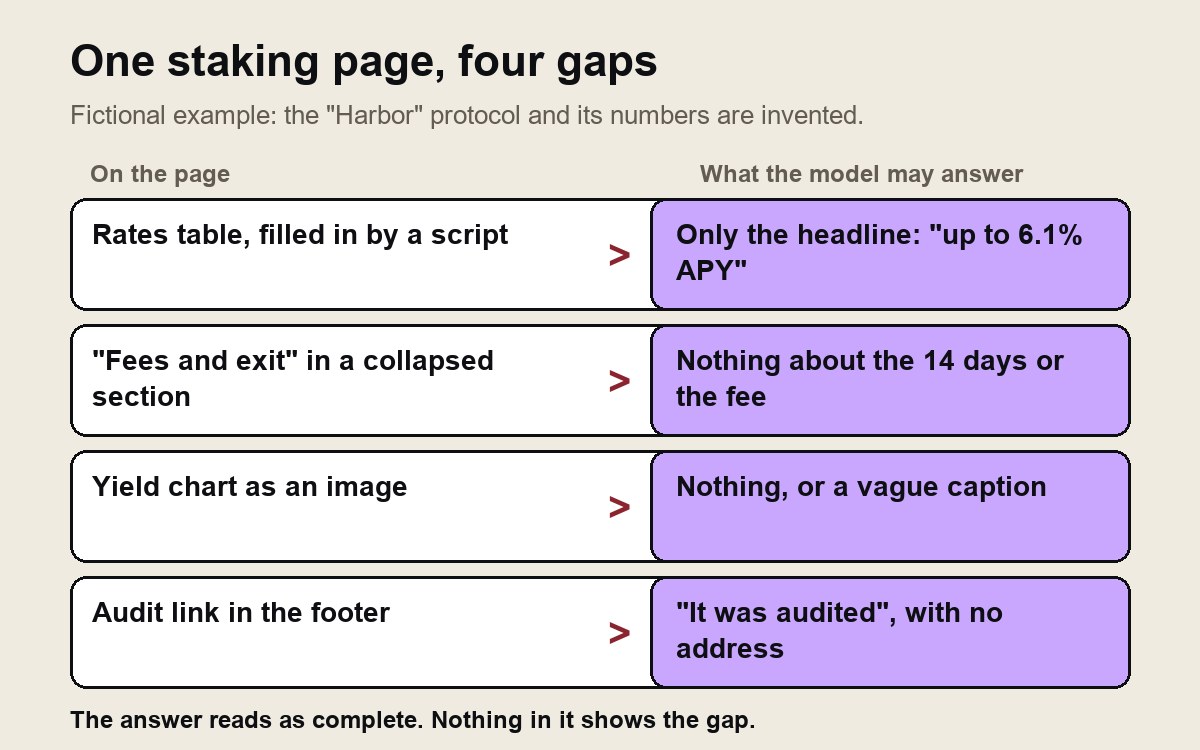
A staking page for an invented protocol, "Harbor", is the source for a question: what does a reader earn on one deposit, and what does it cost to leave?
On screen the page shows four things:
- A headline: "Earn up to 6.1% APY".
- A rates table that fills in after the page loads.
- A collapsed section, "Fees and exit", that says exits take up to 14 days and carry a fee.
- A chart of the last twelve months of yield, as an image.
An AI tool is asked, "What do I earn and what does it cost to withdraw?" Here is what each loss does.
| What is on the page | Where it can be lost | What the model may answer |
|---|---|---|
| The rates table, loaded by a script | Loss 1: the HTML is a shell | Only the headline: "up to 6.1%" |
| "Fees and exit" in a collapsed section near the bottom | Loss 2 or 3: judged as not main content, or cut for length | Nothing about the 14 days or the fee |
| The yield chart | Loss 4: an image with no text | Nothing, or a vague caption |
| The audit link in the footer | Loss 4: link targets dropped | "The protocol has been audited", without an address |
Every row is possible, none is certain; the example is built so that each loss shows once. The answer would be fluent and true to the text the model saw: "up to 6.1% APY". It would still miss what matters, because the cost of leaving was never in what it read, and nothing in the answer shows the gap.
The receipt: five checks before you trust a number
A reading receipt is a short record of what a tool read. You can build it in a few minutes.
- Find a known sentence. Pick a sentence you can see in your browser, from near the bottom of the page, and check that it appears in what the tool returned. If you cannot see the tool's text, ask the model to quote the last paragraph it received, word for word, and find that paragraph on the page. A paraphrase proves nothing.
- Compare the end of the page. If the page ends with terms, fees or footnotes, ask where the text ends. A cut at a round number such as 5000 characters may be the fetch server's default limit [2].
- Look for the numbers in tables and charts. If the figure you need lives in a table or an image, check it separately. A table may be extracted [5] and an image may not.
- Ask about the shell. Does the text you got contain the content that appears only after the page loads? If not, note that the tool did not run scripts, or run the page in a tool that does, for example a browser-driven one [3][6].
- Write down the tool and its settings. Engine, length limits and image and link modes all change the output [2][3][4][5]. A claim built on a reading should say which reader produced it.
When the answer matters, such as a fee, a deadline or a risk, the receipt can be replaced by the oldest check: open the page and read the sentence yourself.
What this article cannot tell you
It cannot tell you how often these losses happen on real pages, which tool loses less, or whether a given page will trigger any of them. I ran none of the tools and read only their documentation, so everything here is what the documentation says a tool does or can do. A tool that is described as truncating may be configured by its operator with larger limits, and a hosted product may change its behaviour without a note. I found no documentation page that lists everything a reader drops, so the five places are a grouping of what is documented, not a complete list. The worked example is invented and its numbers mean nothing outside it.
How this article was made
| Task | What the AI did | What a person did | How it was checked |
|---|---|---|---|
| Research | Collected the documentation pages and extracted the relevant settings and limits | Chose the question and which tools to cover | Statements checked against the pages listed below, fetched 18 November 2026 [1]–[7] |
| Draft | Wrote the first draft from the notes | Edited the text, the five losses and the worked example | A separate review compared claims and quotes with the sources |
| Images | Generated the cover illustration (from the Dapp.Expert cover library); explanatory images were built in code | Chose the cover; checked the diagrams | Labelled as AI-generated in the disclosure line and alt text |
| Not done by AI | — | The decision to publish and responsibility for the text | — |
Conflicts of interest: none. The author has no commercial relationship with Mozilla, Anthropic, Jina AI, Microsoft, Google or the Trafilatura authors; the protocol in the example is fictional.
Responsible for this article: Dmitriy Lastovka, author. Corrections: contact form.
Where this leads
Knowing what a reader leaves behind is half of the question. The other half is when the page was read and which version of it: pages change, and so do tools. That is the next article in this series.
Sources
Labels: official (the project's or vendor's own documentation), project (the open-source project's own README or manual).
- Mozilla, Readability README (standalone version of the library used for Firefox Reader View). https://github.com/mozilla/readability Project.
- Model Context Protocol servers, README of the Fetch server. https://github.com/modelcontextprotocol/servers/tree/main/src/fetch Project.
- Anthropic, "Web fetch tool". https://platform.claude.com/docs/en/agents-and-tools/tool-use/web-fetch-tool Official.
- Jina AI, Reader README (request headers and troubleshooting). https://github.com/jina-ai/reader Project.
- Trafilatura documentation, "Usage with Python". https://trafilatura.readthedocs.io/en/latest/usage-python.html Project.
- Microsoft, Playwright MCP README. https://github.com/microsoft/playwright-mcp Project.
- Google Search Central, "Understand JavaScript SEO basics". https://developers.google.com/search/docs/crawling-indexing/javascript/javascript-seo-basics Official.