
AI tools helped gather research and write the first draft of this article. I edited it and checked every figure against the log files and model-card pages listed at the end, read or re-analysed on 27 November 2026. The cover illustration is AI-generated. Details at the end.
"Fits in 24 GB" sounds like one fact. It is at least three: how big the model's weights are, how high memory climbs while an image is being made, and how much of the card is already taken by other programs. Only the second and third can be measured, and only on your own machine, with your own settings. A model card gives a claim; a log gives a number.
This article reports what two image models actually used on one RTX 3090 with 24 GB, sets those numbers next to what the models' own cards say, and ends with a short way to measure your own card. It is about memory. It does not rank image quality and it does not replace a licence check, which is a separate question.
What "fits" means
Three numbers are easy to confuse.
Weights. The size of the model on disk, once loaded. A model with fewer parameters, or stored at lower precision, is smaller.
Peak during a run. While the model works, memory also holds the text encoder, the image decoder and temporary working data. The peak is usually higher than the weights alone, and it grows with image size.
What else is on the card. A desktop with a browser, a chat client and a window manager uses video memory before any model starts. So may another AI program that was left open.
One more catch: nvidia-smi reports memory used on the whole GPU, not by one program, and a Python library may keep memory it has already finished with, for reuse. A reading is therefore an upper bound on what the job needed, not the minimum it could have run in. Every figure below is a whole-GPU reading and is labelled that way.
What was measured
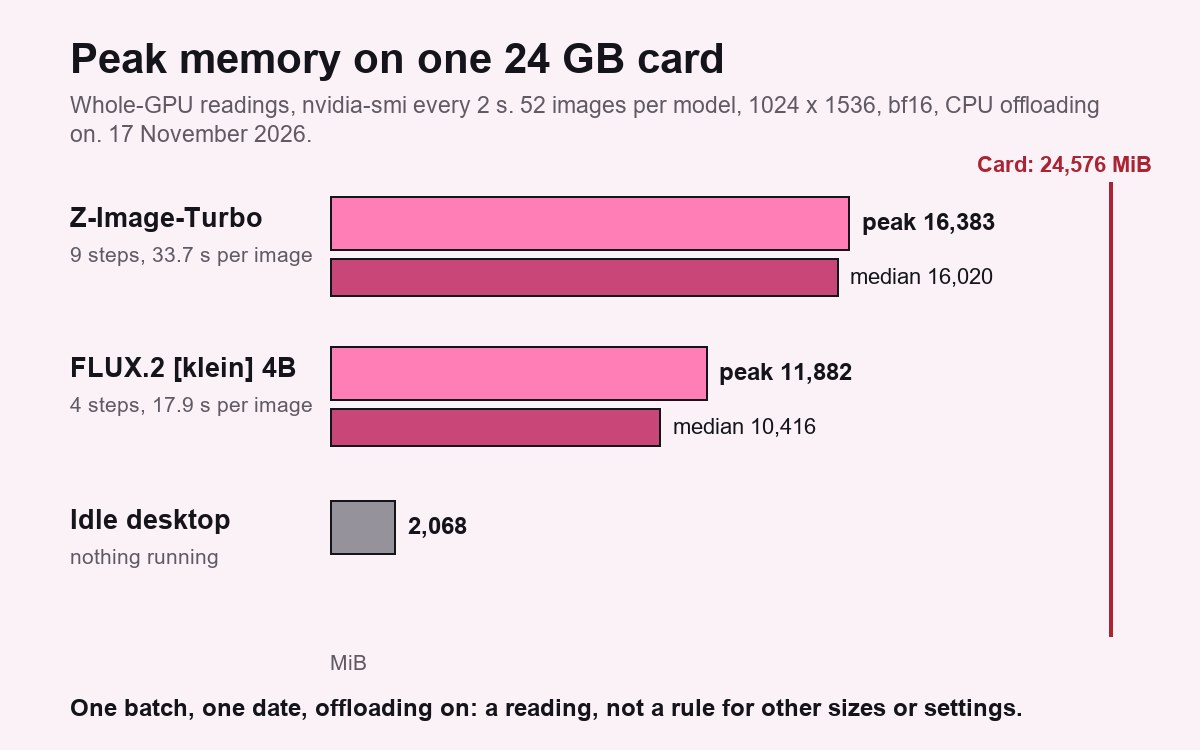
On 17 November 2026 the author's PC (RTX 3090, 24 GB, 64 GB of system RAM) ran a comparison batch for cover pictures: 52 prompts per model, each 1024 x 1536 pixels, with the Hugging Face diffusers library, bf16 precision and enable_model_cpu_offload() switched on. A monitor wrote the GPU's used memory to a file every two seconds during the whole batch. Both models had a per-image timing log. Those files were re-analysed on 27 November 2026; copies and the small analysis script are in the article's research/ folder.
| Model | Steps per image | Whole-GPU peak | Typical (median) during batch | Time per image (median) |
|---|---|---|---|---|
| Z-Image-Turbo | 9 | 16,383 MiB | 16,020 MiB | 33.7 s |
| FLUX.2 [klein] 4B | 4 | 11,882 MiB | 10,416 MiB | 17.9 s |
The same GPU read about 2,068 MiB with nothing running (the Windows desktop and its background programs) at the end of the batch, and a median of 2,224 MiB during the hour before the first model loaded. Subtracting the idle reading gives about 14,300 MiB (14.0 GiB) more than idle for Z-Image-Turbo and about 9,800 MiB (9.6 GiB) more for klein at its peak. Both peaks stay well below the card's 24,576 MiB at 1024 x 1536 with offloading on.
So the measured answer for this card is narrow: either of these two image models, one image at a time at 1024 x 1536 with offloading, ran with several gigabytes to spare. Anything beyond that, other models, sizes or settings, is a claim from a model card, not a measurement here.
Four limits belong next to these numbers. They come from one batch on one date, with offloading switched on, so a different library version, a different offload setting or a larger image would give other readings. Samples were taken every two seconds, so a spike shorter than that could be missed and the true peak may be slightly higher. The 52 prompts were all cover-style prompts of similar length. And the first image of each batch took longer than the rest (60.7 s for Z-Image-Turbo, which likely includes model loading), so the medians describe a warmed-up run.
What the model cards say
I read the cards of the models on 27 November 2026. They make different kinds of claims.
- Z-Image-Turbo. The card says the model "fits comfortably within 16G VRAM consumer devices" [1]. The measured whole-GPU peak of 16,383 MiB sits almost exactly at that figure, which is a coincidence worth stating plainly: the measurement was taken with offloading on, and the card does not say which settings its sentence refers to.
- FLUX.2 [klein] 4B. The card says the model "fits in ~13GB VRAM and is accessible on NVIDIA RTX 3090/4070 and above" [2]. The measured peak, 11,882 MiB with offloading, is lower. That is consistent with a card figure that does not assume offloading, but the card does not say so.
- Qwen-Image. The card I read gives a licence and example code but no memory figure [3]. A planning note on the author's PC lists an estimate of roughly 22 to 23 GB for a particular 8-bit setup, but it is an estimate from before any run and is not a measurement. Nothing in this article treats it as one.
- Wan2.2 TI2V-5B (video). The card says the 720p text-and-image-to-video command "can run on a GPU with at least 24GB VRAM (e.g, RTX 4090 GPU)" using offloading flags [4]. Its efficiency table is an image, not text, so I do not quote its numbers.
None of these claims states the resolution, precision and offload settings behind it in one place. That is why a card is a starting point and a measurement is the answer.
Offloading: memory for time
Both batches above ran with model offloading. The diffusers documentation describes it this way: "Model offloading moves entire models to the GPU instead of selectively moving some layers or model components" [5]. In practice the text encoder, the image model and the decoder take turns on the GPU instead of sitting there together, and the documentation says the tradeoff is that the memory savings are smaller than with finer-grained offloading [5]. For the SDXL base model, the card suggests the same switch for people "limited by GPU VRAM" [6].
The price is time and system RAM: parts of the model are copied back and forth. These two models were not run without offloading, so this article cannot say how much memory or time that setting saved in this case. That is a fair next measurement, not a conclusion.
The card is never fully free
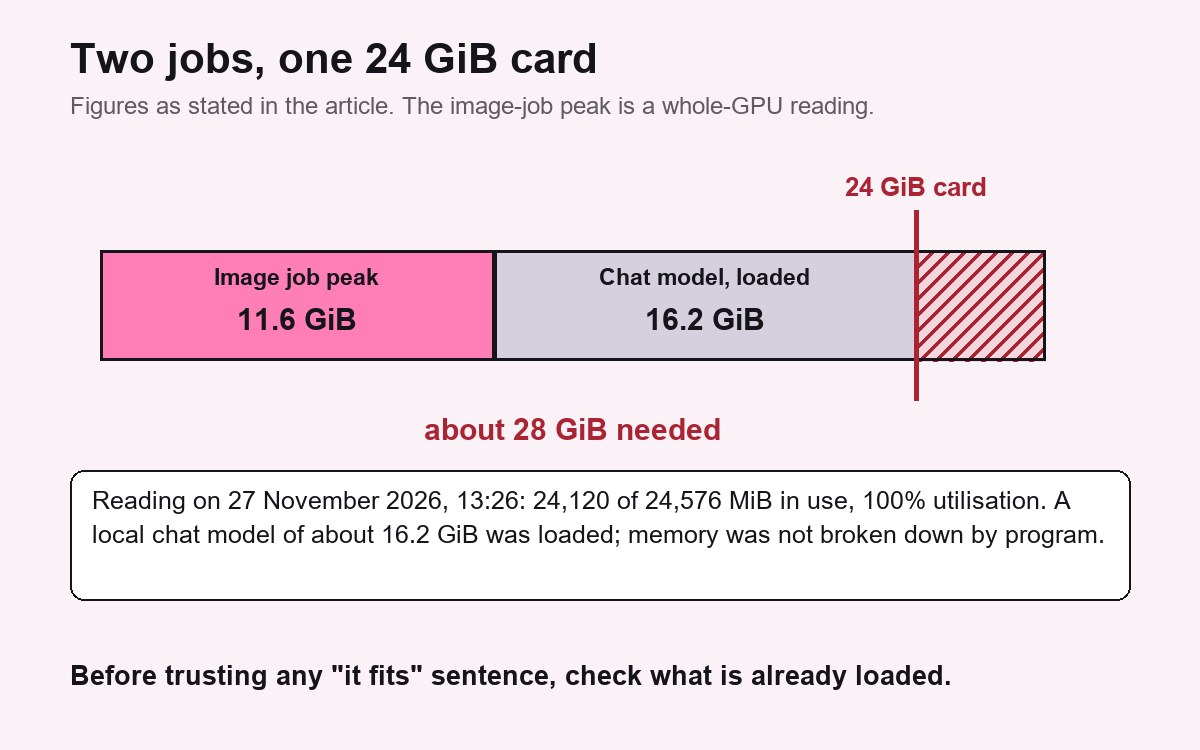
When this article was being prepared, on 27 November 2026 at 13:26, nvidia-smi showed 24,120 MiB of 24,576 MiB used and 100% utilisation on the same RTX 3090. A local language model served through Ollama was loaded, and Ollama's own status listing gave its video-memory size as 17,361,996,347 bytes (about 16.2 GiB). The rest, roughly 5 to 6 GiB beyond the idle desktop, belonged to other programs that were not identified one by one; this reading did not break memory down by program.
This is the practical meaning of "24 GB": the number on the box is the ceiling for everything at once. An image job that peaked at 11.6 GiB and a 16.2 GiB chat model need about 28 GiB together, more than the card's 24 GiB, so they do not share this card. Before trusting any "it fits" sentence, check what is already loaded.
A fictional example
The following example is invented. Example Games is a made-up studio; its numbers are for illustration and are not measurements.
Example Games wants to generate forty cover pictures overnight on a single 24 GB card. Its artist saw "16G VRAM" on a model card and plans the job.
- The 16 GB claim leaves about 8 GB. The studio's desktop and background programs take about 2 GB. That leaves about 6 GB, which looks safe.
- The team also keeps a local language model loaded for prompt drafting. If that model uses 16 GB, the plan fails before the first image.
- So the team measures: it unloads the chat model, records idle memory, runs five images at the planned size and settings, and reads the peak. It plans for the peak plus a margin, not for the card's sentence.
The point of the example is the order of steps: measure idle, measure a real run, then decide what may stay loaded. The numbers in it are invented.
Video is a different budget
Video models make many frames at once, so frame count and resolution multiply the memory needed. The Wan2.2 card's own command for 720p carries offloading flags and a 24 GB statement [4], which tells you the model sits at the edge of this card class. The card notes that its 720p for this task means 1280 x 704 pixels [4]. The author's reels use shorter clips at a slightly larger frame, and the author's own render log for three reel clips shows what the time side looks like: Wan2.2 TI2V-5B in ComfyUI, 896 x 1120 pixels, 73 frames, 20 steps, 246 to 251 seconds per clip. Memory was not recorded during those clips. A new memory reading was attempted for this article, but the shared lock for the video generator was held by another task for the whole 15-minute waiting window, so no Wan memory figure is reported here, and nothing here says Wan fits on this card beyond the card's own statement. The honest answer for video on this card is: the card claims it runs, the time is logged, and the peak is unmeasured.
Licences, briefly
The cards I read state these licences: Apache 2.0 for Z-Image-Turbo [1], for FLUX.2 [klein] 4B [2], for Qwen-Image [3] and for Wan2.2 TI2V-5B [4], and the CreativeML Open RAIL++-M licence for SDXL base 1.0 [6]. The klein card says its 9B sibling is released under a non-commercial licence [2], so "klein" alone does not tell you the terms. The FLUX.1 and Stable Diffusion 3.5 cards require a login and refused automated access, so I do not state their terms here. What a licence allows you to do with a published illustration is the subject of the next article in this block, "Reading an Image Model's License Before Publishing".
Measure your own card: a checklist
- Idle first. Close what you can. Record nvidia-smi --query-gpu=memory.used --format=csv with nothing running.
- List what else is loaded. Chat models, other generators, a video editor. Their memory belongs to the budget.
- Fix the job. Model, image size, steps, precision and offload setting. Write them down; change one at a time.
- Sample during a real run. For example nvidia-smi --query-gpu=memory.used --format=csv -lms 500 > vram.csv, while the generation runs.
- Report the delta. Peak minus idle, plus the settings and the time per image.
- Run it twice. The first image includes loading and warm-up.
- Leave margin. A different prompt, a larger image or a second program can move the peak.
What this article cannot tell you
It does not rank the models by image quality. It measured two image models at one size with offloading on, on one card, in one batch; it did not measure other sizes, other settings, FLUX.1, Stable Diffusion 3.5, Qwen-Image, or the memory of any video model. A reading on the whole GPU includes the desktop and cached memory, so it overstates the strict minimum, while two-second sampling can miss a brief spike. The card statements are the publishers' own claims, read once on one date. The fictional example is an illustration, and the checklist is a proposal.
How this article was made
| Task | What the AI did | What a person did | How it was checked |
|---|---|---|---|
| Research | Gathered candidate sources, read the logs and drafted notes | Chose the question and which logs and pages to rely on | Memory figures recomputed from the saved logs; card sentences copied from the pages read on 27 November 2026 |
| Draft | Wrote the first draft from the notes | Edited the text, the example and the checklist | An independent review compares claims with the sources before publication |
| Images | Generated the cover illustration | Chose and checked it | Labelled as AI-generated in the disclosure line and alt text |
| Not done by AI | — | The decision to publish and responsibility for the text | — |
Conflicts of interest: none. The author has no commercial relationship with the organisations named here.
Responsible for this article: Dmitriy Lastovka, author. Corrections: contact form.
Sources
Labels: model card (a publisher's own page), documentation (a library's guide), measurement (a log on the author's PC, kept with the article). Quotes are as on the pages read on 27 November 2026.
- Tongyi-MAI, Z-Image-Turbo model card. https://huggingface.co/Tongyi-MAI/Z-Image-Turbo Model card.
- Black Forest Labs, FLUX.2-klein-4B model card. https://huggingface.co/black-forest-labs/FLUX.2-klein-4B Model card.
- Qwen, Qwen-Image model card. https://huggingface.co/Qwen/Qwen-Image Model card.
- Wan-AI, Wan2.2-TI2V-5B model card. https://huggingface.co/Wan-AI/Wan2.2-TI2V-5B Model card.
- Hugging Face, diffusers documentation, "Reduce memory usage". https://huggingface.co/docs/diffusers/en/optimization/memory Documentation.
- Stability AI, stable-diffusion-xl-base-1.0 model card. https://huggingface.co/stabilityai/stable-diffusion-xl-base-1.0 Model card.
- Author's PC: nvidia-smi samples (every 2 s) and per-image logs of the 17 November 2026 cover batch, the Wan clip render log of the reel episode r-080, and a status reading of 27 November 2026, 13:26. Saved in research/vram-2026-11-27/ in the article folder. Measurement.